Need help?
Do you have a question about the ZBT ZBT-WE826 and is the answer not in the manual?
Describes the ZBT-WE826 router's purpose and features for extending wired Ethernet wirelessly.
Outlines the main features and technical specifications of the ZBT-WE826 router.
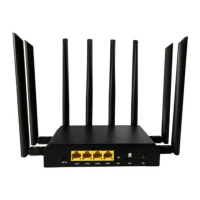
Details the physical appearance and layout of the router's front and back panels.
Details the steps to reset the router to its factory default settings.
Lists the necessary hardware and software requirements for using the router.
Provides guidelines on the optimal environment and conditions for installing the router.
Guides users on how to start and log into the router's web interface.
Explains how to view the router's current operational status and system information.
Covers system settings like time, hostname, and general configuration.
Details various services the router offers, such as Dynamic DNS.
Manages network settings including interfaces, wireless, DHCP, DNS, and firewall.
Explains how to log out from the router's web interface.
Provides instructions on how to upgrade or restore the router's firmware.
Troubleshoots why the LAN LED might be off and provides connection checks.
Addresses unstable links and packet drops, suggesting solutions like checking connections and rebooting.
 General
| Model | ZBT-WE826 |
|---|---|
| Type | Wireless Router |
| Wireless Standard | 802.11b/g/n |
| Frequency Bands | 2.4 GHz |
| Wireless Speed | 300 Mbps |
| Chipset | MT7620A |
| CPU | 580 MHz |
| RAM | 64 MB |
| Flash | 16 MB |
| USB Ports | 1x USB 2.0 |
| Power Supply | 12V/1A |
| Operating System | OpenWRT |
| Ethernet Ports | 4 LAN, 1 WAN |
| Antenna | External |
| Security | WPA/WPA2 |


 To Next Page