EasyManua.ls Logo

Zealot S31 - User Manual

Zealot S31
3 pages
Print Icon
To Next Page IconTo Next Page
Loading...
Portable Wireless Speaker S31
Instruction Manual
Features
Wireless connection
Memory function
High-fidelity speakers
Music light effects, music sync feature
TWS interconnection
FM function
Waterproof IPX7
Reverse charging technology
Built-in Mic, answer calls hands-free
Support U disk/ TF card/ AUX play mode
Button instruction
1. Long press to turn on/turn off; short press to switch functions.
2. Long press to reduce the volume; short press to previous track/channel(FM).
3. Long press to turn up the volume; short press to next track/channel(FM).
4. Long press to switch music light effects or reject calling;
short press for pause/play, auto search (FM) or answer/hang up the phone;
double click to turn on the TWS function.
Direction for use
1.Device to connect:
1.1.Turn on the device to default wireless mode.
1.2.Turn on wireless device, search model S31 and connect, play music after
connected successfully.
2.Voice prompt:
2.1.There is a voice prompt when turn on/off.
2.2.There is a voice prompt when the battery is low. The speaker will be
automatically turned off 30 seconds after the second voice prompt (the second
Question and Answer IconNeed help?

Do you have a question about the Zealot S31 and is the answer not in the manual?

Summary

Speaker Features

Button Operations

Power and Function Switching

Long press for power on/off; short press to switch audio modes.

Volume and Track Control

Long press to adjust volume; short press for previous track/channel.

Playback, Call, and TWS Control

Short press for play/pause/answer/hang-up/FM search; long press for light effects/reject call; double click for TWS.

Usage Instructions

Wireless Device Connection

Turn on speaker, search for 'S31' on your device, and connect to play music.

Voice Prompts

Provides audio cues for power status, low battery, and maximum volume.

Audio Mode Switching

Switch between Wireless, AUX, and FM modes by pressing the power button.

Indicator Light Status

Details on white light for wireless search/pairing and red light for charging.

Music Light Effects

Control music light effects by long-pressing the pause button.

Advanced Features

TWS Interconnection

Pair two speakers for synchronized stereo sound; double-click button to connect/disconnect.

Reverse Charging Technology

Use the speaker as a power bank to charge other devices via USB-A port.

Troubleshooting and Precautions

Troubleshooting Common Issues

Addresses connection failures, auto power off, music playback, sound output, and FM signal issues.

Safety Precautions

Guidelines on keeping the speaker away from children, water, heat, and avoiding disassembly or overcharging.

Overview

The S31 Portable Wireless Speaker is a versatile audio device designed for a range of listening experiences, offering both convenience and robust performance.

Function Description:

The S31 speaker primarily functions as a wireless audio playback device, connecting to other devices via Bluetooth. It supports various audio sources, including U disk, TF card, and AUX input, providing flexibility in how users can play their music. A notable feature is its FM radio capability, allowing users to tune into local broadcasts. The speaker also incorporates a built-in microphone, enabling hands-free calling for added convenience. For an enhanced audio experience, the S31 supports TWS (True Wireless Stereo) interconnection, allowing two S31 speakers to be paired and play music synchronously, creating a stereo soundstage. Beyond its audio functions, the speaker includes a unique "reverse charging" technology, effectively turning it into a portable power bank to charge other low-battery devices. It also features dynamic music light effects that can sync with the rhythm of the music, adding a visual dimension to the listening experience.
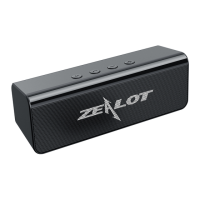
Important Technical Specifications:

  • Connectivity: Wireless (Bluetooth), AUX input, U disk, TF card.
  • Waterproof Rating: IPX7, indicating it can withstand immersion in water up to 1 meter for 30 minutes.
  • Battery: Features reverse charging technology, allowing it to act as a power bank.
  • Audio Output: High-fidelity speakers.
  • Microphone: Built-in for hands-free calling.
  • Special Features: Music light effects (syncs with music, slow pace, quick dance, no light), TWS interconnection, FM radio, memory function (remembers settings).
  • Default Startup Volume: 70%.

Usage Features:

  • Power On/Off & Function Switch: A single button is used for both powering the device on/off (long press) and switching between functions (short press). The function switching sequence is Wireless mode -> AUX mode -> FM mode. U-disk and TF card modes are activated automatically when the respective media is inserted.
  • Volume Control: Dedicated buttons for increasing (+) and decreasing (-) volume. Long pressing these buttons adjusts the volume, while short pressing navigates to the next or previous track/FM channel.
  • Playback Control & Calls: A dedicated play/pause button (►) allows for short presses to pause/play music, auto-search in FM mode, or answer/hang up phone calls. Long pressing this button switches music light effects or rejects incoming calls.
  • TWS Interconnection: To activate TWS, double-click the play/pause button on either of two S31 speakers when both are on and within 10m. They will connect automatically if previously paired. Double-clicking the play/pause button again on either speaker will disconnect them.
  • Reverse Charging: To use the reverse charging feature, turn on the speaker and connect the device to be charged to the speaker's USB-A port using a USB cable. The speaker's micro-USB port is for charging the speaker itself.
  • Voice Prompts: The speaker provides voice prompts for power on/off, low battery (with an automatic shutdown 30 seconds after the second low battery prompt), and maximum volume. There is no voice prompt for minimum volume.
  • Indicator Light: At the charging port, a white light flashes quickly during wireless search and stays on during wireless pairing. A red light indicates charging, which turns off when charging is complete.

Maintenance Features:

  • Troubleshooting - Wireless Connection: If connection fails, check if the speaker is connected to another device, disconnect if necessary, and retry. Restarting the speaker is also an option.
  • Troubleshooting - Auto Power Off: The speaker automatically turns off due to low battery (protection feature) or after 3 hours of inactivity to conserve power.
  • Troubleshooting - Music Playback: If music fails to play, ensure music files are stored in the root directory of the removable device.
  • Troubleshooting - No Sound (Computer): If connected to a computer with no sound, check the computer's audio output port for correct connection.
  • Troubleshooting - No FM Signals: Weak signals can be improved by using the attached USB cable as an antenna. Insert the cable into the speaker and use the AUX end to search for signals.
  • Precautions:
    • Keep out of reach of children.
    • Do not disassemble the speaker.
    • Avoid striking the speakers.
    • Keep away from fire, water, and extreme temperatures (too high or too low).
    • Do not overcharge the speaker to prevent battery damage.

Zealot S31 Specifications

General IconGeneral
BrandZealot
ModelS31
CategorySpeakers
LanguageEnglish

Related product manuals