12
Due to safety reasons, the volume of the AM/FM radio and music streaming is muted at an incoming
call or other communication from the connected unit.
The volume is reset automatically when the communication is ended.
Due to safety reasons, the volume of the Level Dependent function and external sound input is NOT
muted at incoming calls or other communication from the connected unit (if these functions are in
use).
Excessive sound pressure from earphones and headphones may cause hearing loss.
Some phones may not have access to all Bluetooth® functions. In that case these functions have to be
controlled directly on the phone.
The headset has the function “side-tone” which allows users to hear their own voice in the headset.
This improves communication in noisy environments and let users talk at a normal speech level.
Low battery warning
When the battery power is decreasing and approximately 5 % remains of maximum run time, an audio signal
of 5 shifting tones will be heard in the headset. The batteries should then be changed or charged as soon as
possible. The LED light ashes purple once and the headset will turn o when the batteries are completely
drained.
Power save function
To avoid unintentionally drainage of the batteries, e.g. if the headset is left on after the working hours, the
headset will automatically be turned o after 6 hours if no settings have been made within the 6-hour period.
Press and hold the BT knob for 3 seconds to restart the Bluetooth® function and resume the connection.
If the AM/FM radio or Level Dependent function was turned on, each individual volume control (A:12, A:10)
must be turned o and then on again.
Exchange the batteries
The headset can run on both rechargeable and disposable batteries of AA type (LR6/HR6). Make sure you
only use specied battery types. Warning! If other battery types than specied are used, risk of explosion may
occur. Dispose used batteries according to local regulations.
Unscrew the battery lid. (A:16). Check that the batteries + and - poles are placed correctly in the battery
compartment.
Never connect a charger to the headset if disposable batteries are used.
Charging of batteries
Prior to charging, make sure all functions are switched o.
The headset will charge when connected to a USB socket (PC, car etc.) or when using a USB wall charger, i.e.
your mobile phone charger. Use the USB cable supplied with the headset. (B:4)
Only use a charger that is approved to local directives for electronic devices. Charger specications: Output
DC5V⎓1000mA
Check that the charger is correctly connected to the headset charging socket (A:18) and the power source and
make sure specied batteries are used and placed with the + and - poles correctly in the battery compartment.
When charging, the headset LED light will ash red.
Use only by the manufacturer specied and approved charger.
When the batteries are charged the LED will light up solid red. A full charge will take approximately 3 hours
(longer if charged from a USB socket).
Important! Do not use the headset when the batteries are charging!
The battery run time is approximately:
Bluetooth® streaming and Level Dependent: 62 hours
AM/FM radio and Level Dependent: 56 hours
The operation time may vary depending on the environment, temperature, and battery.
Recommendations for maximum lifespan of rechargeable batteries
• New rechargeable batteries should be fully charged before rst use.
• Remove batteries if not in use for a long period.
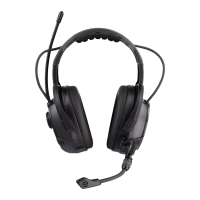
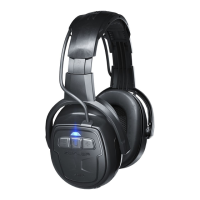
Components (pic. A)
A:1. Headband of thermo plastic
A:2. Stirrup attachment with rm and easy size adjustment
A:3. Replaceable foam lled ear cushions
A:4. FM radio aerial with excellent reception sensitivity
A:5. Level Dependent “Active Listening” microphones
A:6. Connection cable between left and right ear cups


 To Next Page
 Loading...