If you cannot buy anti-calc rell due to any
reasons, you are advised to use distilled
water rather than tap water in order to use the
appliance.
You cannot remove anti-calc rell until the
water reservoir is pulled out.
If the anti-calc rell container has not been
installed properly, you will hear continuously
repeated sound signal and the anti-calc rell
replacement indicator is going to blink on
the LCD display.
If the anti-calc rell has been installed while the
appliance was switched off, the electronic anti-
calc system will be unable to recognize that the
anti-calc rell has been replaced.
Never use waste anti-calc rells and do not
leave an empty anti-calc container. It can cause
damages to the appliance and to the electronic
system.
SELF-CLEANING SYSTEM
The steam generator has a cleaning system designed
to keep the steam leads and steam boiler clean. We
recommend to perform this operation once a month.
1
Proceed as described in section “Preparing the steam
generator to operation”.
2
Select the maximal steam emission level by pressing the
fabric and steam emission selection button „ ” until
you see MAX setting displayed ( ).
3
The appliance is ready to perform the self-cleaning
operation if the red pilot light has disappeared and the
green pilot light has been switched on.
4
Keep the iron ca. 150 mm (ca. 0,4 in) away from the sink
in the ironing position, press and hold the steam emission
button pressed for about 3 min. The sediments will be
removed together with water through the steam openings.
5
Iron some damp item in order to remove all the
sediments from iron baseplate.
6
As soon as you have nished the ironing, set the steam
emission level to the ” ” by pressing the fabric
and steam emission selection button „ ”.
7
Press the on/off button to switch off the appliance.
8
Disconnect the steam generator from the power supply.
9
As soon as the iron is cooled down completely empty the
water reservoir and store it in a safe place in a horizontal
position.
You can change language version at any
moment.
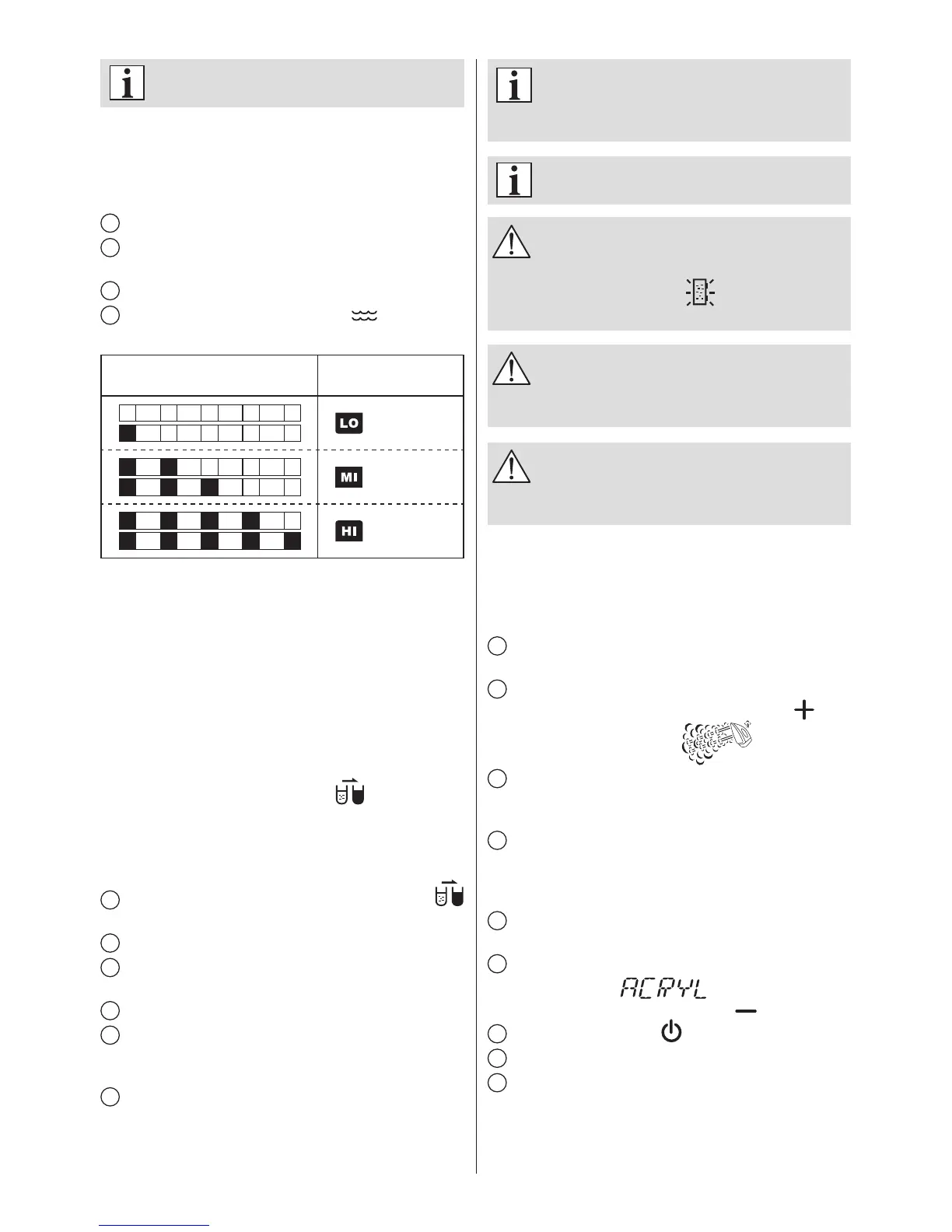
WATER HARDNESS TEST
Water hardness test allows you to set the parameters of the
steam generator optimally to the quality of water. To test
water hardness, follow the procedures below:
1
Unpack the water hardness tester.
2
Fill a glass or other container with tap water and immerse
test strip in water for approximately 60 seconds.
3
Read the level of water hardness.
4
On the basis of a given result, press button of the
steam generator to set its water hardness level.
Water hardness level
(test strip)
Water hardness level
(steam generator)
LOW
MEDIUM
HIGH
ANTI-CALCIFICATION SYSTEM AND THE ANTI-
CALC REFILL INDICATOR
Your appliance has an electronic monitoring system to
control the level of the anti-calc rell wear. The anti-calc
rell is applied to clean water and remove its permanent
and temporary hardness. The rell contains anti-calcication
ingredients. Depending on the water hardness level and
the rell wear, you have to replace the rell when you
see appropriate signal emitted by the steam generator.
Depending on the selected water hardness level, the
anti-calc rell replacement button will inform you
concerning the need of replacing the anti-calc rell from time
to time.
REPLACING THE ANTI-CALC REFILL
1
You see the anti-calc rell replacement indicator
blinking on the LCD display.
2
Leave the steam generator switched on.
3
Release the water reservoir catch and pull the water
reservoir out.
4
Pull the anti-calc rell container out.
5
Wait for 5 sec after completing the step 4 before
installing again the anti-calc rell container into the steam
generator.
6
Place the water reservoir in its former position.
A characteristic “click” sound will inform you that the water
reservoir has been re-installed properly.


 To Next Page
 Loading...