Microwave cooking
1
PresstheTime Cookbutton.Thedisplaywillshow„ ”.
2
Enterthetimeofmicrowavecookingbymeansofthenumerickeypad.Themaximum
cookingtimeis99minutesand99seconds.
3
PressthePowerbutton,thedisplaywillshow„ ”.Thedefaultpowersettingis
100%.
4
Presstheappropriatebuttononthenumerickeypadtosetthedesiredpowerlevel.
5
PresstheSTART/+30SEC.buttontostartthecooking.
EXAMPLE
Inordertosetthecookingtimefor15minutesatthe50%microwavepowerlevel,perform
thefollowingsteps.
1
PresstheTime Cookbutton,thedisplaywillshow„ ”.
2
By meansofthe numeric keypad,enter the cookingtime, enter inturn“1, 5,0,0”
(15minutes).
3
PressthePowerbutton,thenpressthe“5”buttononthenumerickeypadinorderto
setthemicrowavepowerlevelto50%.
4
PresstheSTART/+30SEC.buttontostartcooking.
If the STOP/Cancel button is pressed while setting the cooking time or
microwave power level or no action is taken for 1 minute, the settings will
be automatically restored to the previous values.
After selecting the 0% power level, the microwave oven will operate without
microwaves, with the fan turned on. The 0% power level can be used for
removing unpleasant odours from the oven cavity.
During microwave cooking, you can change the set microwave power level.
Press the Power button, the current power level setting will appear on the
display for 3 seconds, during that time set the new power level by means of
the numeric keypad.
MICROWAVEPOWERTABLE
Display
PL10 PL9 PL8 PL7 PL6 PL5 PL4 PL3 PL2 PL1 PL0
Microwave
power
100% 90% 80% 70% 60% 50% 40% 30% 20% 10%
0%;fan
turnedon
Button on
numeric
keypad
1+0 9 8 7 6 5 4 3 2 1 0
Quick start
1
Whenthemicrowaveovenisinthestandbymode,presstheSTART/+30SEC. button
tostartcookingfor30secondsatthefullpower,eachtimeyoupresstheSTART/+30SEC.
buttonthecookingtimewillbeextendedbyanother30seconds.Themaximumcooking
timeis99minutesand99seconds.
2
When the microwave oven is in the standby mode and one of the buttons on the
numerickeypadfromtherange1to6ispressed,theovenwillstarttooperateatthefull
(100%)powerlevelfor1,2,3,4,5or6withrespecttothebuttonwhichhasbeenpressed.
PresstheSTART/+30SEC.buttontoextendthetimebyanother30seconds.
3
During microwave cooking or defrosting by time, each time you press the
START/+30SEC.buttonthecookingtimewillbeextendedbyanother30seconds.
Defrosting by weight
1
PresstheWeight Defrostbutton,thedisplaywillshow„ ”.
2
Bymeansofthenumerickeypad,entertheweightofthefoodtobedefrostedingrams.
Thepowerlevelandthecookingtimewillbeautomaticallysetaccordingtotheweight.The
weightenteredmustbewithintherangefrom100gto2000g.
3
Press the START/+30SEC. button to start defrosting.Asingle sound signal will be
heardandtheremainingdefrostingtimewillbevisibleonthedisplay.
Defrosting by time
1
PresstheTime Defrostbutton,thedisplaywillshow„ ”.
2
Bymeansofthenumerickeypad,enterthedefrostingtime.Thetimeenteredmustbe
withintherangefrom00:01to99:99.
3
Thedefaultpowerlevelfordefrostingbytimeissetto30%.Inordertochangethe
powerlevel,pressthePowerbutton(thedisplaywillshow„ ”),andthenselectthe
newpowerlevelbymeansofthenumerickeypad.
4
Press the START/+30SEC. button to start defrosting.Asingle sound signal will be
heardandtheremainingdefrostingtimewillbevisibleonthedisplay.
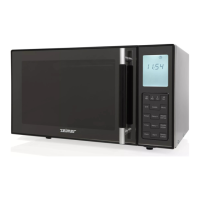
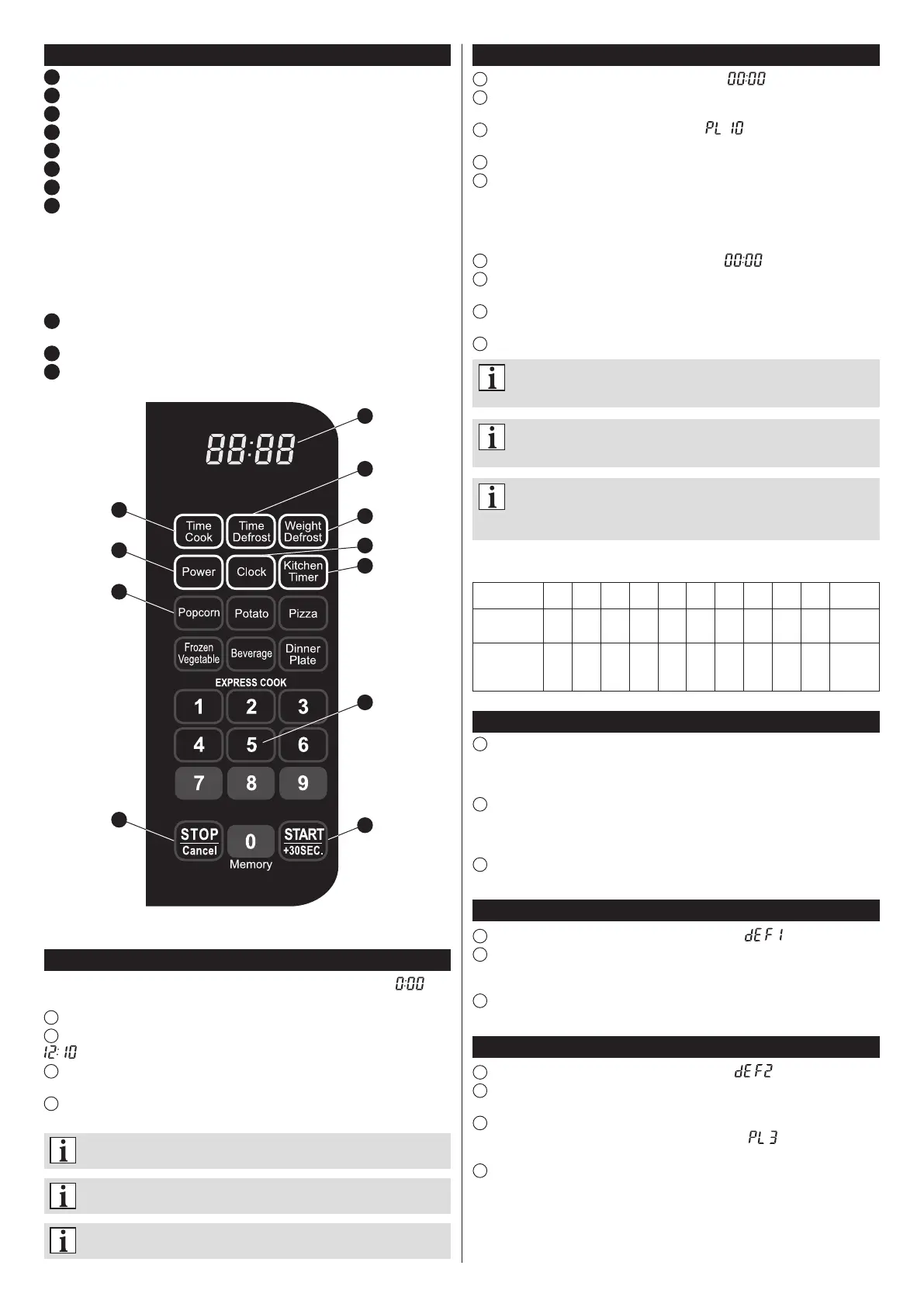
Control panel
1
Display
2
Time Cook(Microwavecooking)
3
Time Defrost(Defrostingbytime)
4
Weight Defrost(Defrostingbyweight)
5
Power (Checking/settingmicrowavepower)
6
Clock (Settingtheclock)
7
Kitchen Timer(Timer)
8
AutoMenubuttons
Popcorn
Potato–potatoes
Pizza
FrozenVegetable–frozenvegetables
Beverage–beverages
Dinnerplate–foodonplate
9
Numerickeypadwiththeexpresscookingbuttons(EXPRESS COOK–buttons1,2,3,
4,5,6)andMemorybutton(button0).
10
STOP/Cancel
11
START/+30SEC.
Setting the clock
After connecting the microwave oven to the mains the display will show „ ” and
asinglesoundwillbeheard.
1
PresstheClockbutton.Thersthourdigitwillstartashing.
2
Enterthecurrenttimebymeansofthenumerickeypad.Forexample,inordertoenter
pressinturn“1,2,1,0”.
3
PresstheClockbuttontonishsettingthetime.The“:”symbolwillstartashingand
thesettimewillappearonthedisplay.
4
Thecurrenttimecanbesetinthe12-hourformatonly(rangingfrom1:00to12:59).
Thetimesettingwillbepossibleonlyafterenteringdigitsfromthegivenrange.
The setting will last as long as the microwave oven is connected to the
mains (and the electricity supply is maintained).
In order to change the clock setting, repeat the steps 1-4.
If you press the STOP/Cancel button while setting the time, the previous
setting will be automatically restored.
2
5
8
10
1
3
4
6
7
9
11


 To Next Page
 Loading...