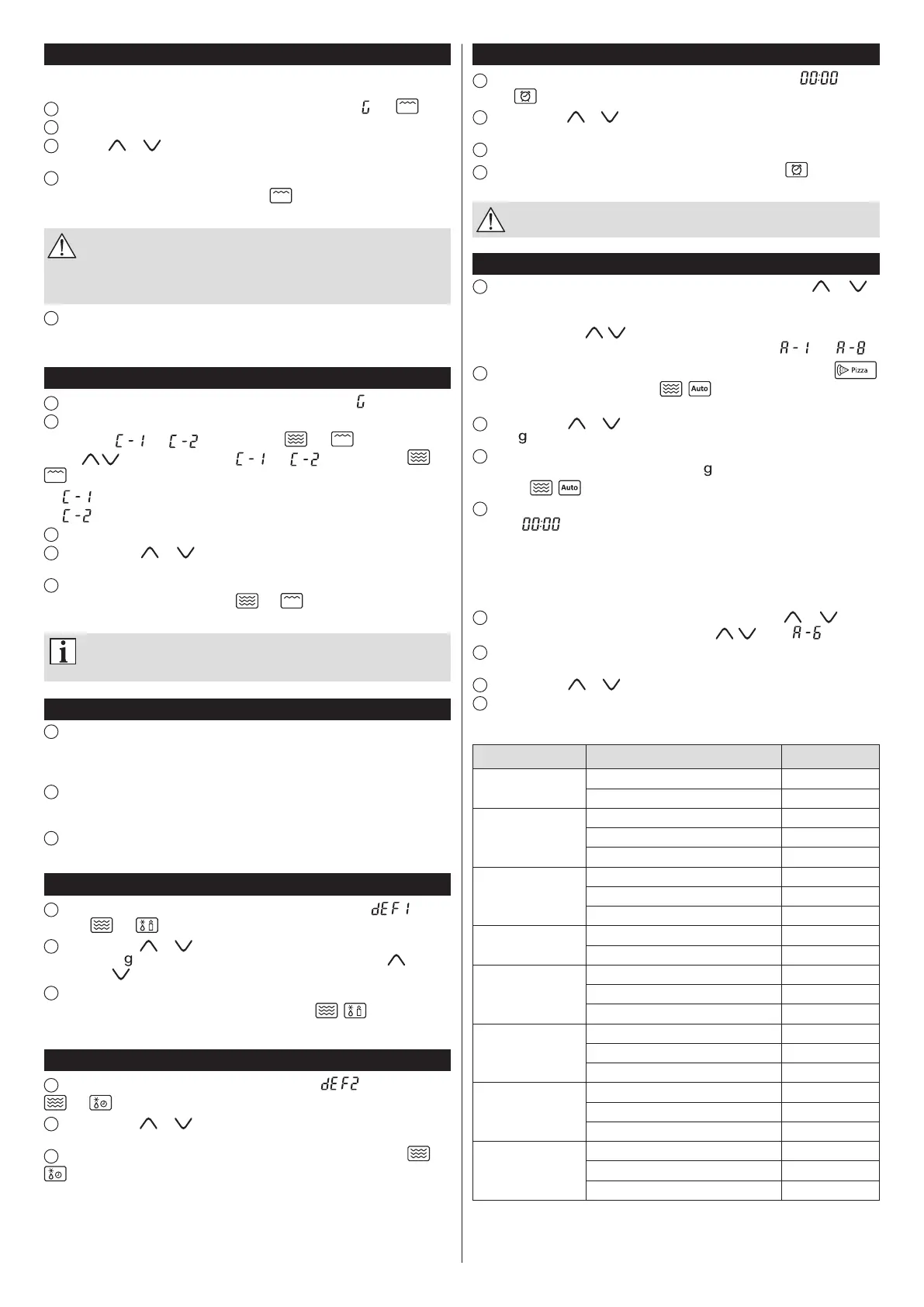
Grilling
Grillingisespeciallysuitableforthinslicesofmeat,steaks,cutlets,kebabs,sausagesand
chickenportions.Itisalsosuitablefortoastsandbreadedfoods.
1
PresstheGrill/Combi.button.Thedisplaywillshowthesymbols„ ”and .
2
PresstheStart/+30Sec./Conrmtoconrmthefunction.
3
Pressthe or buttontosetthegrillingtime.Thegrillingtimecanbesettoany
valuefrom0:05(5seconds)to95:00(95minutes).
4
PresstheStart/+30Sec./Conrmbuttontostartgrilling.Asoundsignalwillbeheard
andthegrillingprogrammewillstart.Thesymbol andtheremaininggrillingtimewill
bevisibleonthedisplay.
Halfway through the set grilling time a double sound will be heard (it is
normal in this mode of operation). In order to obtain a better grilling effect,
press the Stop/Clear button to stop the oven operation, and then open the
door and turn the food over. After closing the door, press the Start/+30Sec./
Conrm button to resume the oven operation.
5
IncasethetimeofovenoperationhasbeenextendedbymeansoftheStart/+30Sec./
Conrmbutton,adoublesoundsignalwillbeheardhalfwaythroughthepreviouslyset
timeratherthanhalfwaythroughthetimeextended,forexample,by30seconds.
Combination cooking (microwave + grill)
1
PresstheGrill/Combi.button.Thedisplaywillshowthesymbol„ ”.
2
Inordertoselecttherequiredfunction,keeppressingtheGrill/Combi.buttonuntilthe
displayshows„ ”or„ ”andthesymbols and orkeeppressingthe
buttons untilthedisplayshows„ ”or„ ”andthesymbols and
.
=55%ofthetime–microwavecooking45%ofthetime–grilling
=36%ofthetime–microwavecooking64%ofthetime–grilling
3
PresstheStart/+30Sec./Conrmbuttontoconrmthefunction.
4
Pressthebutton or tosetthecookingtime.Thecookingtimecanbesetto
anyvaluefrom0:05(5seconds)to95:00(95minutes).
5
PresstheStart/+30Sec./Conrmbuttontostartcooking.Asoundsignalwillbeheard
andtheprogrammewillstart.Thesymbols and aswellastheremainingcooking
timewillbevisibleonthedisplay.
When the appliance is operated in the combination mode, children may
only use the oven under adult supervision, because the appliance is heated
to high temperature.
Quick start
1
Whenthemicrowaveovenisinthestandbymode,presstheStart/+30Sec./Conrm
button to start the cooking for 30 seconds at the full power. Each time you press the
Start/+30Sec./Conrmbuttonthecookingtimewillbeextendedbyanother30seconds.
Themaximumcookingtimeis95minutes.
2
Duringthegrilling,microwaveandcombinationcookinganddefrostingbytime,each
timeyoupresstheStart/+30Sec./Conrmbuttonthecookingtimewillbeextended by
another30seconds.
3
During the programme selected from the Auto Menu and during the defrosting by
weightitisnotpossibletoextendthetimebyanother30seconds.
Defrosting by weight
1
PresstheWeight Defrostbutton.Thedisplaywillshowthesymbol„ ”andthe
indicators and willlight.
2
Pressthebutton or tosettheweightoffoodtobedefrosted.Thedisplaywill
showthesymbol andinturnthenumbersfrom100–200...1900–2000( )orinthe
reverseorder( ).
3
Press the Start/+30Sec./Conrm button to start defrosting. A sound signal will be
heardandthedefrostingprogrammewillstart.Thesymbols , andtheremaining
defrostingtimewillashonthedisplay.
Defrosting by time
1
PresstheTime Defrostbutton.Thedisplaywillshow„ ”andtheindicators
and willlight.
2
Pressthebutton or tosetthedefrostingtime.Thedefrostingtimecanbeset
toanyvaluefrom0:05(5seconds)to95:00(95minutes).
3
PresstheStart/+30Sec./Conrmbuttontostartdefrosting.Theindicators and
willlight.ThepowerduringthedefrostingbytimeissettoP30andthisvaluecannot
bechanged.
Kitchen timer
1
PresstheClock/Kitchen Timerbuttontwice.Thedisplaywillshow„ ”andthe
indicator willlight.
2
Pressthebutton or tosetthedesiredtimeforthekitchentimer.Themaximum
timersettingis95minutes.
3
PresstheStart/+30Sec./Conrmtoconrmthesetting.
4
Afterthesettimeelapses,ave-timesoundwillbeheardandthe indicatorwillgo
out,thecurrenttimewillappearonthedisplay.
The kitchen timer is a separate operating mode of the microwave oven,
independent from the clock.
Automatic menu (auto menu)
1
Whenthemicrowaveovenisinthestandbymode,pressthebutton or to
selecttheautomaticcookingmenu.Thedesiredmenuitemcanbeselectedaccordingto
thetablebelowinthefollowingmanner:
Bypressingthebuttons , youcanselect:Pizza–Meat–Vegetables–Pasta–
Potatoes – Fish – Beverages – Popcorn,andthedisplaywillshow„ ”,...,„ ”.
2
Afterselectingtheautomenu,theautomaticprogrammesymbol,e.g.A-1 ,
willstartashing,aswellasthesymbols , .Conrmtheselectedprogrammeby
pressingtheStart/+30Sec./Conrmbutton.
3
Pressthebutton or toselecttheweightoffoodtobecooked.Thedisplaywill
showthel symbol.
4
PresstheStart/+30Sec./Conrmbuttontostartcooking.Asoundsignalwillbeheard
andthecookingprogrammewillstart.Thesymbol willgooutandthedisplaywillshow
thesymbols , andtheremainingcookingtime.
5
Attheendofcookingprogramme,ave-timesoundsignalwillbeheard.Thedisplay
willshow„ ”.Iftheclockhasbeensetearlier,thecurrenttimewillappearonthe
display.
EXAMPLE
Inordertosettheautomaticmenuforcooking350gramsofsh,completethefollowing
steps:
1
Ifthemicrowaveovenisinthestandbymode,pressthebutton or toselect
theautomaticcookingmenu.Bypressingthebuttons , select„ ”(Fish).
2
Press the Start/+30Sec./Conrm button to conrm the selected automatic menu
programme.
3
Pressthebutton or tosettheweight350g.
4
PresstheStart/+30Sec./Conrmbuttontostartcooking.
AUTOMATIC MENU TABLE
PROGRAMME PRODUCT WEIGHT, VOLUME TIME [s]
A-1Pizza
200g 2:30
400g 4:10
A-2Meat
250g 4:10
350g 5:10
450g 6:30
A-3Vegetables
200g 3:30
300g 4:20
400g 5:10
A-4Pasta
50g(in450mlofcoldwater) 17:30
100g(in800mlofcoldwater) 20:00
A-5Potatoes
200g 4:40
400g 8:40
600g 10:10
A-6Fish
250g 3:50
350g 4:50
450g 6:20
A-7Beverages
1cup(120ml) 1:25
2cups(240ml) 2:25
3cups(360ml) 3:30
A-8Popcorn
50g 1:40
85g 2:25
100g 2:30
Theresultsofautomaticcookingdependontheshapeandsizeoffoodstuffs,yourcooking
preferencesas regards particular products and thearrangementof products inside the
oven.Shouldyoufeelthatthecookingresultscouldhavebeenbetter,youmayneedto
adaptthecookingtimetoyourownneeds.



 To Next Page
 Loading...