Setting the clock
Afterconnecting themicrowaveoven tothemains thedisplaywill showtheinscription
„ ”andthesymbol .Asinglesoundwillbeheard.
1
PressandholdtheClockbuttonfor3secondstosetthehour.Thedisplaywillshow
„ ”.Ifyouwanttochangethetimeformattothe12-hourformat,presstheClock
buttonagain.Thedisplaywillshow„ ”.
2
Inordertosetthehourusingthe24-hourformatwhenthedisplayshows„ ”,
setthecurrenttimebymeansofclockandtimersettingbuttons.Forexample,tosetthe
clockat12:10,press“10Min,thenpress1 Mintwice,andthen10Sec”.
3
Press theClockbuttontonish settingthe time.Thesymbol „:”willash,andthe
displaywillshowthesettimeandthesymbol .
Starting the microwave oven
Havingconnectedtheappliancetoanappropriatemainssocket,placethefoodinsidethe
ovenchamberandlockthedoorbeforeyoustartprogrammingthemicrowaveoven.
Microwave cooking
1
PresstheMicro.buttontoselecttherequiredmicrowavepowerlevel.Thedisplaywill
showtheinscription„ ”,andthesymbols and .
2
Inordertoselectadifferentmicrowavepowerlevel,e.g.60%,presstheMicro. button
untilthedisplayshows„ ”.
3
Setthemicrowavecookingtimebymeansoftheclockandtimersettingbuttons.The
maximumcookingtimeis99minutesand59seconds.
4
PresstheStartbuttontostartthecooking.
EXAMPLE
Inordertosetthecookingtimefor20minutesatthe80%microwavepower,performthe
followingsteps:
1
PresstheMicro.buttontoselecttherequiredpowerlevel.Thedisplaywillshowthe
inscription„ ”,andthesymbols , .
2
Inordertoselectthemicrowavepowerlevelof80%,presstheMicro.buttononce.The
displaywillshow„ ”.
3
Usetheclockandtimersettingbuttonstosetthemicrowavecookingtime,pressthe
“10Min”buttontwice(20minutes).
4
PresstheStartbuttontostartthecooking.
MICROWAVE POWER TABLE
Display
P-Hi P-80 P-60 P-40 P-20 P-00
Microwave power
100% 80% 60% 40% 20% 0%
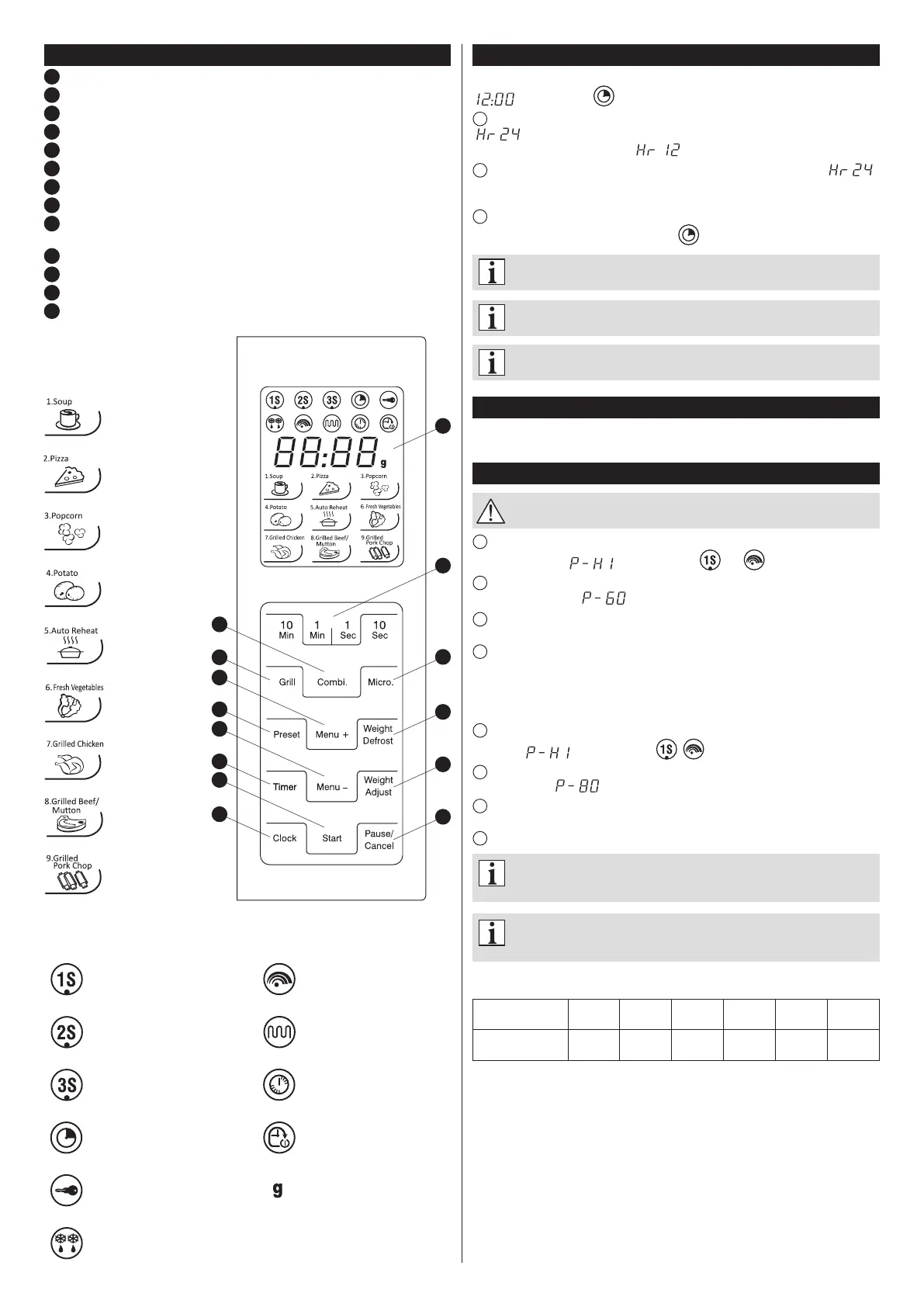
Control panel
1
Display:clock+indicators
2
Clockandtimersettingbuttons
3
Grill
4
Preset(Delayedstart)
5
Timer
6
Clock(Clocksetting)
7
Micro.(Microwaves)
8
Weight Defrost(Defrostingbyweight)
9
Weight Adjust (Weight and the number of portions can be adjusted when the
automaticmenuisselected)
10
Pause/Cancel
11
Combi.(Combinationcooking)
12
Automaticmenuselectionbuttons
13
Start(Programmestart)
AUTO MENU
(Automaticmenu)
(Soup)
(Pizza)
(Popcorn)
(Potatoes)
(Autoreheat)
(Fresh
vegetables)
(Grilledchicken)
(Grilledbeef/
mutton)
(Grilledpork
chop)
Firststageofmulti-stage
cooking
Secondstageof
multi-stagecooking
Thirdstageofmulti-stage
cooking
Clock
Childlock
Defrostingbyweight
Microwaves
Grill
Timer
Delayedstart
Weight[g]
1
7
8
9
10
3
11
12
12
13
4
5
6
2
DISPLAY:INDICATORS–SIGNALLING



 To Next Page
 Loading...