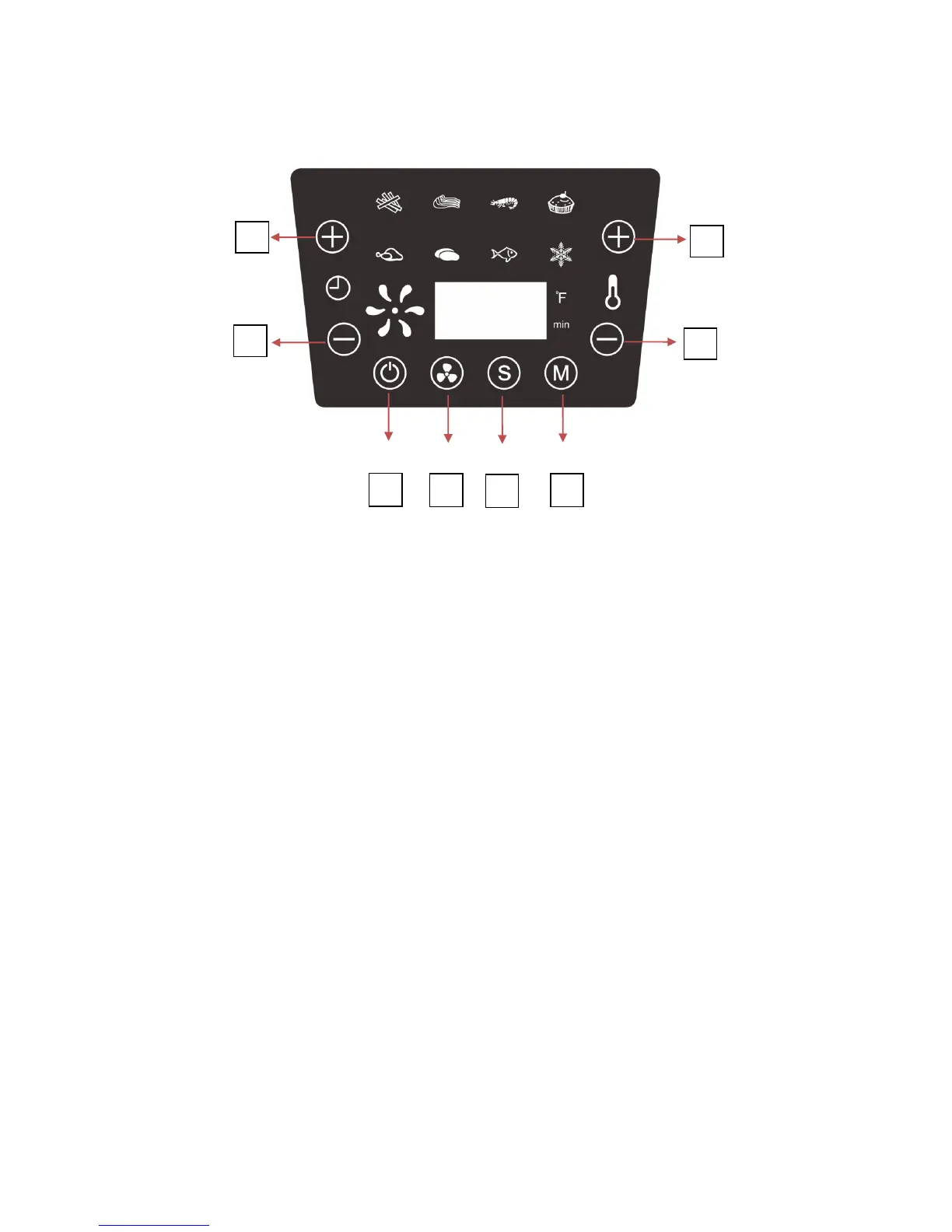
How to Use the Control Panel
A) POWER BUTTON:
Tap ‘Power’ button to turn the air fryer ON/OFF.
B) RAPID COOL BUTTON:
Press to speed up the cooling process of hot food for immediate consumption after cooling.
C) START/STOP BUTTON:
Tap this button to START or STOP cooking. The time and temperature will be displayed
alternately every 5 seconds.
D) MENU BUTTON:
Use this button to toggle through the different menu functions.
E) TIMER INCREASE BUTTON:
Tap “Timer Increase” button to increase cooking time by one minute. Up to a maximum of 60-
minutes can be added. (hold button for rapid increase).
F) TIMER DECREASE BUTTON:
Tap “Timer decrease” button to decrease cooking time by one minute. (hold button for rapid
decrease).


 To Next Page