EasyManua.ls Logo

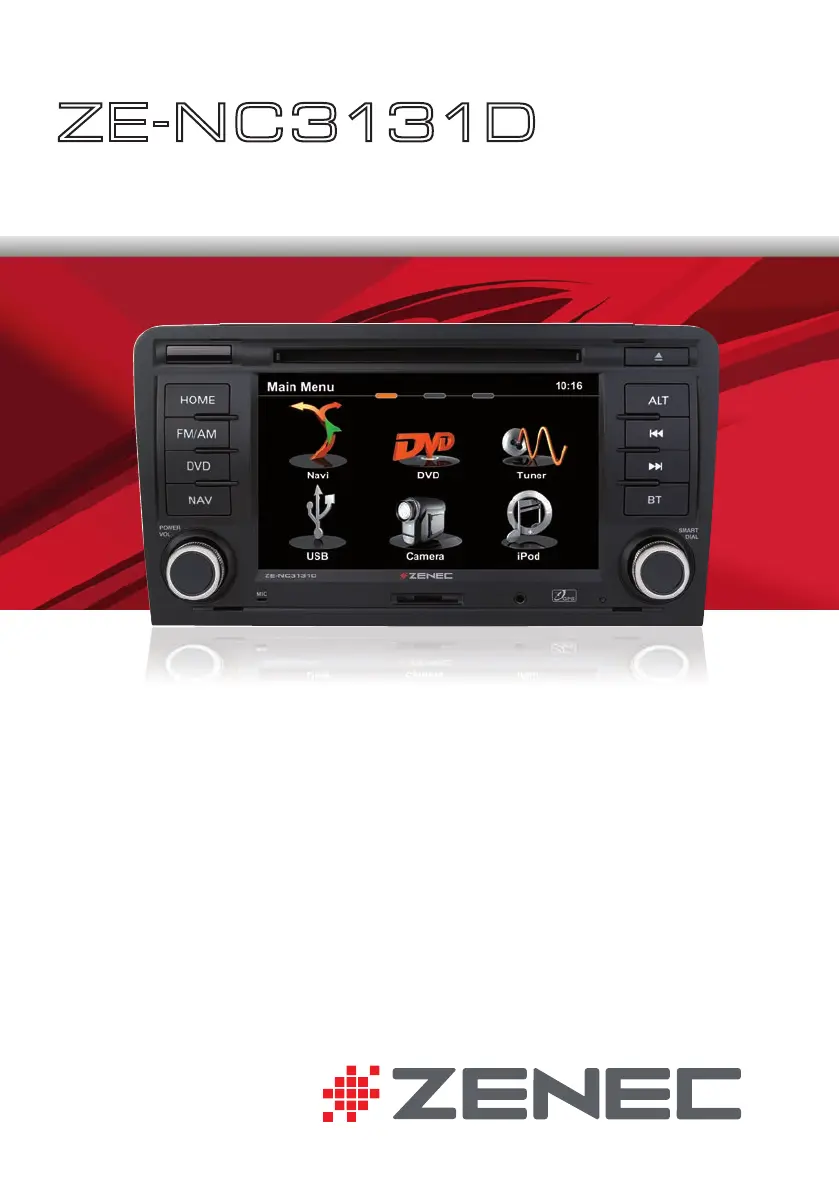
ZENEC ZE-NC3131D - User Manual

ZENEC ZE-NC3131D
104 pages
Print Icon
To Next Page IconTo Next Page
Loading...
USER MANUAL
ENGLISH/ GERMAN
USER MANUAL
BEDIENUNGSANLEITUNG
ZE
-
NC3131D
CAR SPECIFIC NAVICEIVER FOR
AUDI A3 VEHICLES

Questions and Answers

  • E
    ellisonkarinaAug 13, 2025
    What to do if my ZENEC ZE-NC3131D Car navigation unit will not power on?
    • B
      Brian DudleyAug 13, 2025
      If your ZENEC Car navigation unit doesn't power on, the radio or car battery fuse might be blown. Install a new fuse with the correct rating. Alternatively, an illegal operation might have occurred. In this case, press the RESET button.
  • D
    David HollandAug 17, 2025
    Why is there no or low audio output from my ZENEC ZE-NC3131D?
    • M
      Maureen ValenzuelaAug 17, 2025
      If you're experiencing no or low audio output from your ZENEC Car navigation, it could be due to several reasons. Check if the audio output connection is properly wired and correct it if necessary. Ensure the volume isn't set too low by increasing the volume level. Damaged speakers can also cause this issue, so consider replacing them. If only one channel is playing, check the balance and fader adjustments. Also, make sure the speaker wiring isn't in contact with any metal part of the car; if it is, insulate the connections or replace the speaker cable. Finally, verify that the Mute function is turned off.
  • L
    Lisa MasonAug 20, 2025
    What causes poor sound quality or distortion in ZENEC Car navigation?
    • J
      Jacob BentonAug 20, 2025
      Poor sound quality or distortion in your ZENEC Car navigation can be caused by using an unauthorized disc. Try using an original disc. It could also be due to the speaker power rating not being compatible with the unit; connect proper speakers. Another possible cause is a shorted speaker; check the speaker connections.
  • H
    Helen BowersAug 25, 2025
    What to do if there is no image on my ZENEC ZE-NC3131D screen?
    • D
      donaldrodriguezAug 25, 2025
      If there is no image on your ZENEC Car navigation screen, it may be because the parking brake is not engaged. Stop the vehicle in a safe place and apply the parking brake. Alternatively, the "Monitor off"-function may be activated. Touch the monitor to activate the display.
  • J
    joshuaparkerAug 28, 2025
    Why is my ZENEC Car navigation showing a prolonged image or improper height/width ratio?
    • L
      Lawrence GreenAug 28, 2025
      A prolonged image or an improper height/width ratio on your ZENEC Car navigation is likely due to an improper aspect ratio setup. Use the correct aspect ratio setting to resolve this.
  • K
    Kenneth ChurchSep 1, 2025
    Why is the station searching weak on my ZENEC ZE-NC3131D?
    • J
      Jessica WallaceSep 1, 2025
      Weak station searching on your ZENEC Car navigation could be because the auto antenna is not properly connected; connect the auto antenna cable correctly. Another reason could be that the REG function is activated; turn the REG function off. Also, check if the AF function is not activated and activate it.
  • C
    Crystal ShortSep 4, 2025
    Why are the ID3 tags shown incorrectly on my ZENEC ZE-NC3131D Car navigation?
    • A
      Anne ParkSep 4, 2025
      Incorrectly displayed ID3 tags on your ZENEC Car navigation may occur if the message is longer than the LCD can display or if the ID3 tag is not compatible. Use proper ID3 tag information.
  • J
    jsanchezSep 8, 2025
    Why can't I insert a disc into my ZENEC ZE-NC3131D Car navigation?
    • J
      josephzunigaSep 8, 2025
      If you cannot insert a disc into your ZENEC Car navigation, it's possible that there is already a disc inside the unit. Eject the current disc before attempting to insert a new one.

Summary

SAFETY INSTRUCTIONS

FRONT PANEL BUTTONS

Source Selection Buttons

Buttons for FM/AM, DVD, NAV, and Bluetooth sources.

Power and Volume Control

Controls device power ON/OFF and adjusts volume.

STEERING WHEEL CONTROLS

Call Management

Controls answering, hanging up, and rejecting phone calls.

Volume and Mute Control

Adjusts audio volume and mutes/unmutes the sound.

BASIC OPERATION

Power Management

Controls device power ON/OFF linked to vehicle ignition.

Source Selection and Menu Access

How to enter the main menu and select sources via touchscreen or buttons.

Language and Display Settings

Instructions for adjusting the OSD language and understanding display elements.

RADIO MODE

Radio Interface and Controls

Overview of screen display elements and physical/virtual controls.

Advanced Radio Functions

Explains features like AF, TA, SCAN, REG, and LOC/DX for optimal reception.

MEDIA PLAYBACK

Playback Navigation and Control

Buttons for track skipping, play/pause, repeat, and shuffle.

iPod and External Media Management

Navigating playlists, modes, and search functions for various media.

BLUETOOTH MODE

Phone Pairing and Connection

Step-by-step guide to pairing a mobile phone and entering the PIN code.

NAVIGATION MODE

Destination Input and Route Guidance

How to input a destination and start route guidance.

SYSTEM SETUP

TROUBLESHOOTING

General Device Troubleshooting

Solutions for power, audio output, and sound quality problems.

ZENEC ZE-NC3131D Specifications

General IconGeneral
Display Size6.2 inches
Resolution800 x 480 pixels
GPS NavigationYes
BluetoothYes
USB PortYes
Audio Formats SupportedMP3, WMA, AAC
DVD PlayerYes
SD Card SlotYes
Video PlaybackYes
Audio PlaybackYes
TouchscreenYes
Steering Wheel ControlYes
Rear View Camera InputYes
Video Formats SupportedMPEG4
RadioFM/AM
Operating SystemWindows CE