EasyManua.ls Logo

Zenith J584W - Page 46

Zenith J584W
80 pages
Print Icon
To Next Page IconTo Next Page
To Previous Page IconTo Previous Page
Loading...
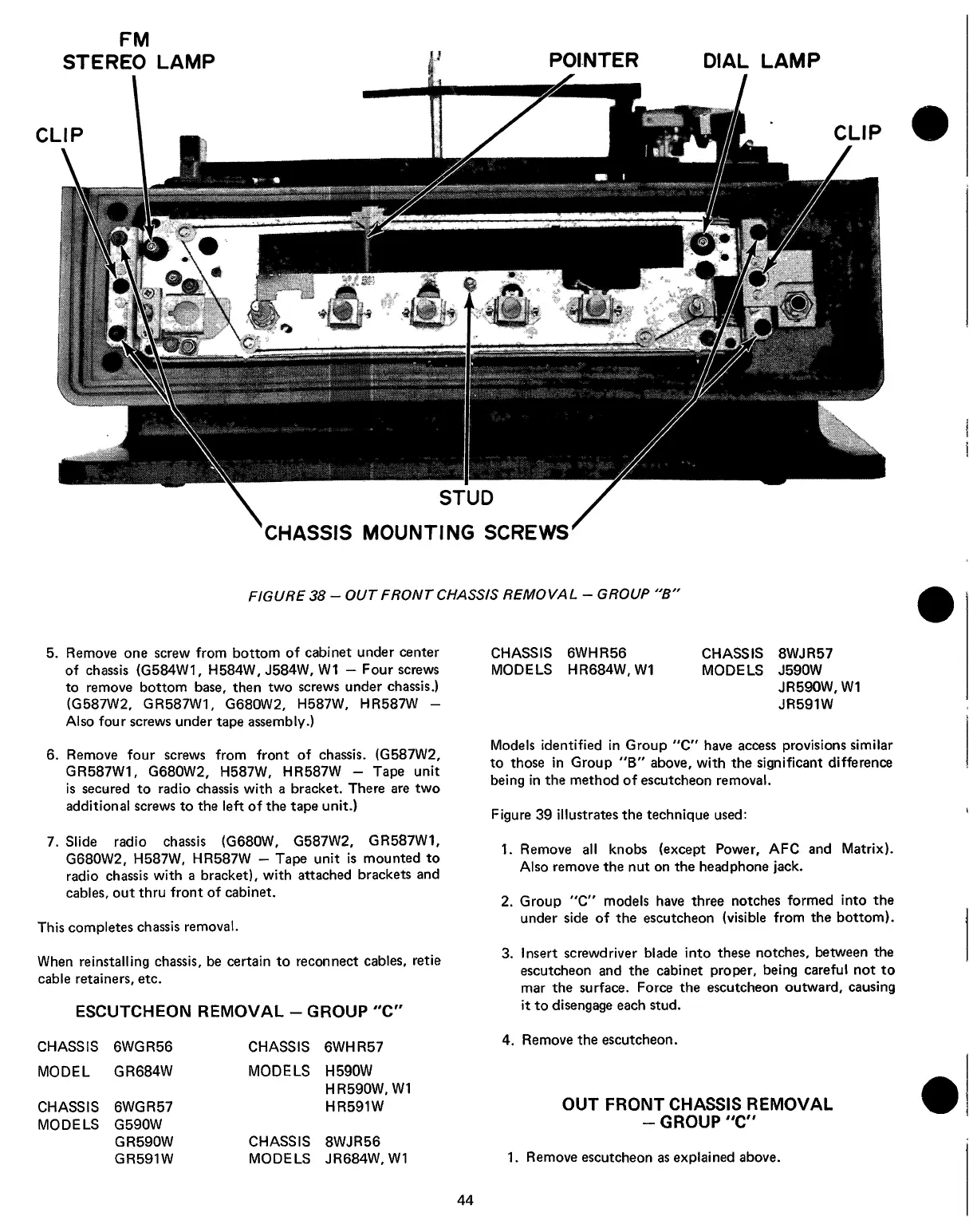
FIGURE
38
-
OUT
FRONT
CHASSIS
REMOVAL
-
GROUP
"B"
5.
Remove
one
screw
from
bottom
of
cabinet
under
center
of
chassis
(G584W1,
H584W,
J584W,
W1
-
Four
screws
to
remove
bottom
base,
then
two
screws
under
chassis.)
(G587W2,
GR587W1,
G680W2,
H587W,
HR587W
-
Also
four
screws
under
tape
assembly.)
6.
Remove
four
screws
from
front
of
chassis.
(G587W2,
GR587W1,
G680W2,
H587W,
HR587W
-
Tape
unit
is
secured
to
radio
chassis
with
a
bracket.
There
are
two
additional
screws
to
the
left
of
the
tape
unit.)
7.
Slide
radio
chassis
(G680W,
G587W2,
GR587W1,
G680W2,
H587W,
HR587W
-
Tape
unit
is
mounted
to
radio
chassis
with
a
bracket),
with
attached
brackets
and
cables,
out
thru
front
of
cabinet.
This
completes
chassis
removal.
When
reinstalling
chassis,
be
certain
to
reconnect
cables,
retie
cable
retainers,
etc.
ESCUTCHEON
REMOVAL
-
GROUP
"C"
CHASSIS
6WHR56
CHASSIS
8WJR57
MODELS
HR684W,
W1
MODELS
J590W
JR590W,
W1
JR591W
Models
identified
in
Group
"C"
have
access
provisions
similar
to
those
in
Group
"B"
above,
with
the
significant
difference
being
in
the
method
of
escutcheon
removal.
Figure
39
illustrates
the
technique
used:
1.
Remove
all
knobs
(except
Power,
AFC
and
Matrix).
Also
remove
the
nut
on
the
headphone
jack.
2.
Group
°C"
models
have
three
notches
formed
into
the
under
side
of
the
escutcheon
(visible
from
the
bottom).
3.
Insert
screwdriver
blade
into
these
notches,
between
the
escutcheon
and
the
cabinet
proper,
being
careful
not
to
mar
the
surface.
Force
the
escutcheon
outward,
causing
it
to
disengage
each
stud.
4.
Remove
the
escutcheon.
OUT
FRONT
CHASSIS
REMOVAL
-
GROUP"C"
1.
Remove
escutcheon
as
explained
above.
44
CHASSIS
6WGR56
CHASSIS
6WHR57
MODEL
GR684W
MODELS
H590W
CHASSIS
6WGR57
HR590W,
W1
HR591W
MODELS
G590W
GR590W
CHASSIS
8WJR56
GR591W
MODELS
JR684W,
W1