29
Monsoon II Use, Care, and Installation Guide
ZEPHYRONLINE.COM
Enabling ACT™
ACT™ Conversion
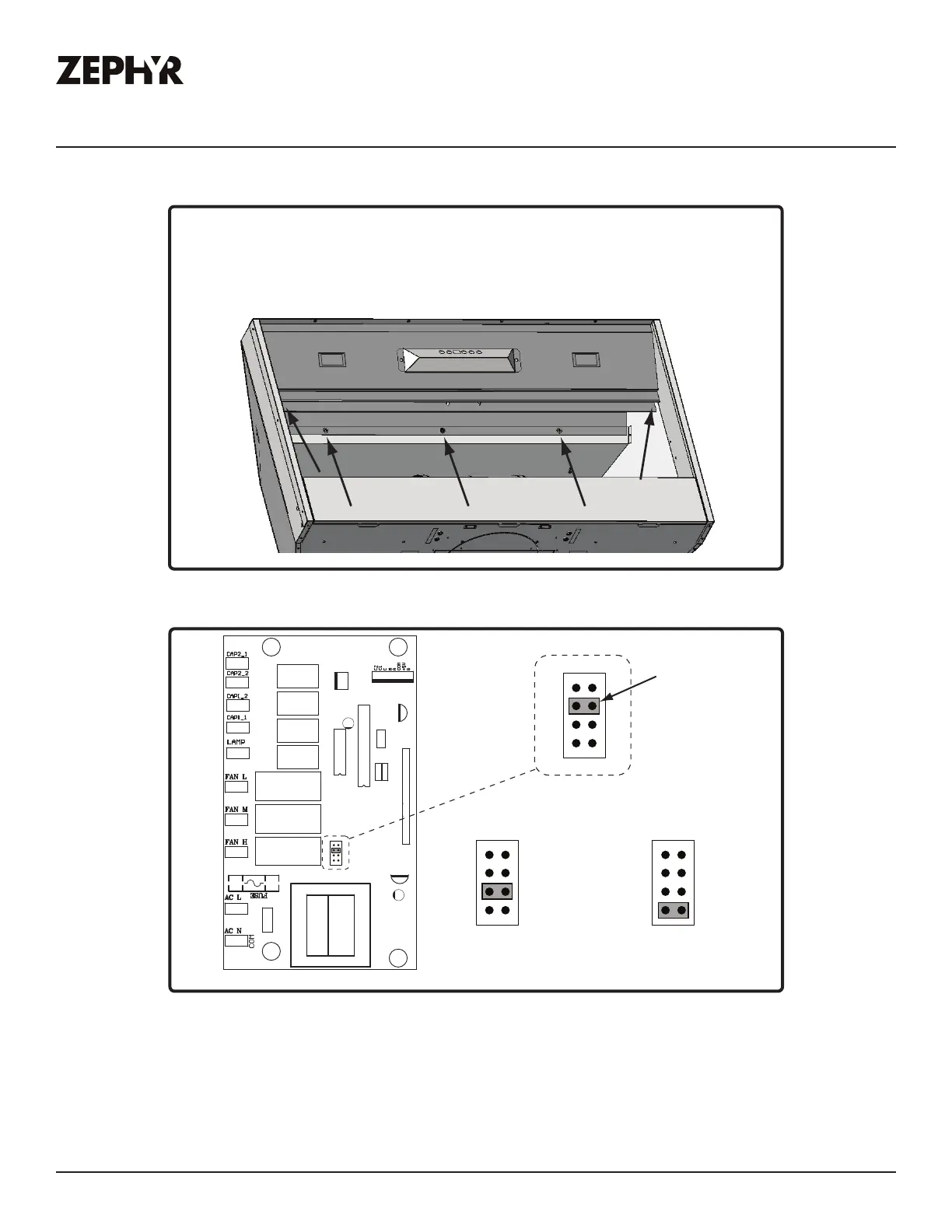
1. PC board located behind the light panel.
2. (If applicable) Remove both spacer panels by
2 screws for each spacer panel.
3. Remove 5 screws attaching light panel.
FIG. I
PC Board
1
3
5
7
2
4
6
8
Jum per 5- 6 or 7-8
DEFAULT POSITION
Default Max. Blower CFM
Jumper 3-4
Max. Blower CFM
Jumper 1-2
Jumper Pins
Plastic
Jumper
1
3
5
7
2
4
6
8
1
3
5
7
2
4
6
8
1
3
5
7
2
4
6
8
Max. Blower CFM
590 390
FIG. J



 To Next Page
 Loading...