13
Troubleshooting
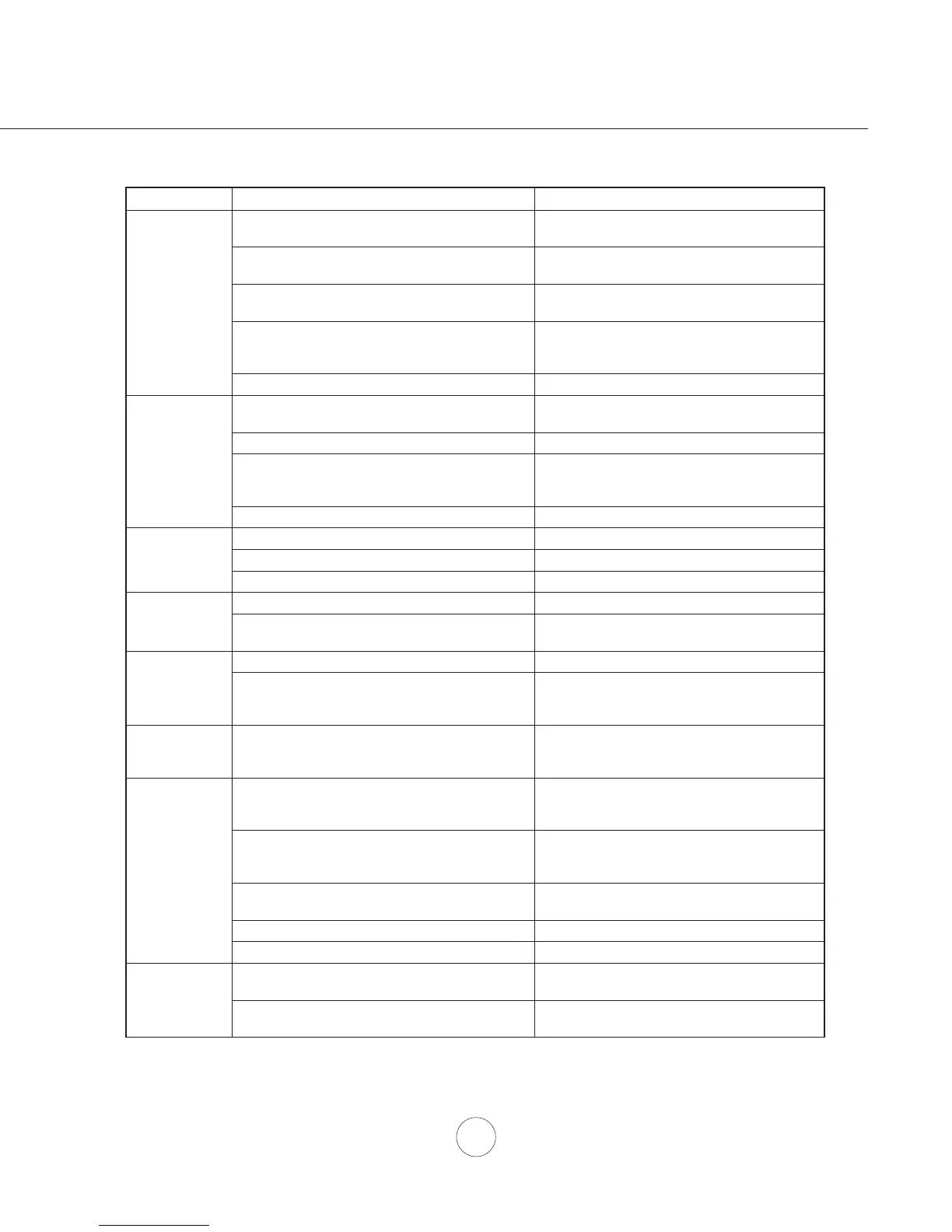
TROUBLESHOOTING PROCEDURES FOR OMBRA WALL
Issue Cause What to do
After installation,
the unit doesn’t
ZRUN
1. The power source is not turned ON. 0DNHVXUHWKHFLUFXLWEUHDNHUDQGWKHXQLW¶V
power is ON.
7KHSRZHUOLQHDQGWKHFDEOHORFNLQJFRQQHFWRU
is not connecting properly.
&KHFNWKHSRZHUFRQQHFWLRQZLWKWKHXQLWLV
connected properly.
3. The wires on the control board are loose. 0DNHVXUHWKHZLUHVRQWKHFRQWUROERDUGDUH
connected properly.
4. The switch board and control board wirings are
disconnected.
0DNHVXUHWKHZLULQJVEHWZHHQWKHVZLWFK
board and control board are connected
properly.
5. The switch board or control board is defective. 5. Change the switch board or control board.
/LJKWZRUNVEXW
blower is not
turning.
1. The blower cable is disconnected. &KHFNDOOZLULQJVIURPWKHEORZHUWREHVXUH
all cables are connected properly.
2. The blower is defective, possibly seized. 2. Change the blower.
3. The thermally protected system detects if the
blower is too hot to operate and shuts the blower
down.
3. The blower will function properly after the
thermally protected system cool down.
4. The switch board or control board is defective. 4. Change defective part.
The unit is
vibrating.
1. The motor is not secure in place. 1. Tighten the motor in place.
2. Damaged blower wheel. 2. Replace the blower.
3. The hood is not secured in place. &KHFNWKHLQVWDOODWLRQRIWKHKRRG
The unit is
whistling.
7KH¿OWHULVQRWLQWKHFRUUHFWSRVLWLRQ $GMXVWWKH¿OWHUVXQWLOWKHZKLVWOLQJVWRSV
2. The duct pipe connections are not sealed or
connected properly.
&KHFNWKHGXFWSLSHFRQQHFWLRQVWREHVXUHDOO
connections are sealed properly.
The blower is
ZRUNLQJEXWWKH
lights are not.
1. Defective light bulb. 1. Change the light bulb.
2. The light bulb wire is loose. &KHFNEXOEZLUHFRQQHFWLRQVDWWKHFRQWURO
board and the light bulbs. Reconnect any
loose wires.
The speed levels
of the blower
sound the same.
1. Using the wrong size of ducting. 1. Change the ducting to at least 6” or higher.
The hood is
not venting out
properly.
1. The hood might be hanging too high from the
FRRNWRS
$GMXVWWKHGLVWDQFHEHWZHHQWKHFRRNWRSDQG
the bottom of the hood within 26” and 34”
range.
2. The wind from the opened windows or opened
GRRUVLQWKHVXUURXQGLQJDUHDDUHDႇHFWLQJWKH
ventilation of the hood.
2. Close all the windows and doors to eliminate
WKHRXWVLGHZLQGÀRZ
%ORFNDJHLQWKHGXFWRSHQLQJRUGXFWZRUN 5HPRYHDOOWKHEORFNLQJIURPWKHGXFWZRUNRU
duct opening.
4. The direction of duct opening is against the wind. 4. Adjust the duct opening direction.
5. Using the wrong size of ducting. 5. Change the ducting to at least 6” or higher.
Mesh Filter is
vibrating.
0HVK¿OWHULVORRVH 0DNHVXUHWKHPHWDOFOLSVLQWKHKDQGOHDUH
QRWVWXFN2UUHSODFHWKHPHVK¿OWHU
)LOWHUVSULQJFOLSLVORRVHRUEURNHQ 8QLQVWDOODQGUHLQVWDOO¿OWHUSXVKXSRQ¿OWHU
ODWFK5HSODFHPHVK¿OWHULIQHHGHG




 To Next Page