EN
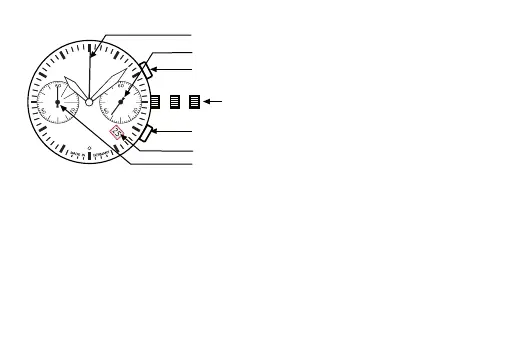
Crown
Second hand
Date indicator
Pushbutton A
Pushbutton B
60 minutes counter
60 second counter
IN
II
Time adjustment: Pull the
crown out to the 2nd Click
Posion. Turn the crown
clockwise to set hour and
minute hands. Aer the
me has been set, push the
crown back to the Normal
posion.[ N ].
Date adjustment: 1. Pull the crown out to the 1st Click Posion.
2. Turn the crown clockwise to set the date. * If the date is set between the hours of
around 9:00 PM and 1:00 AM, the date may not change on the following day.
3. Aer the date has been set, push the crown back to the Normal posion.
Using the Chronograph: This chronograph is able to measure and display me in 1/4
second united up to maximum of 59min 59sec.
1. Press buon „ A „ to start the chronograph.
DO NOT set Date between 9:00 pm – 1:00 am


 To Next Page