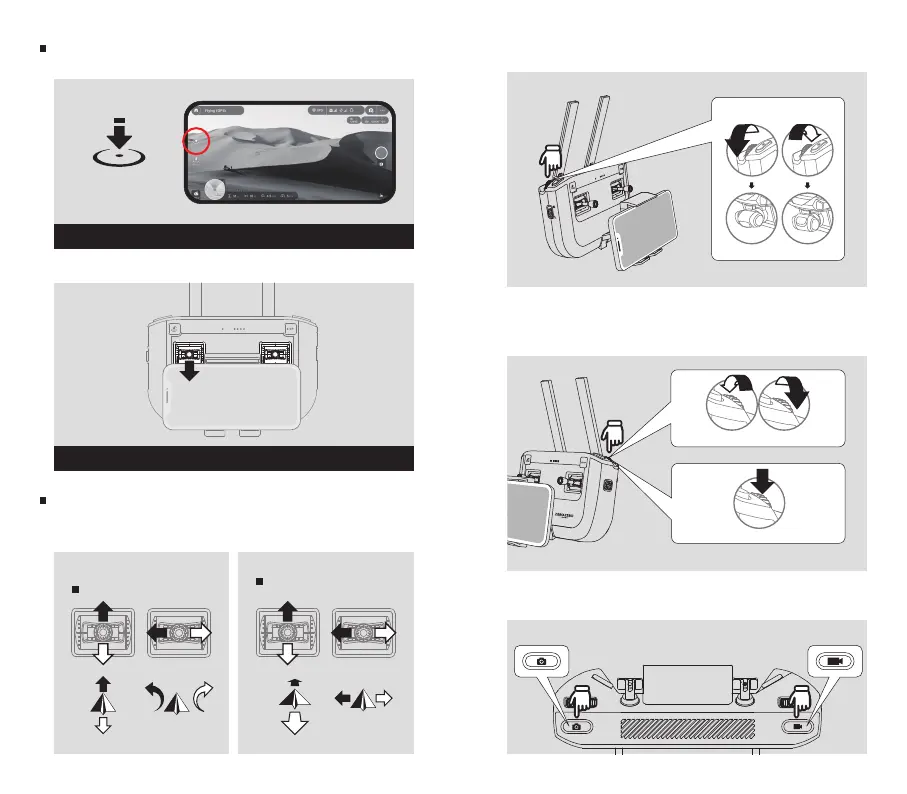
Landing
1. Auto landing in the App.
BlastOff Controller Operations
1. The default control mode is shown below. You can
choose other control modes in the App.
2. You can use the “gimbal wheel” to control the tilt angle
of the camera.
3. You can use the “camera settings adjustment dial” to
control the ISO/Shutter/EV value (short press the button
to switch the control value).
4. Short press the “shutter button" to take a photo; short
press the “record button" to start/stop video recording.
Up
Down Turn
Left
Turn
Right
Forward
Left Right
Backward
Left Stick
Right Stick
Tap the “landing” button to land the drone
Left stick down until the drone touch the ground and the motors stop
2. Manual landing with the BlastOff Controller.
Land
Shutter Button Record Button
Gimbal Control
Change the ISO/Shutter/EV value
Switch the control value



 To Next Page