Take off
1. Auto takeoff in the App.
Press and hold the power button for 5 seconds
until the status indicator light blinks. Once it's
finished booting up, you will hear a sound
Connect the DroneStep 5
Open the V-Coptr App
Press the link button on the drone. The status
indicator light of the drone will flash green and
begin the linking process
*
During the connection process, please keep the BlastOff Controller and
the drone within 1 meter of each other.
*
Note : There is no need to manually rotate the motors. The motor angle will
automatically be in place before takeoff.
Method Two: Connect the BlastOff Controller and
the drone with the combination keys
1. Press and hold the two custom buttons + record button for
two seconds, the status indicator light of the BlastOff
Controller will flash green as it starts to connect to the drone.
2. The connection is successful when the status indicator light
of the BlastOff Controller is solid green.
Start Connecting
Method One: Connect BlastOff Controller and the drone
via App
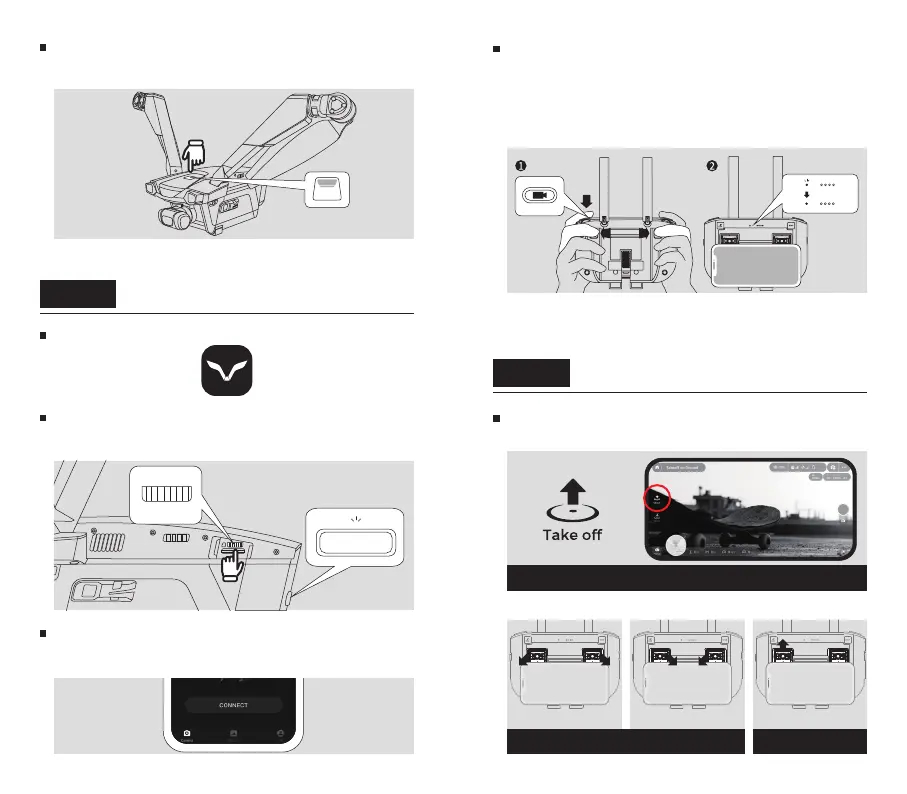
Step 6 Flight
Tap the “takeoff ” button to initiate takeoff
2. Manual takeoff with the BlastOff Controller.
Start the propellers
Method 1 Method 2
Left stick up to take off



 To Next Page
 Loading...