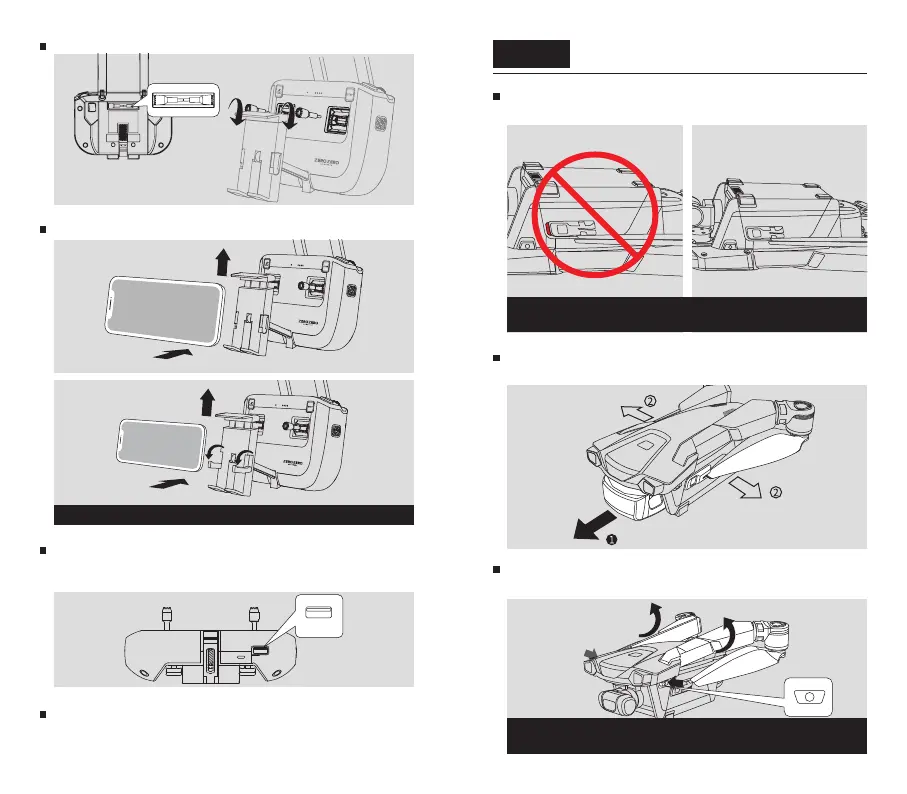
Insert the intelligent battery into the slot and
push forward the battery buckles
Prepare the DroneStep 4
Make sure the red labels under the battery buckles are not visible to ensure the
battery is securely installed
Remove the gimbal protector and pull out the
propellers from the battery buckles
Press and hold the arm buttons until the arms
are completely unfolded
After releasing the arm buttons, the buttons are fully popped up, indicating that
the arms are fully unfolded
Use the cable of your mobile phone (not included
in the package) to connect the BlastOff Controller
and your mobile phone
Press and hold the power button for 2 seconds. The
BlastOff Controller will beep when it is successfully
turned on
Install the Control Sticks
Place your mobile phone on the Mobile Phone Stand
Use the clamps to secure smaller phones


 To Next Page
 Loading...