Step 1 Download V-Coptr App
Use mobile phone to scan the QR code below or
download the V-Coptr App from the App Store /
Google Play Store
*
The V-Coptr App is compatible with iOS 10.0 (or above) or Android 6.0 (or above).
Step 2
Charging
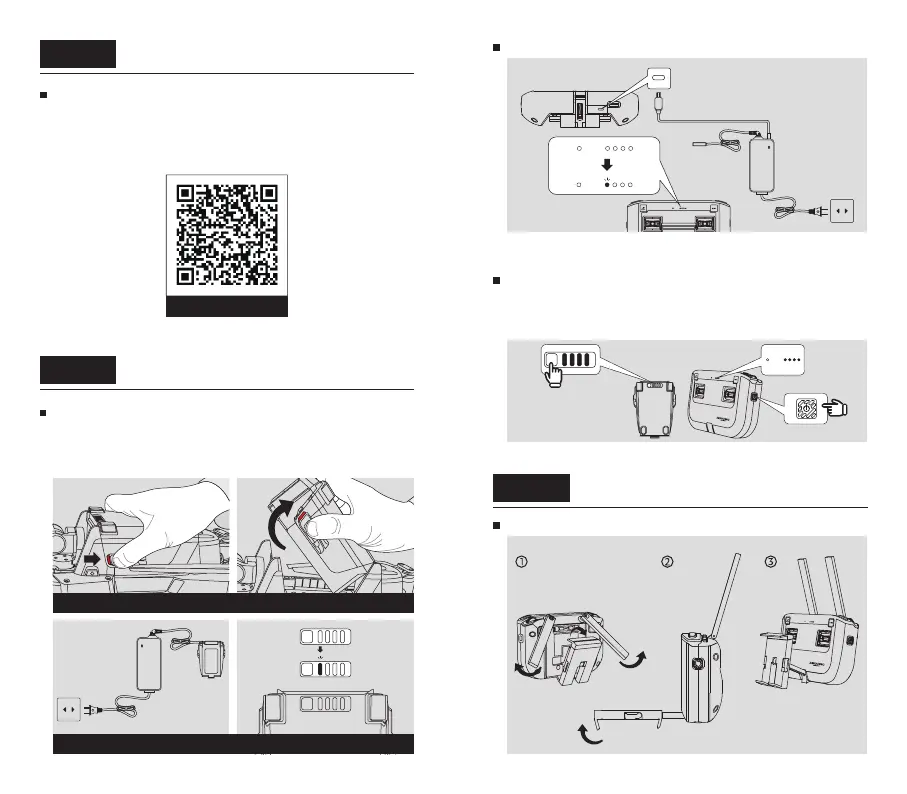
Charge the Intelligent Battery
1. Push back the battery buckles to remove the battery.
2. During charging, the indicator lights of current battery
level flash regularly.
Charge the BlastOff Controller
Remove the Intelligent Battery
Charge to activate the battery
Press the power button of Intelligent Battery / BlastOff
Controller briefly, and the battery level indicator light
will show the current battery level.
Check the battery level
Plug the charging cable into the USB-C Port.
It takes about 2.5 hours to fully charge.
Prepare the BlastOff ControllerStep 3
Unfold the Mobile Phone Stand and the Antennas
iOS / Android



 To Next Page