Start Measuring
View the Data
Notes: The data of the day will be cleared to zero automatically when the time is
0:00. The data cannot be cleared to zero manually.
The device only stores the latest 7 day’s heart rate data, the data will be deleted
if it’s over 7 days.
★ Light It Up
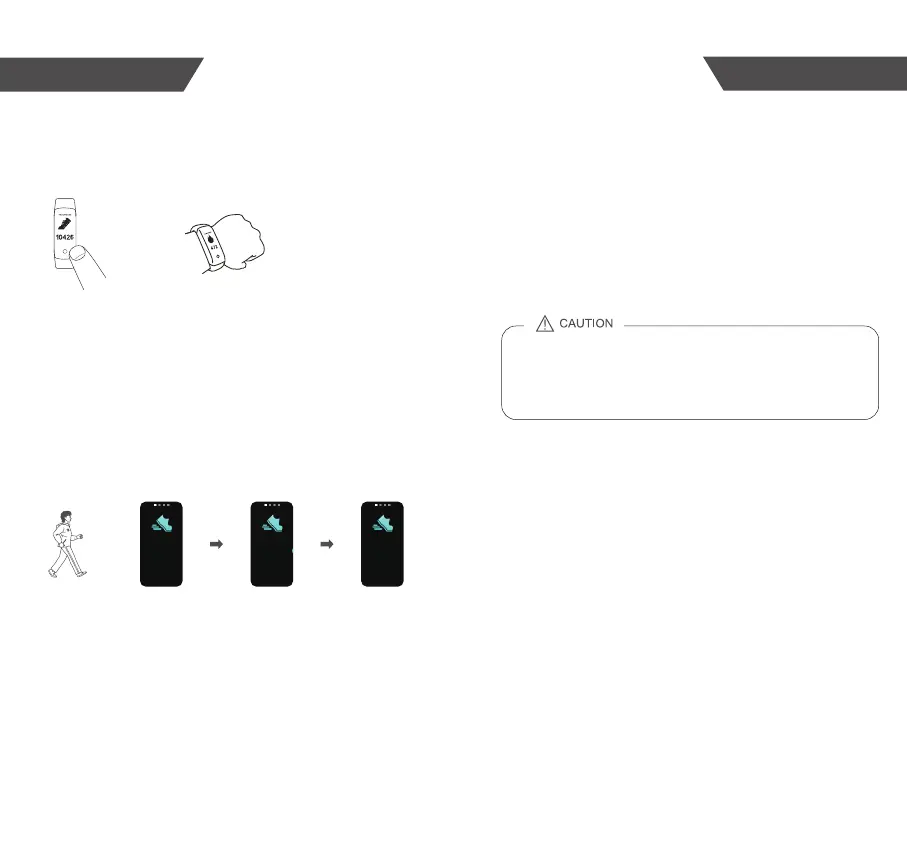
Light up the Activity Tracker as the below steps:
If there is no operation, it will turn off in 5 seconds.
OR
Tap the touch key Rotating your wrist
kcal
steps
★ Check the Data
Following the steps of LIGHT IT UP to read the data you want.
Tap the touch key at any time to light up the Activity Tracker , it will
display the time first. Tap the touch key each time, it will display the data
according order set from Zewa APP. If there is no operation, it will turn
off in 5 seconds.
★ How to Use
Follow the tips in the manual to wear the Activity Tracker . Then it can
start the measurement.
The measuring data will be transmitted to your device which supports
Bluetooth 5.0 technology if you have paired up with it.
Start Walking 10 Steps More than 10 steps
9 10


 To Next Page