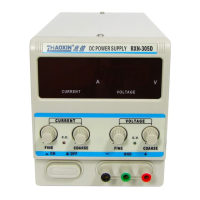
This document is the user manual for the ZHAOXIN KXN Series Switching DC Power Supply.
Function Description
The KXN Series Switching DC Power Supply offers current preset and current-limiting protection, ensuring safe operation. It features automatic switching between constant voltage (CV) and constant current (CC) modes, adapting to various load conditions. Some models include a fine adjustment knob for precise control of voltage and current. The device is designed with a temperature-controlled fan that automatically activates to dissipate heat when the internal temperature exceeds 50°C, contributing to low noise operation.
Important Technical Specifications
The KXN Series offers a wide range of models with varying input voltages, output voltages, and currents.
General Specifications (common across many models):
- Working Temperature: -10℃ to 40℃ with relative humidity < 80%.
- Storage Temperature: -10℃ to 40℃ with relative humidity < 90%.
- Ripple Noise: Generally ≤0.3%Vp-p (Peak to peak) for D/DM models, and ≤0.5%Vp-p for other models.
- Display Accuracy:
- 3-digit LED digital display for voltage/current with ±1%/±1%±1 character (D/DM models).
- Voltage 4-digit (±0.3%), Current 3-digit (±1%) LED ±1 character (some higher voltage/current models).
- Voltage 4-digit (±0.3%), Current 4-digit (±0.3%) LED ±1 character (some higher voltage/current models).
- Display Resolution:
- Voltage 0.1V Current 0.01A (D/DM models).
- Voltage 0.1V Current 0.1A/0.01A (some D/DM models).
- Voltage 0.1V Current 0.1A (some higher voltage/current models).
- Voltage 0.01V Current 0.1A (some higher voltage/current models).
- Voltage 1V Current 0.01A (some higher voltage/current models).
Specific Model Examples:
KXN-155D / KXN-305D / KXN-645D (3-digit display, 0.1V/0.01A resolution):
- Input Voltage: AC 220V±10% 50Hz, AC 110V±10% 60Hz, or AC 240V±10% 50Hz.
- Output Voltage: 0-15V, 0-32V, 0-64V respectively.
- Output Current: 0-5A for all three.
- Voltage Stabilization Degree: ≤0.2%+2mV (KXN-155D), ≤0.1%+2mV (KXN-305D/KXN-645D).
- Load Stability (Voltage): ≤0.35%+2mV (KXN-155D), ≤0.2%+2mV (KXN-305D/KXN-645D).
- Current Stabilization Degree: ≤0.1%+3mA.
- Load Stability (Current): ≤0.2%+3mA.
- Boundary Dimension: 275 (depth) * 126 (width) * 155 (height) mm.
- Weight: 1.96KG (KXN-155D/KXN-645D), 2.0KG (KXN-305D).
KXN-1510D / KXN-3010D (3-digit display, 0.1V/0.1A or 0.01A resolution):
- Input Voltage: Same as above.
- Output Voltage: 0-15V, 0-32V respectively.
- Output Current: 0-10A for both.
- Voltage Stabilization Degree: ≤0.2%+2mV.
- Load Stability (Voltage): ≤0.35%+3mV (KXN-1510D), ≤0.2%+2mV (KXN-3010D).
- Current Stabilization Degree: ≤0.1%+3mA.
- Load Stability (Current): ≤0.2%+3mA.
- Boundary Dimension: 275 (depth) * 126 (width) * 155 (height) mm.
- Weight: 2.14KG for both.
KXN-155DM / KXN-305DM / KXN-645DM (4-digit display, 0.1V/0.01V, 0.01A/0.001A resolution):
- Input Voltage: Same as above.
- Output Voltage: 0-15V, 0-32V, 0-64V respectively.
- Output Current: 0-5A for all three.
- Voltage Stabilization Degree: ≤0.2%+2mV (KXN-155DM), ≤0.1%+2mV (KXN-305DM/KXN-645DM).
- Load Stability (Voltage): ≤0.35%+2mV (KXN-155DM), ≤0.2%+2mV (KXN-305DM/KXN-645DM).
- Current Stabilization Degree: ≤0.1%+3mA.
- Load Stability (Current): ≤0.2%+3mA.
- Boundary Dimension: 275 (depth) * 126 (width) * 155 (height) mm.
- Weight: 1.96KG (KXN-155DM/KXN-645DM), 2.0KG (KXN-305DM).
KXN-1510DM / KXN-3010DM (4-digit display, 0.1V/0.01V, 0.1A/0.01A/0.001A resolution):
- Input Voltage: Same as above.
- Output Voltage: 0-15V, 0-32V respectively.
- Output Current: 0-10A for both.
- Voltage Stabilization Degree: ≤0.2%+2mV.
- Load Stability (Voltage): ≤0.35%+3mV (KXN-1510DM), ≤0.2%+2mV (KXN-3010DM).
- Current Stabilization Degree: ≤0.1%+3mA.
- Load Stability (Current): ≤0.2%+3mA.
- Boundary Dimension: 275 (depth) * 126 (width) * 155 (height) mm.
- Weight: 2.14KG for both.
Higher Power Models (e.g., KXN-1530D to KXN-15100D, KXN-3020D to KXN-6020D, KXN-1001D to KXN-1205D, KXN-1501D to KXN-15010D, KXN-2001D to KXN-3002D, KXN-3003D to KXN-4005D, KXN-5001D to KXN-6005D, KXN-8001D to KXN-10002D, KXN-3050D to KXN-30120D, KXN-4860D to KXN-5050D, KXN-6030D to KXN-6080D, KXN-10050D to KXN-15300D, KXN-30150D to KXN-15030D):
These models offer a wider range of output voltages (up to 1000V) and currents (up to 300A).
- Voltage Stabilization Degree: Generally ≤0.5%.
- Load Stability (Voltage): Generally ≤0.5%.
- Current Stabilization Degree: Generally ≤0.5%.
- Load Stability (Current): Generally ≤0.5%.
- Boundary Dimensions: Vary, with common sizes including 366 (depth) * 198 (width) * 158 (height) mm, 332 (depth) * 198 (width) * 158 (height) mm, 378 (depth) * 260 (width) * 160 (height) mm, and 460 (depth) * 260 (width) * 160 (height) mm.
- Weights: Vary significantly depending on power output, from around 3.4KG to 15KG.
Usage Features
General Security Overview:
- Always use the provided power line and ensure correct voltage settings (AC 110V, 220V, or 240V).
- The product must be properly grounded to prevent electric shock.
- Observe all rated values and markings on the terminals.
- Disconnect power before any maintenance.
- Do not operate with the cover open or if malfunctioning.
- Keep away from exposed circuits and use the specified fuse type.
- Avoid humid, flammable, or explosive environments.
- Ensure proper ventilation with at least 3cm clearance on sides and back.
Front Panel Controls (Model B, C, D, E):
- Current and Voltage Displays: Digital displays for real-time output.
- Coarse and Fine Adjustment Knobs: For precise setting of current and voltage.
- C.C. / C.V. Indicators: LEDs to show constant current or constant voltage mode.
- Power Switch: To turn the unit on/off.
- Output Terminals: Positive (+), Negative (-), and Ground (GND).
- Output On/Off Button (Model D/E): To control power output to the terminals.
Rear Panel Features:
- Cooling Fan: For heat dissipation.
- AC Power Connector: For connecting the input power line.
- AC Fuse Box: Contains the protective fuse.
- High-power Output Terminal (some models): Additional terminals for high current applications.
Connection of Load Line:
- Terminals are loosened by rotating counterclockwise and tightened by rotating clockwise.
- Banana plugs can be inserted directly.
- Load lines must be capable of carrying the maximum short-circuit output current without overheating.
Constant Voltage/Constant Current Characteristics:
- The power supply automatically switches between CV and CC modes based on load conditions.
- In CV mode, the output voltage is constant at the set value, and the C.V. indicator is green.
- In CC mode, the output current is constant at the preset value, and the C.C. indicator is red.
Knob Sound On/Off (Model B, C, D, E):
- Long press the coarse adjustment knob of current (or voltage for some models) for 3-6 seconds in standby to toggle the knob sound.
Current Display Reset (Model B, C, D, E):
- Without any load, long press the fine adjustment knob of current for 3 seconds to reset the current display to zero. This is useful if the display does not return to zero after prolonged use.
Power Output Control On/Off (Model D/E):
- Long press the Output button for 3 seconds to turn off power output control (terminals always charged). Long press again for 6 seconds to turn it back on. Short press to start/turn off output.
Voltage and Current Calibration Operation:
- Requires an electronic load with high accuracy (preferably ten times that of the power supply).
- Involves a sequence of pressing coarse and fine adjustment knobs while turning on the power to enter calibration mode.
- Steps include low-side and high-side calibration for current measurement, current limit, and constant voltage.
Maintenance Features
Product Cleaning:
- Regularly clean the outer surface with a lint-free rag to remove dust, being careful not to scratch the display.
- For more thorough cleaning, use a soft cloth dampened with water or 75% isopropanol.
Troubleshooting:
- No Display on Power On: Check power connector and fuse.
- Abnormal Constant Voltage Output: Check if maximum output power meets load requirements, if current setting is appropriate, and for short/open circuits or poor contact in load cables.
- Abnormal Constant Current Output: Check if maximum output power meets load requirements, if voltage setting is appropriate, and for short/open circuits or poor contact in load cables.
Fuse Change:
- Cut off power and remove the power line.
- Use a slot-type screwdriver to take out the fuse holder.
- Replace the fuse with one of the specific specifications and rated value.

 Need help?
 General

 To Next Page