EasyManua.ls Logo

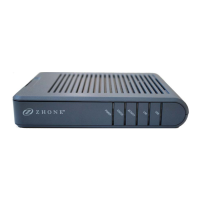
Zhone 6381-A4-200 - User Manual

Zhone 6381-A4-200
131 pages
Print Icon
To Next Page IconTo Next Page
Loading...
6381-A4 Combination
Modem with in-line Filter
Users Guide
Document Part Number: 830-01935-01
November, 2008

Table of Contents

Question and Answer IconNeed help?

Do you have a question about the Zhone 6381-A4-200 and is the answer not in the manual?

Summary

About This Guide

Style and notation conventions

Defines conventions used for instructional alerts, warnings, and tips in the document.

Typographical conventions

Acronyms

Contacting Global Service and Support

Technical Support

Details how to contact Zhone for installation, operation, or warranty repair assistance.

Service Requirements

Outlines that repairs must be performed by the manufacturer or authorized agents.

Chapter 1 Introduction

System Requirements

Lists prerequisites for using the modem for internet access, including ISP service and computer hardware.

Package Contents

Safety Instructions

Front Panel

Back Panel

Chapter 2 Hardware Installation and PC Setup

Overview

Introduces the chapter's content on connecting the router and preparing the PC.

Connecting your hardware

Provides step-by-step instructions for connecting the modem to the ADSL line, telephone, and PC.

Mounting the Modem

Configuring Your Computer

Windows XP

Installing USB Drivers

Chapter 3 The Web User Interface

Overview

Describes the modem/router's WAN and LAN connections and initial setup steps.

Log in to the Modem

Details the procedure for accessing the modem's web interface via a browser.

Home

Quick Start

WAN Setup

New Connection

PPPoE Connection Setup

PPPoA Connection Setup

Static Connection Setup

DHCP Connection Setup

Bridge Connection Setup

CLIP Connection

Modify a Connection

Delete a Connection

Modem

LAN Setup

LAN Configuration

Explains how to configure LAN interfaces, bridge groups, and IP settings.

Firewall; NAT Services

Enable;Disable DHCP

Changing the Routers IP address

Log Out

Advanced

UPnP

Explains Universal Plug and Play features for NAT traversal and device identification.

SNTP

Port Forwarding

DMZ Settings

Custom Port Forwarding

IP Filters

Custom IP Filters

LAN Clients

LAN Isolation

TR-068 WAN Access

Bridge Filters

Dynamic DNS Client

IGMP Proxy

Configure a WAN Interface as the Upstream IGMP Proxy

Configure a LAN interface as the Upstream Interface

Static Routing

Dynamic Routing

Quality of Service (QoS)

Policy Database

Ingress

Ingress Layer 2 Configuration

Ingress Layer 3 Configuration

Ingress Static Configuration

Ingress Payload Database Configuration

Egress

Egress Layer 2 Configuration

WLAN QoS Support

Shaper

Access Control

Chapter 4 Tools

System Commands

Provides commands for saving configuration, restarting, and restoring defaults.

Remote Log - Router

User Management

Update Gateway

Analyzer

Ping Test

Modem Test

Chapter 5 Status

Network Statistics

Allows viewing statistics for different interfaces: Ethernet, USB, and DSL.

Connection Status

DDNS Update Status

DHCP Clients

QOS-TCA NTCA Status

Modem Status

Product Information

System Log

Chapter 6 Troubleshooting

The Router Is Not Functional

Steps to diagnose and resolve issues if the router is not working.

You Cannot Connect to the Router

Troubleshooting steps for resolving connection issues to the router.

LEDs Blink in a Sequential Pattern

Indicates kernel or flash file system corruption, requiring service.

The Status LED Continues to Blink

Suggests DSL line training issues, possibly due to distance from the central office.

Diagnosing Problems using IP Utilities

Ping

Nslookup

Appendix A - Glossary

Summary

About This Guide

Style and notation conventions

Defines conventions used for instructional alerts, warnings, and tips in the document.

Typographical conventions

Acronyms

Contacting Global Service and Support

Technical Support

Details how to contact Zhone for installation, operation, or warranty repair assistance.

Service Requirements

Outlines that repairs must be performed by the manufacturer or authorized agents.

Chapter 1 Introduction

System Requirements

Lists prerequisites for using the modem for internet access, including ISP service and computer hardware.

Package Contents

Safety Instructions

Front Panel

Back Panel

Chapter 2 Hardware Installation and PC Setup

Overview

Introduces the chapter's content on connecting the router and preparing the PC.

Connecting your hardware

Provides step-by-step instructions for connecting the modem to the ADSL line, telephone, and PC.

Mounting the Modem

Configuring Your Computer

Windows XP

Installing USB Drivers

Chapter 3 The Web User Interface

Overview

Describes the modem/router's WAN and LAN connections and initial setup steps.

Log in to the Modem

Details the procedure for accessing the modem's web interface via a browser.

Home

Quick Start

WAN Setup

New Connection

PPPoE Connection Setup

PPPoA Connection Setup

Static Connection Setup

DHCP Connection Setup

Bridge Connection Setup

CLIP Connection

Modify a Connection

Delete a Connection

Modem

LAN Setup

LAN Configuration

Explains how to configure LAN interfaces, bridge groups, and IP settings.

Firewall; NAT Services

Enable;Disable DHCP

Changing the Routers IP address

Log Out

Advanced

UPnP

Explains Universal Plug and Play features for NAT traversal and device identification.

SNTP

Port Forwarding

DMZ Settings

Custom Port Forwarding

IP Filters

Custom IP Filters

LAN Clients

LAN Isolation

TR-068 WAN Access

Bridge Filters

Dynamic DNS Client

IGMP Proxy

Configure a WAN Interface as the Upstream IGMP Proxy

Configure a LAN interface as the Upstream Interface

Static Routing

Dynamic Routing

Quality of Service (QoS)

Policy Database

Ingress

Ingress Layer 2 Configuration

Ingress Layer 3 Configuration

Ingress Static Configuration

Ingress Payload Database Configuration

Egress

Egress Layer 2 Configuration

WLAN QoS Support

Shaper

Access Control

Chapter 4 Tools

System Commands

Provides commands for saving configuration, restarting, and restoring defaults.

Remote Log - Router

User Management

Update Gateway

Analyzer

Ping Test

Modem Test

Chapter 5 Status

Network Statistics

Allows viewing statistics for different interfaces: Ethernet, USB, and DSL.

Connection Status

DDNS Update Status

DHCP Clients

QOS-TCA NTCA Status

Modem Status

Product Information

System Log

Chapter 6 Troubleshooting

The Router Is Not Functional

Steps to diagnose and resolve issues if the router is not working.

You Cannot Connect to the Router

Troubleshooting steps for resolving connection issues to the router.

LEDs Blink in a Sequential Pattern

Indicates kernel or flash file system corruption, requiring service.

The Status LED Continues to Blink

Suggests DSL line training issues, possibly due to distance from the central office.

Diagnosing Problems using IP Utilities

Ping

Nslookup

Appendix A - Glossary

Zhone 6381-A4-200 Specifications

General IconGeneral
Wi-FiYes
SecurityWEP, WPA, WPA2
ADSL StandardsANSI T1.413 Issue 2
Wireless Standards802.11b, 802.11g
Device TypeModem/Router
Ports4 x Ethernet

Related product manuals