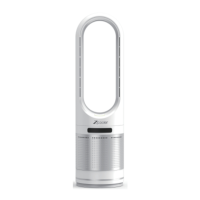
This document describes the Zicooler Bladeless Fan, model UML-018, providing instructions for its operation, maintenance, and safety.
Function Description
The Zicooler Bladeless Fan is designed to provide cooling airflow. It operates without visible blades, drawing air in from the base (Intake air) and expelling it through multiple outlets in the upper loop (Outlet air, Air outlet). The fan features a digital display that shows the current speed setting or operational mode.
The fan can be controlled both via a touch screen on the device and a remote control.
On-device Control:
- Switch On/Off: Tap the touch screen to switch on from standby. Press and hold for 4 seconds to switch off.
- Gear Adjustment: Each tap on the touch screen adjusts the fan speed.
- Head Shaking (Oscillation): Press and hold the touch screen for 2 seconds to activate oscillation. Press and hold again for 2 seconds to deactivate.
Remote Control Operation:
The remote control provides comprehensive control over the fan's functions, with each button press generating a "beep" sound.
- ON/OFF: Turns the fan on from standby and starts it running. Pressing again slows down the fan, stops it, and enters standby mode.
- Wind speed + / -: Adjusts the wind speed by 1 level. The fan has 8 speed levels. Pressing '+' at Speed 8 or '-' at Speed 1 will generate a "beep beep" sound, indicating the maximum or minimum level, respectively.
- Timing + / -: Enters timing mode. The initial timing setting is 1 hour, displayed as "1". Each press of '+' increases the timing by 1 hour. Each press of '-' reduces the timing by 1 hour, but cannot go below 1 hour.
- Swing: Activates or deactivates the oscillation (head shaking) mode.
- Strong wind: Enters strong wind mode, setting the wind speed to the maximum level. The digital display shows "H". Recommended for daytime use.
- Sleep wind: Enters sleep wind mode, where the wind speed gradually and slowly decreases. The digital display shows "L".
Important Technical Specifications
Fan Speed and Noise Levels:
- Speeds 1-3: 30-40dB
- Speeds 4-5: 40-45dB
- Speeds 6-8: 45-60dB
Note: These noise levels are measured in a soundproof room, with a normal environment test error of approximately 5dB. Speeds 1-3 are recommended for night sleep.
Remote Control Battery:
- Type: Button cell, CR2025
- Voltage: LITHIUM BATTERY 3V
Usage Features
- Standby Mode: When powered on, the digital display shows "0", indicating standby.
- Default Startup Speed: The fan starts at Speed 5 by default.
- Digital Display: Provides visual feedback on the current speed (1-8), standby ("0"), strong wind ("H"), and sleep wind ("L") modes.
- Buzzer: Generates a sound for every button press and specific actions (e.g., reaching max/min speed).
Maintenance Features
Regular cleaning and maintenance are crucial for the fan's performance and longevity. Always disconnect the power plug before any maintenance.
General Cleaning:
- Wipe the fan with a soft, dry cloth.
- For stubborn stains, use a wet cloth dipped in neutral detergent, then dry with a dry cloth.
- Never use lacquer thinner, eleoptene, alcohol, lamp oil, benzene, grinding powder, alkaline lotion, or fiber scrubbers, as these can cause paint discoloration or resin degradation.
- Do not sprinkle or splash water onto the fan to prevent electric shock or short-circuit.
Air Inlet/Outlet Cleaning:
- Check and confirm that the air inlet on the back of the fan is not blocked by dust. Remove dust with a soft brush.
- Check and confirm that the air outlet of the wind outlet loop is free from dust. Clean as necessary.
- It is recommended to regularly clean dust with a vacuum cleaner. Excessive dust deposition can cause failure.
Power Cord and Plug:
- After prolonged use, dust and water may accumulate between the plug and socket, potentially leading to fire hazards. Disconnect the plug and clean the part with a dry cloth.
- If the power cord is damaged, it must be replaced by professional personnel from the manufacturer or maintenance department to prevent hazards.
- Do not stretch or tighten the power cord, and keep it away from overheated surfaces.
Storage:
- When not in use for a long time, disconnect the plug from the socket and store the power cord properly to prevent tripping hazards.
Placement:
- Place the fan on a level surface in a well-ventilated and dry environment, away from heat sources and corrosive gas.
- Maintain a clearance of 150mm around the fan to ensure proper airflow.
- The fan should only be used in dry places; it is not suitable for outdoor or wet surfaces.
- Do not cover the fan with a rag or other materials.
- Do not place air fresheners or similar products next to the fan.
Safety Precautions:
- Supervise children, elderly, or disabled persons when using the fan. Children should not play with the fan as a toy.
- Use a separate socket with rated current matching the fan's current. Do not use universal sockets or share sockets with other appliances.
- If the fan malfunctions, cut off the power before repair, and repairs must be performed by professional personnel.
- Do not move the fan while it is connected to the power supply.
- Always hold the plug when disconnecting the power, do not pull the power cord.
- Do not put any objects at the air inlet or outlet, ensuring they are free from dust, lint, hair, or other obstacles that may hinder airflow.
- Do not immerse the fan, power cord, or power plug in water or other liquids.
- Do not use other extension power cords unless inspected by a professional.
- Turn off all operating devices before unplugging.

 Need help?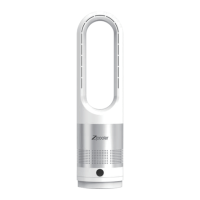

 To Next Page
 General