Mainboard User's Manual Page 39
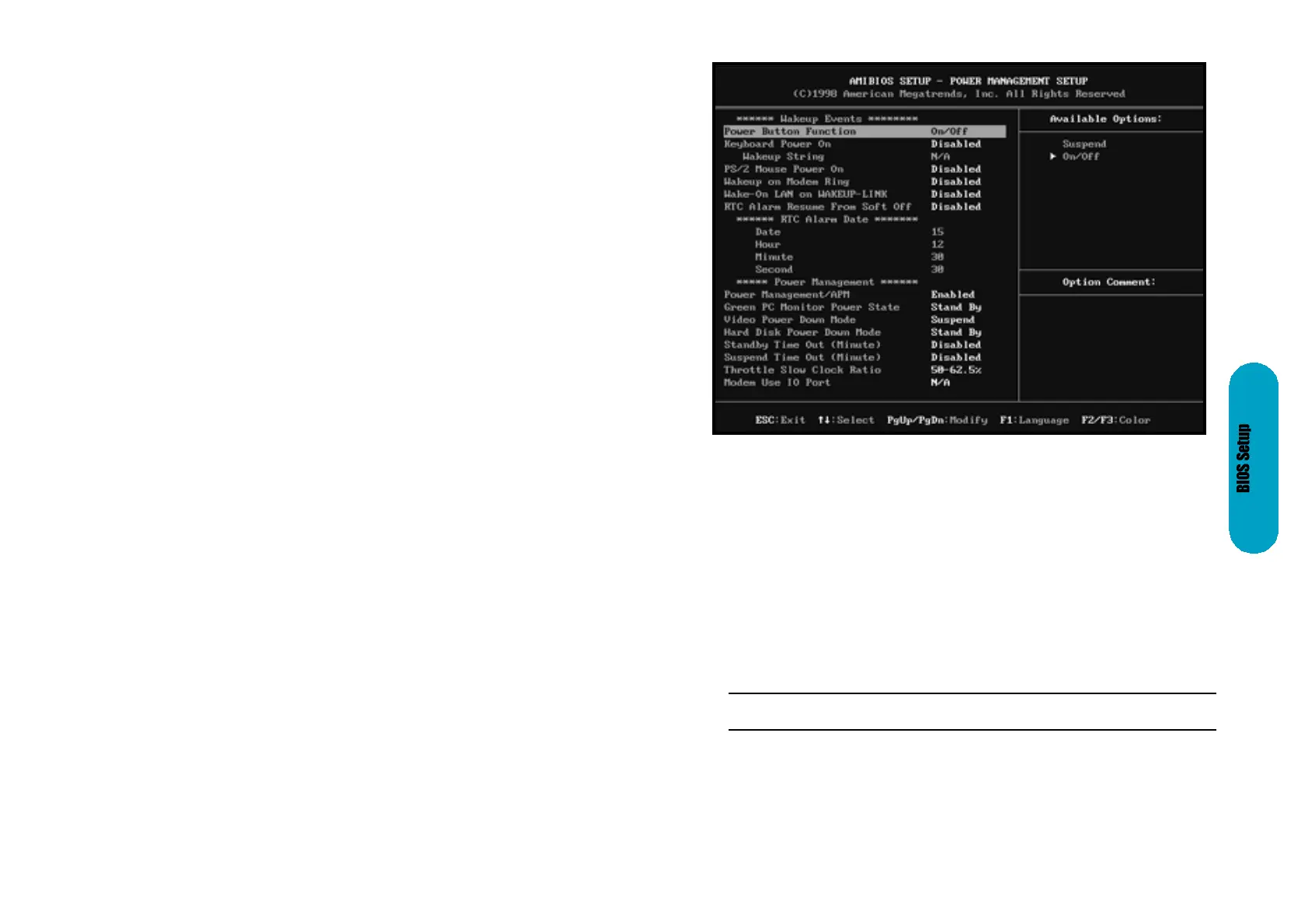
Power Management Setup
The AMIBIOS Setup options described in this section are selected by choosing Power
Management Setup from the AmIBIOS Setup main menu.
Power Management/APM
Set this option to Enabled to enable the chipset power management and APM
(Advanced Power Management) features. The settings are Enabled or Disabled. The
Optimal and Fail-Safe default settings are Disabled.
Power Button Function
This option specifies how the power button mounted externally on the computer chas-
sis is used. The settings are:
Instant On Support
Set this option to Enabled to enable AMIBIOS support for the Intel InstantON specifi-
cation. The settings are Enabled or Disabled. The Optimal and Fail-Safe default set-
tings are Disabled.
Setting
On/Off
Suspend
Description
Pushing the power button turns the computer on or off.
Pushing the Power button places the computer in Suspend mode or
Full On power mode.
Page 38
PCI Slot1 IRQ Priority, PCI Slo IRQ Priority, PCI Slot3 IRQ Priority,
PCI Slot4 IRQ Priority
These options specify the IRQ priority for PCIdevices installed in the PCI expansion
slots. The settings are Auto, (IRQ) 3, 4, 5, 7, 9, 10 and 11, in priority order. The Optimal
and Fail-Safe default settings are Auto.
DMA Channel 0, DMA Channel 1, DMA Channel 3, DMA Channel 5, DMA Channel 6,
DMA Channel 7
These options allow you to specify the bus type used by each DMA channel. The set-
tings are PnP or ISA/EISA. The Optimal and Fail-Safe default settings are PnP.
IRQ3, IRQ4, IRQ5, IRQ7, IRQ9, IRQ10, IRQ11, IRQ12, IRQ14, IRQ15
These options specify the bus that the specified the IRQ line is used on. These options
allow you to reserve IRQs for legacy ISA adapter cards. These options determine if
AMIBIOS should remove an IRQ from the pool of available IRQs passed to devices that
are configureable by the system BIOS. The available IRQ pool is determined by reading
the ESCD NVRAM. If more IRQs must be removed rom the pool, the end user can use
these options to reserve the IRQ by assigning an ISA/EISA setting to it. Onboard I/O is
configured by AMIBIOS. All IRQs used by onboard I/O are configured as PCI/PnP.
IRQ12 only appears if the Mouse Support option in Advanced Setup is set to Disabled.
IRQ14 and 15 will not be available if the onboard PCI IDE is enabled. If all IRQs are set
to ISA/EISA and IRQ14 and 15 are allocated to the onboard PCI IDE, IRQ9 will still be
available for PCIand PnP devices, because at least one IRQ must be available for PCI
and PnP devices. The settings are ISA/EISA and IRQ14 and 15 are allocated to the
onboard PCI IDE, IRQ9 will still be available for PCI and PnP devices, because at least
one IRQ must be available for PCI and PnP devices. The settings are ISA/EISA or
PCI/PnP. The Optimal and Fail-Safe default settings are PCI/PnP.
Reserved Memory Size
This option specifies the size of the memory area reserved for legacy ISA adapter cards.
the settings are Disable, 16K, 32K, or 64K. The Optimal and Fail- Safe default settings
are Disabled.
Reserved Memory Address
This option specifies the beginning address (in hex) of the reserved memory area. the
specified ROM memory area is reserved for use by legacy ISA adapter cards.
This option does not appear if the Reserved Memory Size option is set to Disabled.
The settings are C0000, C4000, C8000, CC000, D000, D4000, D8000, or DC000. The
Optimal and Fail-Safe settings are N/A.


 To Next Page
 Loading...