BRADICO ApS – Fåborgvej 15A, 9220 Aalborg Øst – CVR: 39445409 – Tlf. 71 99 29 23
Anvendelse/Operation
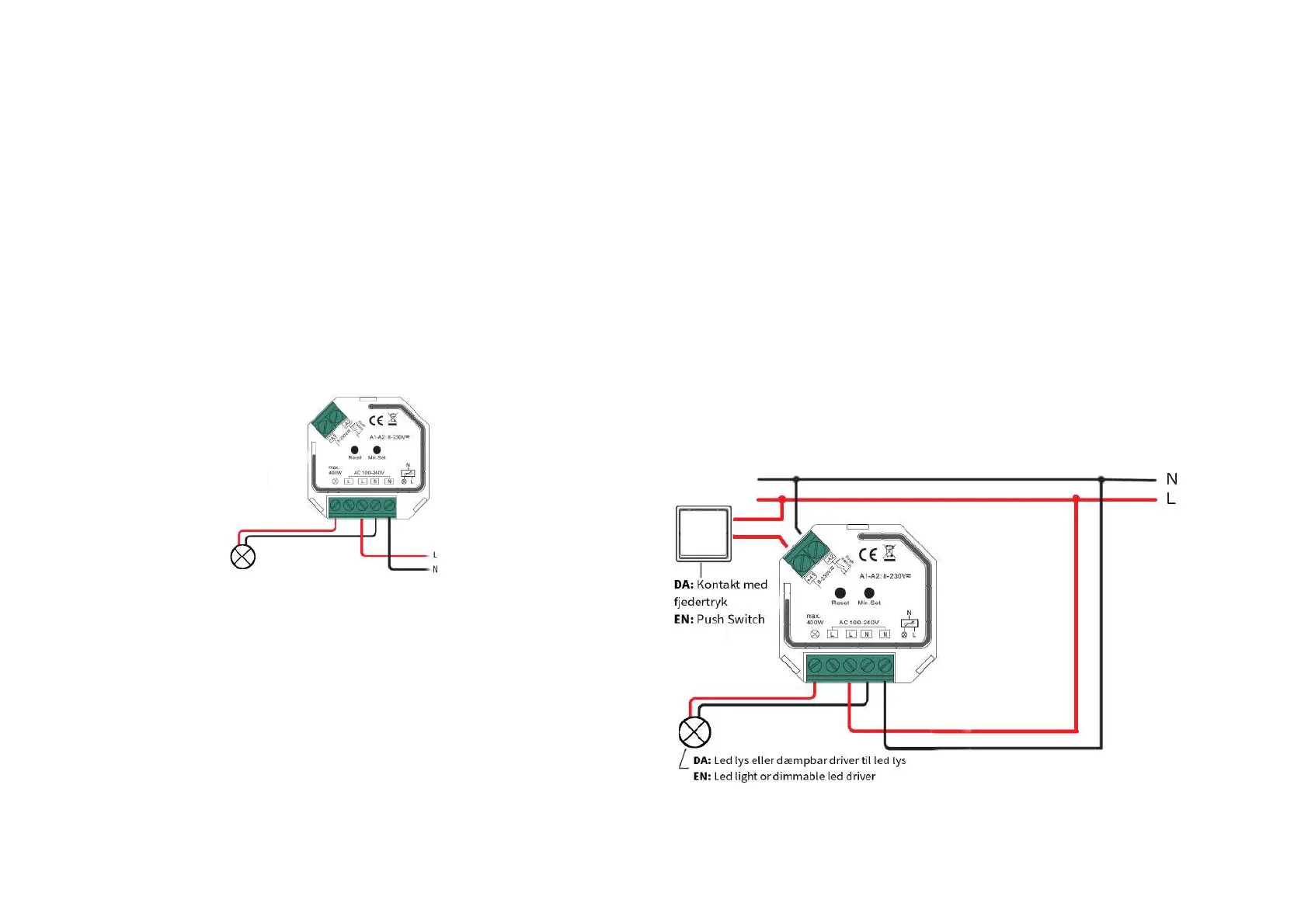
1. DA: Benyt tilslutningsdiagram i forbindelse med installation
EN: Connect wirering according to connection diagram
2. DA: Denne universale Zigbee enhed er en trådløs modtager, der kan
kommunikere med en række forskellige Zigbee kompatible systemer. Enheden
modtager og kontrolleres af trådløse signaler fra kompatible Zigbee systemer.
EN: This ZigBee device is a wireless receiver that communicates with a variety of
ZigBee compatible systems. This receiver receives and is controlled by wireless
radio signals from the compatible ZigBee system.
Parring med Zigbee Gateway/Pairing with Zigbee Gateway (Philips
HUE etc.)
1. DA: Sørg for at enheden er fjernet fra evt. tidligere zigbee-netværk. Hvis enhed
allerede er registreret på et zigbee netværk vil parring fejle (se evt. info omkring
”Gendan fabriksindstillinger”
EN: Remove the device from previous zigbee network if it has already been added
to, otherwise pairing will fail. Please refer to the part "Restore factory settings".
2. DA: Fra din Zigbee controller eller interface, vælg ”add light” (tilføj lys) og tilgå
parringstilstand.
EN: From your ZigBee Controller or hub interface, choose to add lighting device
and enter Pairing mode as instructed by the controller.
3. DA: Tænd for enheden for at tilgå parringstilstand (når enheden er
tilsluttet vil lyset blinke langsomt 2 gange). Parringstilstand varer indtil
enheden er forbundet til et zigbee netværk.
EN: Power on the device to set it into network pairing mode (connected
light flashes twice slowly), the network pairing mode will last until device
is added to a zigbee network .
4. DA: Tilføj lyset i interface. Forbundet lys vil blinke 5-gange og herefter lyse stabilt.
Enhed kan nu styres via anvendt interface.
EN: Connected light will blink 5 times and then stay solid on, then the device will
appearar in your controller's menu and can be controlled through controller or hub
interface.
s
Manuel styring via fjedertryk/Controlling by push switch

 To Next Page
 Loading...