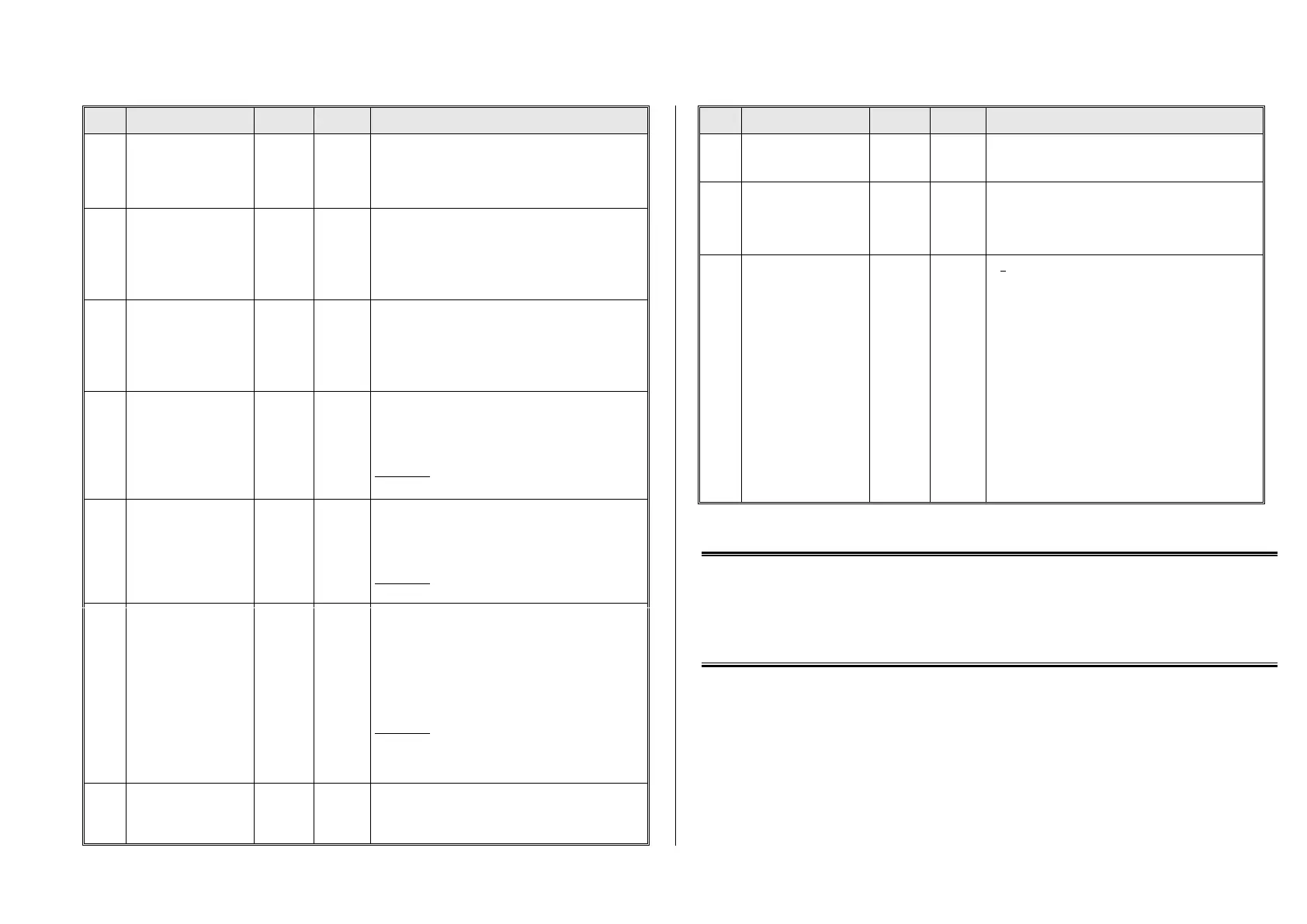
Non-Sound Decoder MX600 - MX638 and Sound Decoder MX640 - MX659 Page 21
The value multiplied by 0.9 equals’ deceleration time in
seconds from full speed to a complete stop.
The effective default value for sound decoders is usual-
ly not the value given here, but is determined by the
loaded sound project.
To temporarily adapt the acceleration rate to a new load
or when used in a consist.
Bit 0 - 6: entered value increases or decreases
acceleration time in CV #3.
Bit 7 = 0: adds above value to CV #3.
= 1: subtracts above value from CV #3.
To temporarily adapt the deceleration rate to a new
load or when used in a consist.
Bit 0 - 6: entered value increases or decreases
deceleration time in CV #4.
Bit 7 = 0: adds above value to CV #4.
= 1: subtracts above value from CV #4.
Acceleration time (momentum) can be stretched in the
lower speed range:
Tens digit: Percentage of speed range to be
included (0 to 90%).
Ones digit: Exponential curve (0 to 9).
EXAMPLE:
CV #121 = 11, 23 or 25 are typical initial test values.
Deceleration time (momentum) can be stretched in the
lower speed range:
Tens digit: Percentage of speed range to be
included (0 to 90%).
Ones digit: Exponential curve (0 to 9).
EXAMPLE:
CV #122 = 11, 23 or 25 are typical initial test values.
Adaptive
acceleration and
deceleration
Raising or lowering the speed to the next internal step
occurs only if the preceding step is nearly reached. The
tolerance for reaching the preceding step can be de-
fined by this CV (the smaller this value the smoother
the acceleration/deceleration).
Value 0 = no adaptive accel. or decel.
Tens digit: 0 - 9 for acceleration (1 = strong effect)
Ones digit: 0 - 9 for deceleration
EXAMPLE:
CV #123 = 11: strongest effect; sometimes affects
the start up too much.
CV #123 = 22: typical setting.
Bit 4: Faster accelera-
tion
From SW-Version 33.25
Bit 0 = 1:: Light flashes at switchgear sound..
Bit 4 = 1: Accelerates faster and sets sound to high
load when regulator is moved quickly to full speed
Bit 5 = 1: Blending of chuff samples
Brake key
From SW-Version 33.25
The key defined here acts as a brake key according to
the rate defined in CV #349 (the normal – higher – de-
celeration time in CV #4 is thereby ignored).
Brake time
From SW-Version 33.25
To achieve the desired effect, the deceleration time in
CV #4 must be set to a very high value (@ 50 … 250)
but the brake time in CV #349 rather low (5 … 20). This
simulates a coasting effect with the “regulator at 0”,
while the brake key results in a short stopping distance.
Compensation for gear
backlash
during direction changes
in order to
reduce start-up jolt.
NOT for MX621
= 0: no effect
= 1 to 255: the motor spins at minimum rpm (according
to CV #2) for a specific time and only starts to acceler-
ate after this time has elapsed. This CV will only be ex-
ecuted after a direction change.
How much time is required to overcome the backlash
depends on various circumstances and can only be de-
termined by trial and error.
Typical values are:
= 100: the motor turns about 1 revolution or a
maximum of 1 second at the minimum speed.
= 50: about ½ a turn or max. ½ second.
= 200: about 2 turns or max. 2 seconds.
Important: The minimum speed must be set correctly,
so that the motor actually turns at the speed step de-
fined as the lowest step in CV #2. Also, CV #146 is only
useful if the load regulation is set to maximum or at
least close to it (i.e. CV #58 = 200 – 255).
NOTE: The actual acceleration and deceleration rates for HLU brake sections (ZIMO signal controlled
speed influence) are determined by CV #49 and #50.
Momentum – explained in more detail:
The momentum (acceleration and deceleration rates) according to CV #3 and #4 refers to the 255 internal steps which
are spaced equally from 0 to full speed. The selected speed table, whether 3-step or 28-step, does not influence the
momentum behavior.
The momentum CANNOT be embettered by bending the speed curve in the speed tables, but is very much possible
with the “exponential acceleration/deceleration” in CV #121 and #122.



 To Next Page