EasyManua.ls Logo

ZIMO MXULFA - User Manual

ZIMO MXULFA
13 pages
Print Icon
To Next Page IconTo Next Page
Loading...
Decoder-Update-and-Sound-Loading-device MXULFA, Test and Connection boards MXTAPS, -V, MSTAPK, -G Page 1
INSTRUCTION MANUAL
MXULFA
Decoder Update and Sound loading device
MXULFA
and:
Test- and Connection Board MXTAPS, MXTAPV
As well as MSTAPK, MSTAPG
MXTAPK
1. MXULFA Features ............................................................................................................................ 2
2. Technical Data .................................................................................................................................. 2
3. The USB stick for use with MXULFA................................................................................................ 2
4. Switching on the MXULFA and connecting a decoder .................................................................... 2
5. Self-update of the MXULF or MXULFA ............................................................................................ 4
6. Decoder software and sound from USB stick .................................................................................. 4
7. Decoder software and sound from computer ................................................................................... 6
8. Synchronous update for accessory decoders MX820, MX821 ....................................................... 7
9. Driving operation with MXULFA ....................................................................................................... 7
10. Programming/ reading CVs SERV PROG / OP PROG .................................................................. 8
11. Read / program load code ................................................................................................................ 8
12. Decoder-connection board MXTAPS / V .......................................................................................... 9
13. the decoder connection boards MSTAPK resp. -G ........................................................................ 11
Annex: Declaration of Conformity and Warranty ....................................................................................... 13
.
EDITIONS:
First delivery in December 2011 - 2011 12 20
until April 2012
SW add-on 2 –- SW version 0.22 – 2012 11 10
SW add-on 3 –- SW version 0.32 – 2012 12 20
SW add-on 4 –- SW version 0.40 – 2013 03 12
SW add-on 5 –- SW version 0.50 – 2013 08 20
0.56.03 - 2013 11 20
2014 03 13
Dortmund 2014 edition 2014 04 06
SW version 0.61 --- 2014 05 20
2014 10 10
2015 01 22
SW add-on 6 - 2015 07 05
2015 08 24
2015 11 25
2016 03 11
SW add-on 0.70 - 2016 08 01
2016 08 18
2016 09 01
SW version 0.85 - 2020 01 20
Addition MS - 2020 02 20
2020 06 01
2020 07 30
2022 06 30
Question and Answer IconNeed help?

Do you have a question about the ZIMO MXULFA and is the answer not in the manual?

Summary

MXULFA Features

Technical Data

Self-update of the MXULF or MXULFA

Decoder Software and Sound from USB Stick

Decoder Software and Sound from Computer

Synchronous Update for Accessory Decoders

Driving Operation with MXULFA

Programming and Reading CVs

Read and Program Load Code

Decoder-Connection Board MXTAPS;V

Decoder Connection Boards MSTAPK; MSTAPG

Declaration of Conformity and Warranty

Overview

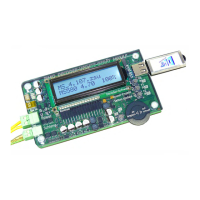
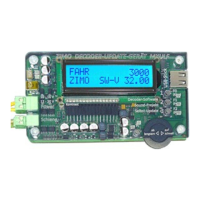
The ZIMO MXULFA is a versatile device designed for updating, loading, testing, and programming ZIMO decoders, particularly those from the MX and MS generations. It serves as a crucial tool for model railway enthusiasts and technicians, offering a range of functionalities for managing decoder software and sound projects.

Function Description:

The primary function of the MXULFA is to facilitate software updates and sound project loading for ZIMO decoders. This can be done either directly from a USB stick inserted into the device or via a computer connected through a USB cable. For MS generation decoders, software updates are exclusively performed without a PC.

Sound projects can be loaded into both MX and MS generation decoders. This process can occur via the rail (with the decoder installed in a locomotive) or through a SUSI interface, which offers significantly faster loading times (approximately 10 times faster than rail). The device also supports simultaneous sound loading for multiple decoders connected in parallel via MXTAP or MSTAP boards, or specialized multi-update boards for series production.

A key feature is the "Power Cycle Update," designed to recover MS decoders that have experienced "software destruction" due to malfunctions during normal update processes.

The MXULFA also functions as a CV (Configuration Variable) programmer and reader. It supports both OP MODE (Operational Mode, POM) and SERV MODE (programming track mode), with simplified displays for reading decoder IDs and writing load codes.

For testing purposes, especially after software updates or sound project loading, the MXULFA allows for driving operation and function switching through its control elements and display. It can also be used for repair work, though it is not intended as a replacement for a full digital command station.

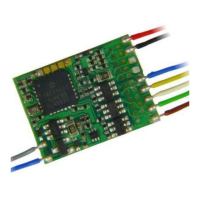
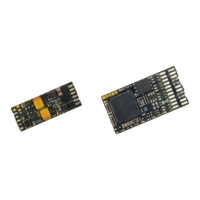
The device interacts with test and connection boards like MXTAP and MSTAP, which accommodate decoders with standard interfaces (PluX, MTC, Next, NEM651, NEM652) or wired decoders. These boards allow for testing motor, loudspeaker, and function LEDs.

The MXULFA itself can be self-updated via a USB stick. It also supports synchronous updates for accessory decoders like MX820 and MX821, allowing multiple decoders to be updated simultaneously while remaining on the layout.

When connected to a computer, the MXULFA can be controlled by programs like ZCS, PfuSch, and Train Programmer, offering comprehensive and user-friendly options for managing ZIMO decoders, particularly for larger fleets.

Important Technical Specifications:

  • Supply Voltage (Input "Power"): 12 - 20 V DC (from a power supply unit or rail current from a digital command station) or 10 - 16 V AC (DC recommended for problem cases). For software updates and sound loading of large-scale decoders, a minimum of 16 V DC is required.
  • Maximum Output Current ("Schiene" / Track): 2 A (stabilized to 12 V).
  • Dimensions (L x W x H): 125 x 65 x 12 mm.
  • USB Stick Compatibility: Requires FAT32 format. A ZIMO USB stick is included, but other FAT32-formatted sticks can be used.
  • Hardware Revisions: Displays hardware revision (e.g., "E" or "E+"), where "E+" indicates optimized RailCom-detector hardware.

Usage Features:

  • USB Stick Operation: The MXULFA primarily uses a USB stick for storing update files (.ulf, .bin) and sound projects (.zpp, .zsu). The root directory of the USB stick should contain the necessary files.
  • Self-Update: To self-update the MXULFA, download the latest MXULF software (.zip) from the ZIMO website, unzip it, and save the .ulf and .bin files to the root of a FAT32 USB stick. Connect power, insert the USB stick, and press Key 3 for 3 seconds.
  • Decoder Software Update (via USB Stick): Download the appropriate decoder SW collection file (.zsu) from the ZIMO website, save it to the USB stick. Connect power and rail (or a test board with the decoder), insert the USB stick, and press Key 1 to start the update.
  • Sound Project Loading (via USB Stick): Download the desired sound project (.zpp) from the ZIMO Sound Database, save it to the USB stick. Connect power and rail (or a test board with the decoder), insert the USB stick, and press Key 2 to start loading. For "coded" sound projects, a load code must be programmed first.
  • Sound Project Loading (via SUSI): This method is significantly faster. Connect the MXULFA to a test board (MXTAP/MSTAP) via a SUSI cable, and the decoder to the test board. Insert the USB stick, press R-key (long, 3 sec) to open the menu, scroll to "SUSI SOUND Load," and press R-key to start.
  • Computer Connection: Connect the MXULFA to a computer via a USB cable. Software like ZSP or ZCS can then be used to manage decoder updates, sound loading, and CV programming. The MXULFA display will show data traffic information.
  • Driving Operation: After powering on, the MXULFA displays track voltage. Pressing the R-key (3 sec) opens a menu; select "LOCO" to enter driving mode. Use the scrolling wheel to adjust speed and the direction key to change direction or stop. Function keys F0-F8 can be activated using buttons 1, 2, 3.
  • CV Programming/Reading: Access "SERV PROG" or "OP PROG" from the R-key menu. Enter CV numbers and values using the scrolling wheel. The display provides feedback (ACK, NACK, READ, N-RD).
  • Load Code Management: Use "SERV PR ID+LD" or "OP PR ID+LD" from the R-key menu to read decoder IDs (CVs #250-253) and program load codes (CVs #260-263).

Maintenance Features:

  • USB Stick Formatting: If a USB stick (especially third-party ones) stops working with the MXULFA, it should be reformatted to FAT32 on a computer.
  • Software Updates: Regular updates of the MXULFA's own software are recommended, especially with the introduction of new decoder types, to ensure compatibility and optimal performance.
  • Power Supply: Ensure a stable power supply within the specified voltage range (12-20 V DC or 10-16 V AC) to prevent operational issues. For large-scale decoders, a minimum of 16 V DC is crucial for updates and sound loading.
  • Connection Boards: When using MXTAP or MSTAP boards, ensure proper connection to the MXULFA and the decoder. Avoid connecting both SUSI and rail simultaneously when using SUSI for sound loading, as this can damage the decoder.
  • Clean USB Stick: For clarity and reliability, it is recommended to keep the USB stick's root directory free of unnecessary files, especially older .zsu versions.

ZIMO MXULFA Specifications

General IconGeneral
BrandZIMO
ModelMXULFA
CategoryMedia Converter
LanguageEnglish

Related product manuals