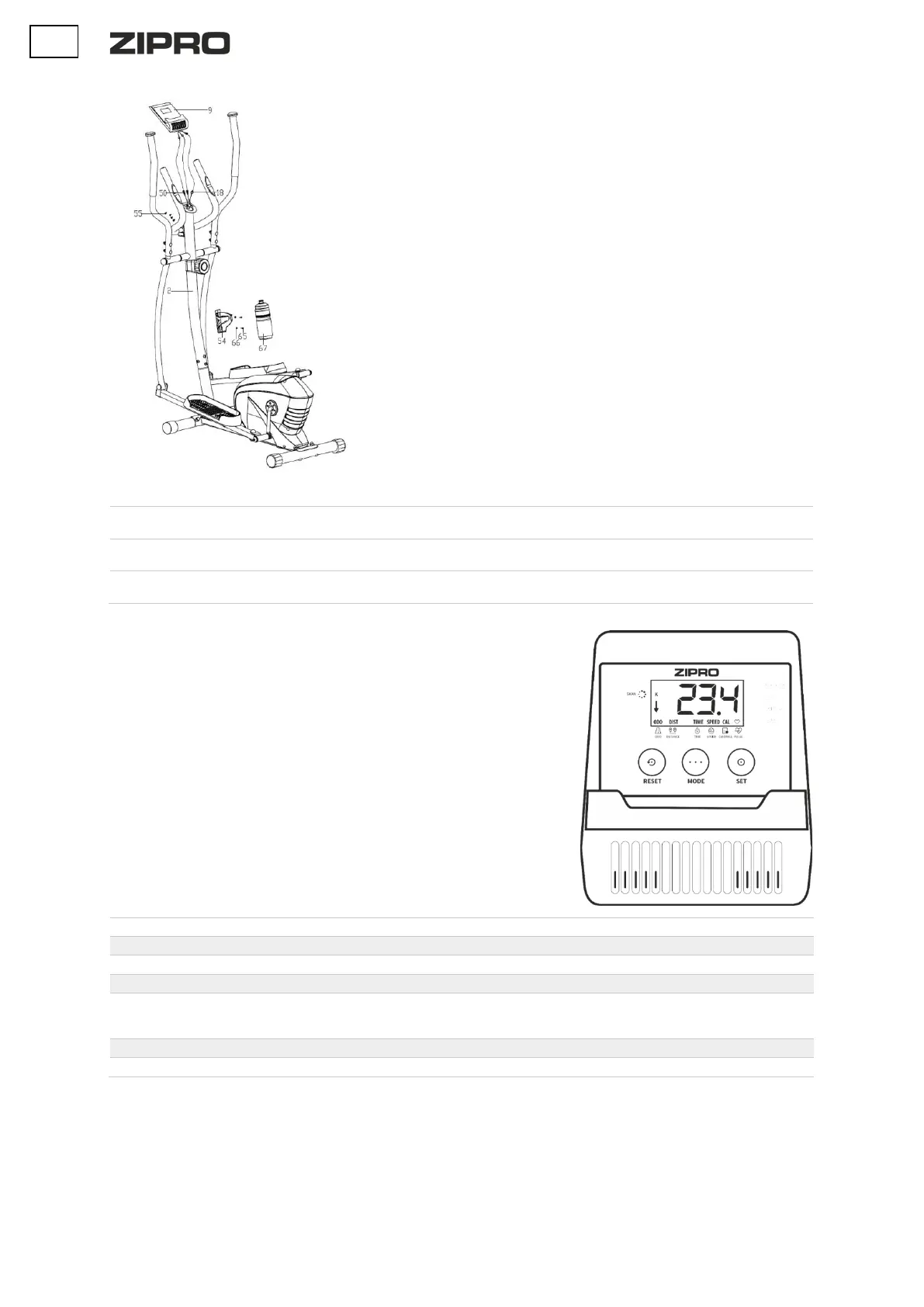
5. Install the computer
Connect the heart rate measurement cable (50) and the connecting cable from
the top of the handlebar column (18) to computer cables (9).
Fix the computer (9) to the handlebar column (2) using the bolts (55).
6. Install the water bottle holder
Install the water bottle holder (54) on the handlebar column (2) using the bolt
(65) and the flat washer (66). Make sure the holder is secure and insert the
bottle.
In order to increase the resistance, turn the resistance knob clockwise. In order to decrease the resistance, turn
the resistance knob counterclockwise.
Fix the side of the rubber strap with three holes to the internal part of the pedal. Fix the other end to one of
the adjustment opening so that the feet is fixed during training and easy to take out. Repeat for the other pedal.
Level the device by rotating the levelling pads on the rear base. The pads are polygons, and each side has a different
height. Find the right one to stabilise the device.
COMPUTER MANUAL
Remove the safety film from the display before use.
COMPUTER (MODEL)
MRMS02-ORG
AUTO ON/OFF
The computer is switched on when the flywheel moves or any button is pressed.
The display shows an up arrow.
The computer is switched off after four minutes of inactivity.
BUTTONS
MODE - selects the parameter.
SET - sets parameter values.
RESET - resets time, distance, and calories immediately.
FUNCTIONS (SPECIFICATION)
Displays all measured training parameters in a cycle.
Total exercise duration, from the start to the end.
Displays the current speed.
Total distance from the start to the end of the exercise.
Total calories burnt from the start to the end of the exercise.
(The measurement is an approximation for comparing training sessions. Do not use for
medical purposes).
Total distance from battery installation.
Displays the current heart rate.
SETTING COUNTDOWN VALUES
• Press the MODE button repeatedly to select the parameter you want to base your training on: time, distance, calories, or the upper heart rate
value. (The display should show only the parameter, without the SCAN option.)
• Press SET multiple times to set the value.
The countdown starts when you start pedalling. A down arrow will be displayed on the screen.
When the countdown is over, or you reach the set heart rate value, the device makes a sound.


 To Next Page