The TS200 Series Tripod Turnstile is a robust access control device designed for managing pedestrian flow. This manual introduces the operations, technical specifications, installation, and maintenance of the product.
Function Description:
The TS200 Series Tripod Turnstile is primarily used to control and manage access in various environments. It operates by allowing or restricting passage based on an input control signal, typically from an access control system. The turnstile features a tripod arm mechanism that rotates to permit one person at a time to pass. It can be integrated with RFID or fingerprint readers, although the standard device requires connection to an external access control system.
Key functions include:
- Opening Signal Input: The turnstile receives an opening signal from an access control system, which triggers the release of the tripod arm, allowing passage.
- Direction Indicator: LED indicators (green arrow and red cross "X") clearly show whether passing is allowed or prohibited in specific directions. The indicator status can be configured for both directions, one-way forbidden (right or left passing allowed), or both ways forbidden.
- Continue Passing Function: This optional feature allows the turnstile to remember multiple card swipes (up to 20) from a single card at one time, enabling up to 20 people to pass consecutively without individual card swipes. This function can be enabled or disabled and its initial value and opening duration can be set.
- Alarm Function (Optional): An alarm function can be enabled or disabled, providing an alert in specific situations.
- Drop Arm in Emergencies: In case of power failure, the arms automatically drop, allowing people to pass freely for safety. An interface on the control board also allows connection to an emergency switch (J6 Drop Arm) to keep the turnstile open. After power restoration, the arms must be manually lifted after at least 6 seconds.
Important Technical Specifications:
- Input Voltage: AC 100~120V / 200~240V, 50Hz/60Hz.
- Arm Length: 500 mm.
- Operating Environment: Indoor and Outdoor (shelter).
- Dimension (L x W x H): 1200 mm x 280 mm x 980 mm (Figure 1).
- Operating Temperature: -28°C ~ 60°C.
- Package Size (L x W x H): 1275 mm x 370 mm x 1063 mm.
- Operating Humidity: 5% ~ 85%.
- Flow Rate: Max 30 passages / minute.
- Input Control Signal: Dry contact.
- Rated Power: 18 W.
- Maximum Stress Tolerance of Arms: 80kg at the center and 40kg at the ends. This design ensures that the arms break first under excessive impact, protecting the equipment body and preventing injury to passers-by.
Usage Features:
- Installation Conditions: The equipment must be installed on concrete ground to firmly secure expansion bolts. An assistant framework or fence is suggested to form a passageway. A minimum distance of 100 mm from the wall is recommended for maintenance access. The spare space from the end of the arm should not exceed 80 mm.
- Warning Line for Card Swiping: It is recommended to set a warning line to prompt users to swipe cards in a particular area, reducing the likelihood of equipment failure due to improper operations. A warning sign is also suggested: "Please swipe your card outside the warning line and pass in order. Thank you!"
- DIP K1 Switch Configuration: The turnstile's behavior can be customized using the DIP K1 switch, which allows settings for:
- Turnstile Opening Duration: Configurable from 5s to 60s (default is 5s).
- Direction Indicator: Defines allowed passing directions (e.g., both directions, one-way forbidden).
- Continue Passing Function: Enables or disables the function and sets its initial value.
- Alarm Function: Enables or disables the alarm.
- Pre-installation Power-on Test: Before full installation, a power-on test is crucial to ensure proper functionality. This involves connecting to the ground, powering on for 30 seconds for self-check, manually lifting the arms, and verifying the turnstile and LED indicators work correctly.
- Emergency Operation: The turnstile is designed for safety, with arms dropping automatically during power failure. An emergency switch can also be connected to keep the turnstile open.
Maintenance Features:
- Forming Maintenance Consciousness: Regular maintenance and timely repairs are essential for the long-term usage of the tripod turnstile. Placing warning signs to encourage careful and orderly passage is also recommended.
- Regular Cleaning: The outer shell of the equipment should be regularly wiped with cleaning and protection liquid specifically designed for stainless steel.
- Annual Maintenance: For outdoor turnstiles or those in dusty environments, annual maintenance is recommended. This includes cleaning dust and adding appropriate lubricating oil to the disk wheel.
- Power-off for Maintenance: All regular maintenance procedures should only be performed after the power has been turned off to ensure safety.
- Environmental Considerations:
- For outdoor use, additional accessories like cooling fans (if operating temperature often exceeds 50°C) or heating plates (if temperature is around or below -30°C) may be required.
- The service life may be shortened in coastal areas or regions prone to acid rain.
- Water Immersion: While the equipment can be immersed under water at a depth of 250 mm if cables are properly connected, it must not be powered on when immersed.
- Troubleshooting Guide: The manual provides a comprehensive troubleshooting section to address common issues such as non-functional indicators, inability to lift arms, and access authentication problems, offering solutions like checking power supply, cable connections, solenoid operation, and access controller settings.

 Need help?
 General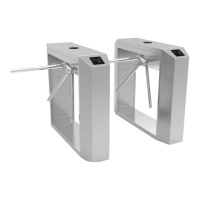

 To Next Page
