
 Need help?
Do you have a question about the Znewtech Hexagon Rotating Timer and is the answer not in the manual?
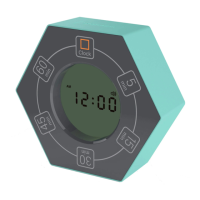
Central digital display for current time and countdown status.
Rotatable segments (5, 15, 30, 45, 60 min) to initiate countdown timers.
Icons for AM/PM, alarm, volume, and snooze status.
Function to stop countdown and return to time clock mode.
Includes Pause/Resume (P/S) and Clock/Alarm setting buttons (DOWN, UP, SET, MODE).
Access points for installing two AAA batteries.
Select desired preset time by rotating the clock face; countdown starts automatically.
Use the P/S button on the back to pause or resume the countdown.
Rotate clock to the 'Clock' position to stop and return to time mode.
After countdown, the timer automatically counts up to 99:59.
Rotate clock to a preset timer position, then back to clock position.
Press SNOOZE/LIGHT for a 4-minute snooze; LED light stays on for 10 seconds.

 To Next Page
 General