16
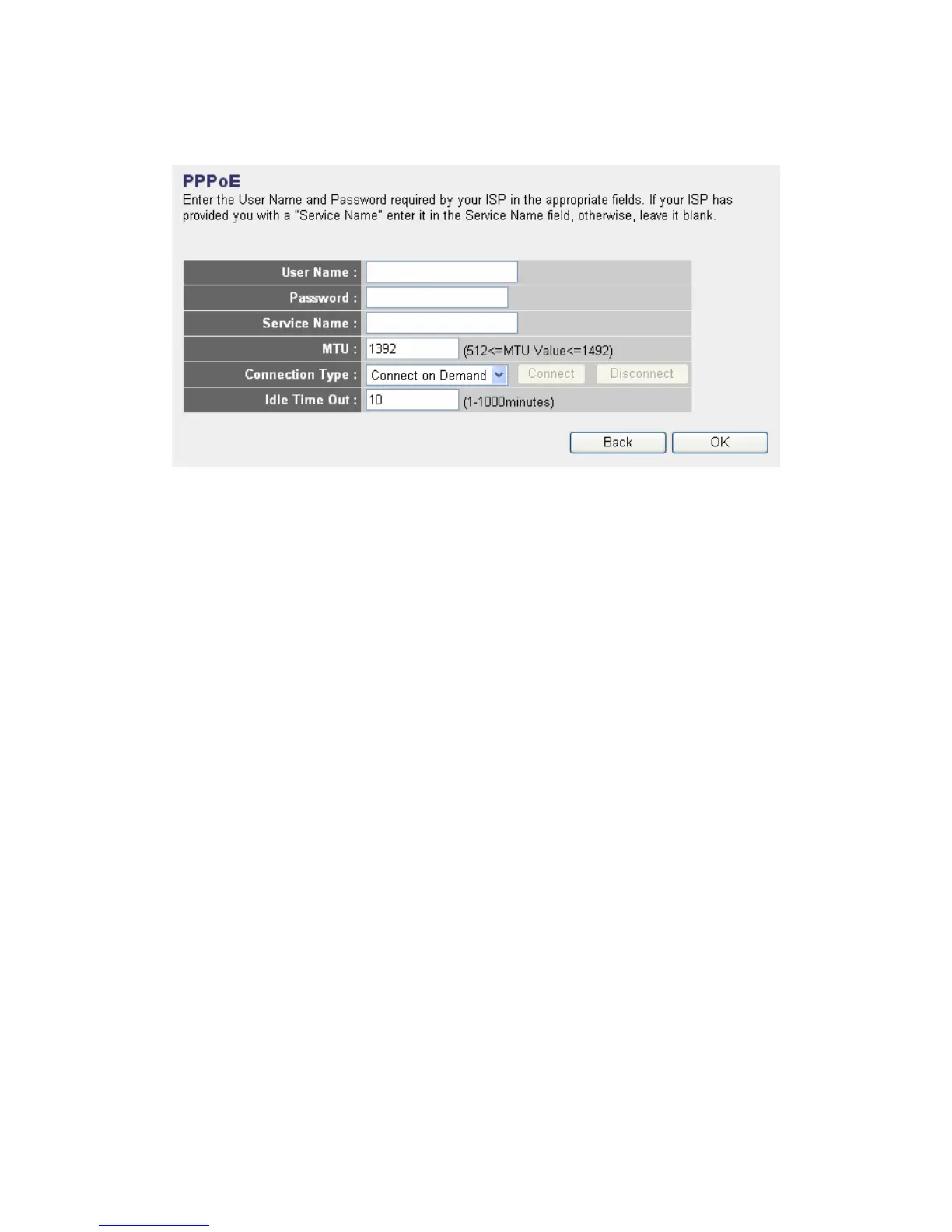
2-3-3. Setup procedure for “PPPoE xDSL”
User Name: Please input user name assigned by your Internet service
provider here.
Password: Please input the password assigned by your Internet service
provider here.
Service Name: Please give a name to this Internet service, this is
optional
MTU: Please input the MTU value of your network connection here. If
you don’t know, you can use default value.
Connection Type: Please select the connection type of Internet
connection you wish to use (detailed explanation listed below).
Idle Time Out: Please input idle time out, (detailed explanation listed
below).
When you finish with all settings, please click “OK”. if you want to go back to
previous menu, click “Back”.
MTU - Please use default value if you don’t know what it is, or ask your
service provider for a proper value.
Connection Type - There are 3 options: “Continuous” - keep internet
connection alive, do not disconnect, connect on Demand - only connects
to Internet when there’s a connect attempt, and “Manual” - only
connects to Internet when “Connect” button on this page is pressed,
and disconnects when “Disconnect button is pressed.
Idle Time Out: Specify the time to shutdown internet connect after no



 To Next Page