How to reduce magnification on Zoomax Magnifiers?
- EErnest TuckerSep 10, 2025
If the text is too large on your Zoomax Magnifiers, adjust the magnification down to a suitable level or lift/move the unit a little away from the viewed material.
How to reduce magnification on Zoomax Magnifiers?
If the text is too large on your Zoomax Magnifiers, adjust the magnification down to a suitable level or lift/move the unit a little away from the viewed material.
How to make text bigger on Zoomax Snow 7 HD Magnifiers?
If the text is too small to read on your Zoomax Magnifiers, you can adjust the magnification to a suitable level or connect to a TV using the supplied cable.
What to do if the screen of Zoomax Accessories is frozen?
If the Zoomax Accessories screen is frozen, distorted, or experiencing an issue not covered in the manual, try restarting the unit. Alternatively, remove and then replace the battery.
Why is my Zoomax Accessories battery not charging?
If your Zoomax Accessories power adapter is connected but the battery isn't charging, make sure the outlet is working and the plug is fully inserted into the power port.
How to make text bigger on Zoomax Accessories?
If the text appears too small on your Zoomax Accessories, try adjusting the magnification to a more suitable level. You can also connect the unit to a TV using the supplied cable.
What to do if my Zoomax Accessories unit will not turn on?
If the Zoomax Accessories unit will not turn on, try changing the battery.
How to clean Zoomax Magnifiers screen?
To remove smudges or blemishes on the screen of your Zoomax Magnifiers, clean the camera and screen with a soft cloth.
What to do if Zoomax Snow 7 HD Magnifiers has no image on TV?
If your Zoomax Magnifiers unit is connected to a TV but no image appears, ensure the TV is on, check the line is proper, and verify the output and connection are correctly connected to the TV.
Why won't my Zoomax Snow 7 HD Magnifiers turn on?
If your Zoomax Magnifiers unit will not turn on, try charging the battery.
Why is my Zoomax Accessories screen black?
If you are getting a black screen on your Zoomax Accessories, make sure the power is on. If it is on, try changing the battery, decreasing the magnification level, and ensuring the image is below the crosshair.
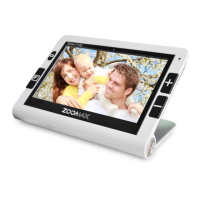
The main Snow 7 HD video magnifier unit included in the package.
Includes HDMI Cable and Power Adapter for connectivity and charging.
Includes Protective Pouch, User's Guide, and Cleaning Cloth.
Connect the supplied Power Adapter to the Power Input Port and plug the other end into a Power Outlet. The Power Indicator is RED while charging.
Press and hold the Power Button for 2 seconds for the device to turn on. Press and hold for 2 seconds to turn off.
Press the '+' button to zoom in and the '—' button to zoom out. Magnification ranges from 2.2X to 19X.
Press the Color Mode Button to cycle through various color display modes, including Normal mode.
Long press Color Mode Button for 2 seconds to enter/exit Favorite mode, offering 3 custom color options.
Press the Freeze Button to capture a static image of the viewed material.
Open the stand and write under the camera. This allows for writing on documents or cards.
Control button sounds: press and hold the '-' button for 7 seconds to turn on/off.
Manage LED lights: press and hold the Mode Button for 5 seconds to toggle LED lights on/off.
Press Freeze and Zoom In buttons simultaneously. Use '+' to increase and '-' to decrease brightness.
| Brand | Zoomax |
|---|---|
| Model | Snow 7 HD |
| Category | Magnifiers |
| Language | English |
Loading...