Daily Operation
21
Operating Distance
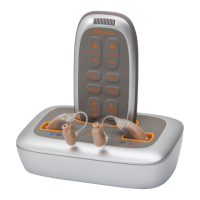
Zounds remote control ne-tunes each hearing aid individually. The remote control is
designed to be used within 12 inches of each ear. Communication between the remote
control and Zounds hearing aids will function best if you hold the remote control in your
hand up to each shoulder.
Once a hearing aid has received the command from the remote control, a single beep
will be heard.
Hearing aids need to be individually adjusted. Buttons do not control both hearing
aids simultaneously.
Increase/Decrease Volume
Press the VOL R + button to increase the volume in your right hearing aid.
Press the VOL R – button to decrease the volume in your right hearing aid.
Press the VOL L + button to increase the volume in your left hearing aid.
Press the VOL L – button to decrease the volume in your left hearing aid.
Each individual press of the button increases or decreases the volume by individual
increments. Holding down the button will NOT increase or decrease the volume in
multiple increments.
You will hear a single tone from the hearing aid when it has conrmed a signal from
the remote control. If a single tone is not heard, press the desired remote contro
button again.
You will hear a series of beeps when the volume limit has been reached. Once you
hear the volume limit beeps, pressing the volume button in that direction will have no
further effect.


 To Next Page