
 Need help?
Do you have a question about the Zumimall MUBVIEW BELL-J7 and is the answer not in the manual?
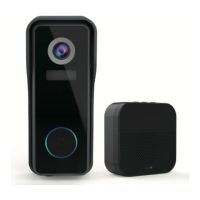
Lists the doorbell, chime, USB cable, mounting hardware, and tape included in the package.
Informs that Micro SD card and power adapter are not included in the package.
Identifies key components like camera, sensor, microphone, buttons, speaker, battery, charging port, and memory slot.
Identifies settings, volume, ringtone controls, LED indicators, and battery compartment.
Guides on downloading the app, QR codes, and essential permissions for functionality.
Step-by-step guide to sign up for a ZUMIMALL App account.
Requirements for SD card, 2.4GHz Wi-Fi compatibility, and router proximity.
Guides to tap 'Add Device', select camera, and turn it on.
Instructions for Wi-Fi password entry and preparing the camera for QR code scanning.
Process of scanning the QR code, finishing installation, and performing network checks.
Provides recommendations for optimal camera placement and mounting.
Instructions on charging the doorbell and understanding LED status (red/blue).
Notes that a USB compatible mobile phone charger (DC 5V 1A~2A) is required.
Guides to switch on the doorbell and observe the flashing red LED indicator.
Advice on operating near the router, 2.4GHz Wi-Fi, and correct password.
Explains LED states like flashing red (config), connecting to Wi-Fi, and solid blue (online).
Instructions to click the 'Settings' button on the chime to enter pairing mode.
Guides to press the doorbell button to send a signal for pairing.
Describes chime rings and blue LED flashing as confirmation of successful pairing.
How to change ringtones and control volume levels (110 dB to 80 dB).
Explains entering/exiting pairing mode and restoring factory defaults.
Recommends mounting height and provides info on angled brackets.
Details on Corner Mount and Wedge Mount brackets.
Illustrates attaching the mounting bracket with screws and then the doorbell.
Explains the anti-theft trigger, siren, recording, and notification features.
How to disable the alarm for battery recharge or maintenance.
Comprehensive specifications for the Bell J7 doorbell model.
Comprehensive specifications for the Chime06 wireless chime.
 General
| Model | BELL-J7 |
|---|---|
| Brand | Zumimall |
| Connectivity | Wi-Fi |
| Resolution | 1080p |
| Night Vision | Yes |
| Two-Way Audio | Yes |
| Motion Detection | Yes |
| Weather Resistance | IP65 |
| Power Source | Battery |
| Compatibility | iOS, Android |
| Category | Accessories |
| Type | Video Doorbell |
| Battery Type | Rechargeable |
| Storage | Cloud, MicroSD (up to 128GB) |

 To Next Page