Power ON/OFF:
Power on: Press the power button, the power level indicator lights
will turn on and the Gyroshoes will beep once.
Power off: Press the power button, the power level indicator lights
will turn off and the Gyroshoes will beep once.
Glow light: After the Gyroshoes are powered on, if the electricity is
more than 40%, the Gyroshoes will show a green light; if the
electricity is less than 40%, the Gyroshoes will show a yellow light; if
the electricity is less than 10%, the Gyroshoes will show a red light.
The Gyroshoes must be on the ground when powered on
or off. To avoid injury do not touch the wheel with any part
of your body.
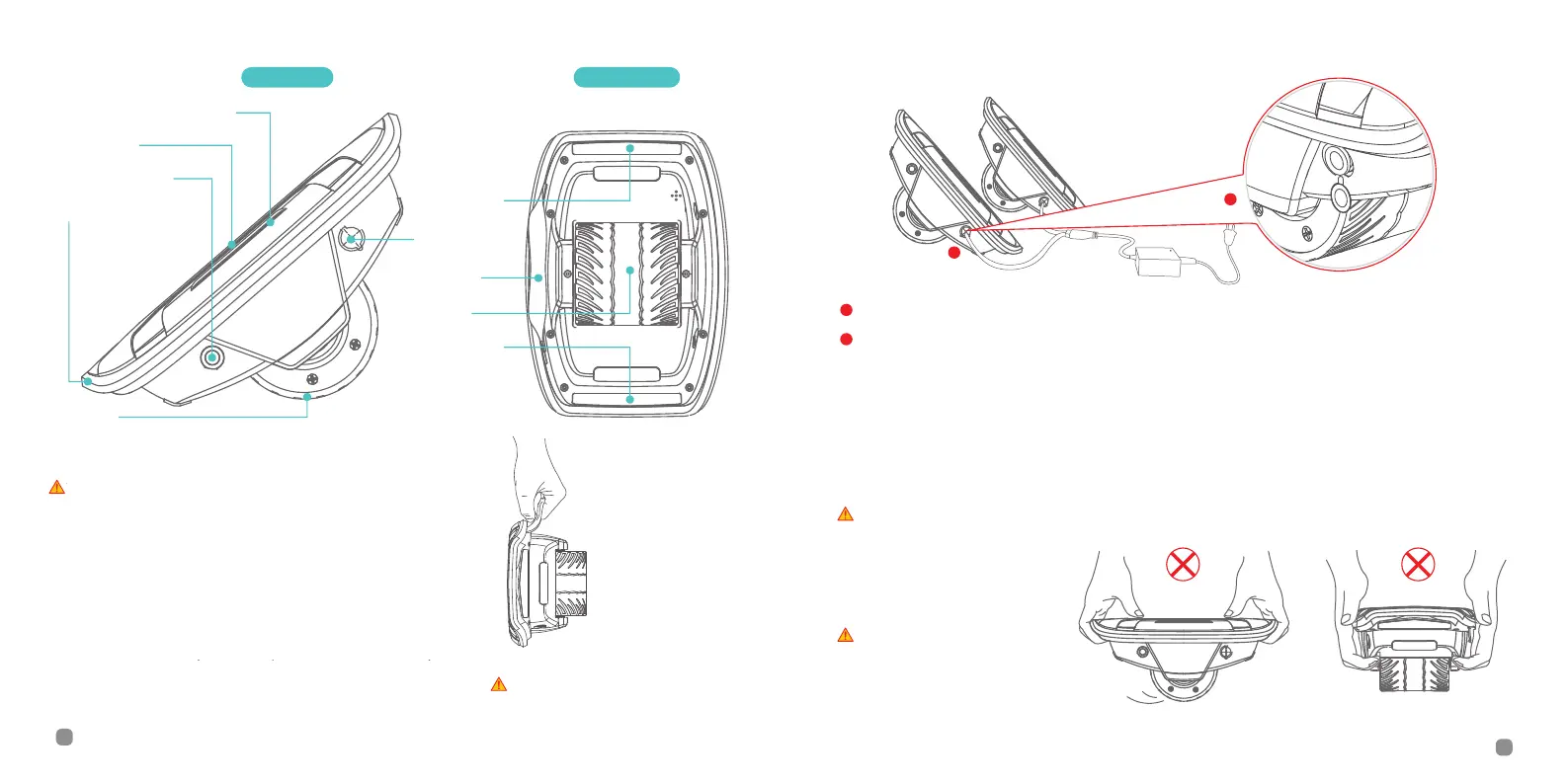
Glow light
Handle
Wheel
Bottom ViewSide View
Foot Mat
Rubber Bumper
Wheel
Charge Port
Power Button
Power Level Indicator
Glow light
Open the rubber cap
Insert the plug into the charge port
You can charge both mainframes at
the same time.
3.Diagram
4.Charging
5. Before riding
There are safety risks when learning
to ride the Gyroshoes. You must read
this User Manual and follow the New
Rider Tutorial by scanning the QR
code on the Welcome Card before
your first ride.
Whenever the Gyroshoes are
powered on, they must stay on the
ground. To avoid injury , do not touch
the wheel with any part of your body.
Always turn off the Gyroshoes
before you lift it off the ground.
Handle: While the
Gyroshoes are
powered off, use the
handle to lift and carry.
●
●
●
Your Gyroshoes are fully charged when the
LED on the charger changes from red
(charging) to green (trickle charge). Close the
rubber cap when not charging.
a
b
*
a
b
5
4
●
●
.
The ZUUM Shoes must be on the ground when powered on
or off. To avoid injury do not touch the wheel with any part '
of your body.
Always turn off the ZUUM Shoes
before you lift it off the ground.
Press the power button, the power level indicator
lights will turn on and the ZUUM Shoes will beep once.
Press the power button, the power level indicator
lights will turn off and the ZUUM Shoes will beep once.
After the ZUUM Shoes are powered on, if the battery
is more than 40%, the ZUUM Shoes will show a green light; if
the battery is less than 40%, the ZUUM Shoes will show a
yellow light; if the battery is less than 10%, the ZUUM Shoes
will show a red light.
While the
ZUUM Shoes are
powered off, use the
handle to lift and carry.
Your ZUUM Shoes are fully charged when the
LED on the charger changes from red (charging)
to green (trickle charge). Close the rubber cap
when not charging.
There are safety risks when
learning to ride the ZUUM Shoes.
You must read this User Manual.
Whenever the ZUUM Shoes are
powered on, they must stay on
the ground. To avoid injury, do
not touch the wheel with any part
of your body.


 To Next Page
 Loading...