
 Need help?
Do you have a question about the ZVOLTZ PRO SPORT and is the answer not in the manual?
Remove the earbuds from the charging case before activation.
Peel off the protective adhesive film from the earbuds.
Place earbuds in the charging case and close for at least 1 minute.
Open case to power on, check indicators, and connect via Bluetooth settings.
Solutions for earbuds not found or connecting to your device.
Earbuds automatically sync and pair when taken out of the case.
Use one earbud by placing the other in the charging case.
Wrap the earloop around the back of your ear for a secure fit.
Gently press the earbud inside of your ear for comfort.
Properly place earbuds into the charging case and close it.
Plug in the Type-C cable to charge both earbuds and case.
LED lights on the charging case show battery percentage.
Single press for Play/Pause, double press for skip/playback.
Answer/end calls, switch calls, or reject calls with button presses.
Activate Siri or Google Assistant by tapping the MFB three times.
Press buttons to increase or decrease earbud volume.
Use the USB Type-A port on the charging case to charge other devices.
Perform a factory reset if earbuds can't be found or paired.
Standard battery life is 3.5 hours; case provides up to 80 hours.
IPX5 rating means resistant to water, sweat, and dust; not waterproof.
Not a toy; keep away from children. Do not modify or disassemble.
Avoid 0% battery, do not bend/tear hooks, do not submerge.
Do not drop, press buttons forcefully, or misuse components.
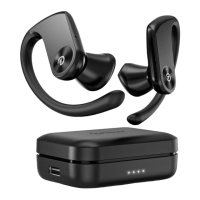
The Zvoltz Pro Sport Wireless Earbuds are a pair of wireless earbuds designed for active users, featuring ear hooks for a secure fit and a charging case with additional functionalities.
These earbuds are designed for audio playback and hands-free calling. They offer both stereo and single ear modes, allowing users to listen with both earbuds or just one. The multi-function button (MFB) on each earbud controls music playback (play/pause, skip tracks), answers/ends calls, switches between calls, rejects calls, and activates voice assistants (Siri, Google Assistant). Volume control buttons on the earbuds allow for direct adjustment of audio levels. The charging case not only recharges the earbuds but also features a USB Type-A port to charge other devices, effectively acting as a portable power bank.

 To Next Page
 General