Need help?
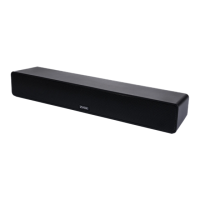
Do you have a question about the Zvox Audio AccuVoice AV100 and is the answer not in the manual?
Essential safety guidelines for using the ZVOX Audio System to prevent hazards.
Alerts users to potential risks like fire and electric shock if the appliance is exposed to moisture.
Advises users not to remove covers, referring servicing to qualified personnel to avoid shock.
Instructions for environmentally responsible disposal of electronic and electrical appliances.
Guidance on positioning the ZVOX speaker for optimal viewing and listening experience.
Steps to connect the power cord and AC adapter to the ZVOX speaker and power outlet.
Instructions for connecting the speaker to a TV using the optical digital audio output.
Procedure to turn off a TV's internal speakers to avoid audio echo with the ZVOX speaker.
Connecting the speaker using a TV's 3.5mm headphone or audio output jack.
Connecting the speaker via red and white RCA analog audio output jacks.
Connecting the ZVOX speaker to a cable or satellite set-top box audio output.
Description of the standard optical, analog miniplug, and RCA cables provided with the speaker.
Advice on placing the ZVOX speaker for the best sound projection towards viewers.
How to switch the ZVOX speaker between on and standby modes.
Using the mute button to silence the speaker and its auto-standby behavior.
Controlling the speaker's volume using the up and down arrow buttons.
How to access and adjust the six levels of voice enhancement technology.
Information on obtaining warranty support for the AV100 speaker.
Contact information and procedures for resolving issues or getting help with the ZVOX speaker.
 General
| Brand | Zvox Audio |
|---|---|
| Model | AccuVoice AV100 |
| Category | Speakers |
| Language | English |

 To Next Page