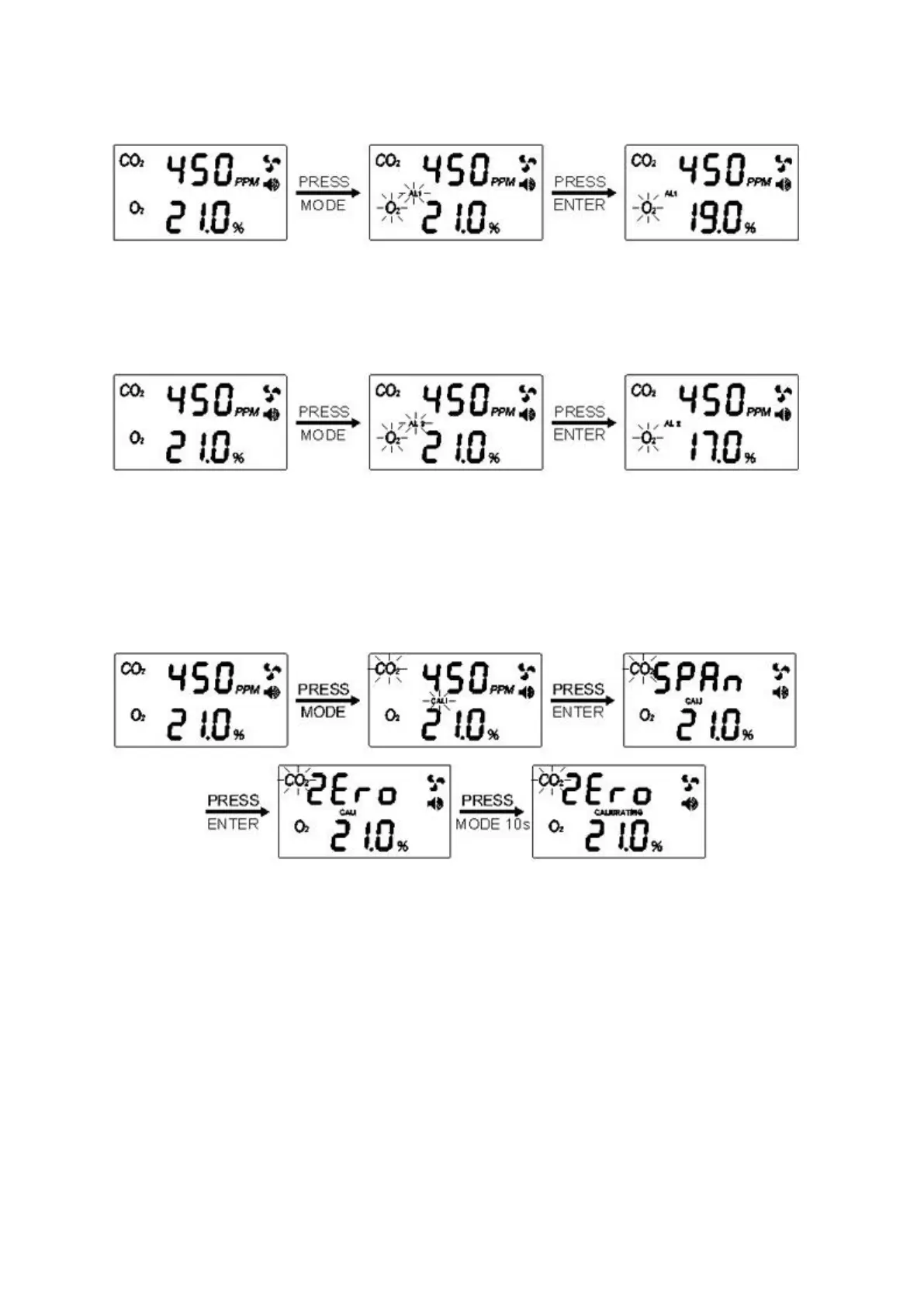
Setting the O2 First Alarm parameter
1. Press Mode until the “AL1” icon flashes
2. Press Enter, the “AL1” icon shows on LCD
3. Press Mode to go through “18%,18.5%,19%,19.5%,20%” alarm level
4. Press Enter again to save the setting after selection
Setting the O2 Second Alarm parameter
1. Press Mode until the “AL2” icon flashes
2. Press Enter, the “AL2” icon shows on LCD
3. Press Mode to go through “16%,16.5%,17%,17.5%,18%” alarm level
4. Press Enter again to save the setting after selection
*Note: The second alarm level should be lower than the first alarm level when setting with the alarm level
parameter.
Using the CO2 CALI function
1. Press Mode until the “CALI” icon flashes.
2. Press Enter, the “CALI” and “ZEro” icons show on the LCD. Press and hold Mode for at least 10
seconds, “CALIBRATING” and “ZEro” icons will flash simultaneously. The calibration will be done
automatically. After about 3 minutes the LCD will display “Pass” or “Fail”. If “Fail”, please try again.
3. Press Enter, the “CALI” and “SPAn” icons show on the LCD, press and hold Mode for at least 10
seconds, “CALIBRATING” and “SPAn” icon will flash simultaneously and the calibration will be done
automatically. After about 3 minutes the LCD will display “Pass” or “Fail”. If “Fail”, please try again.
*Note: When do the calibration, When do the “ZEro” Calibration, please enter through N2. When do the “SPAn”
Calibration, please enter through 4% CO2 gas. Before doing “ZEro”/” SPAn” calibration, it will take about 5 min to
enter through CO2 to stabilize. When do “ZEro”/” SPAn” calibration, the reading is beating too often and
calibration fails.


 To Next Page
 Loading...