Infrared Non-Contact Thermometer
L THERMOMETER
INSTRUCTION FOR USE
Please read thoroughly before using
KI-8360
WARNING:
1. Read the entire instruction manual before trying to operate the device.
2. The device is delivered non-sterile; please clean the device before measuring.
3. Stop using the device if malfunctions appear or if it operates abnormally.
4. Children should not use the device without the supervision of an adult. Keep out of reach of
unsupervised children.
5. Do not use the device when flammable materials are around.
6. Do not place the device on scarred tissue, open wounds or abrasions.
7. Some medications may cause a rise in skin temperature which can consequently lead to
incorrect measurements.
8. Taking a measurement after skin has been exposed to an extreme condition such as direct
exposure to sunlight, fireplace/ heater or air conditioner flow, may lead to incorrect readings.
9. If the device has been kept or stored in extreme temperatures, wait at least one hour for the
device to return to room temperature before measuring.
10. Do not touch the probe when the device is measuring.
11. The device is not water resistance, please keep dry.
12. Do not drop the thermometer or expose it to heavy shock.
13. Do not bite or swallow the probe and the battery cover.
14. Do not let thermometer come into contact with any thinner or chemical solvents.
15. Components may be harmful if swallowed. Contact a physician immediately should this occur.
16. Do not use it if the display malfunctions or it operates irregularly.
17. Do not put this unit in dishwasher.
18. Performance of the thermometer may be degraded if: Operated or stored outside stated
temperature and humidity ranges or if the patient's temperature is below the ambient (room)
temperature.
19. The reading is for reference, if feeling sick or uncomfortable, please contact the physician.
CAUTION:
1. Do not scrape or scratch the probe as it will hamper the effectiveness of the device.
2. Do not dismantle the device except when replacing the batteries.
3. Wait at least thirty minutes after exercising, bathing or eating before taking a measurement.
4. If the subject’s body temperature is lower than the room temperature, a false reading may occur.
5. To ensure the best performance of the device, please follow the PRODUCT SPECIFICATION
“Storage Condition” regarding temperature and humidity ranges for storing the device.
6. Dispose of the device and battery according to your local regulatory or environmental protection
agency.
7. The device is not intended for use in the emergency medical services environment.
For maximum performance of the device, we recommend a regular checkup and device calibration
every two years.
SAFETY INSTRUCTION
The thermometer is an electronic device intended to measure the body (human) temperature. It is
designed to absorb the infrared from human body to detect your temperature. It can be used with
adult or pediatric patients and it can be used in household.
DEVICE DESCRIPTION AND INTENDED USE
A person’s normal body temperature can range from 95.9°F to 100.0°F(35.5°C to 37.8°C)
throughout the day. We recommend taking your temperature at different times during the day
when you are NOT sick. This will give you a preliminary reference to know what your normal
temperature is and how it fluctuated during a normal day. Then, when you feel sick or discomfort,
knowing this will provide an index for a reliable diagnosis of a fever.
ABOUT BODY TEMPERATURE
1. Place the probe in scarred tissue or tissue compromised by any disorders of measuring site.
2. Patients in trauma or treat with certain drug therapies of measuring site.
3. Place the device on measuring site exposed to direct sunlight, fireplace heat, cold, compress
therapies, air condition flow, etc.
CONTRAINDICATIONS
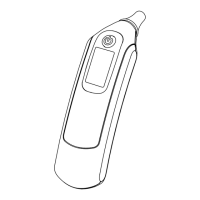
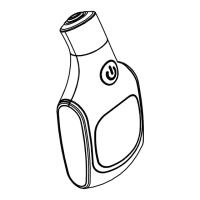
DEVICE OVERVIEW & DISPLAY OVERVIEW
Measured Value
Object
Measurement
Forehead Measurement
Alarm Clock Indication
Measured Unit
°F/°C SWITCH
1. Turn on the device by pressing and release ON/OFF button.
2. Press and hold ON/OFF button within first 2 seconds until °F or °C change, release the button as
soon as change occurs.
3. Press and hold ON/OFF button again for 2 seconds to switch back and forth from °F or °C.
MEMORY FUNCTION
RECALL MEMORY
1. When the unit is off, press and hold the ON/OFF button around 3 seconds
until the last memory shows.
2. You may continue to press and release the ON/OFF button to recall up to 9
previous records.
3. Discontinue pressing the ON/OFF button to stop recalling memories.
4. The device is ready to do a new measurement.
DELETE ALL MEMORY
When the device is in memory mode, press and hold the ON/OFF button until LCD
shows dEL, press and release the ON/OFF button to delete all memories, then the
device will be off automatically.
Otherwise,
1. To stop deleting memory, do not press the ON/OFF button when you see “dEL”.
2. Then the device will quit the memory mode after 2 seconds then it is ready for measuring.
BT Button
Site Switch
1. Install batteries into the device. Make sure
the polarity (+ and -) of the battery matches
as shown in the battery compartment.
2. Press and release the ON/OFF button, you will hear
a short beep. The device will be ready for measuring.
3. Aim probe to the measuring site within measuring
distance.
4. Press the ON/OFF button then read the temperature
on the display.
QUICK START
+
+
-
-
BATTERY INSTALLATION
WARNING
1. Replace with batteries, when the low battery indication shows.
2. Use only same type batteries to avoid incompatibility.
WARNING
1. Discard old battery carefully, out of reach of young children. Swallowing the battery may be fatal.
If the battery is swallowed, contact a hospital immediately to have it removed. Do not dispose of
the battery in a fire. It may explode.
2. For battery disposition, please consider the national regulation.
3. Memory may be erased after replacing batteries.
4. If no use for 1 month, please take out the battery to avoid the battery leakage or deterioration.
1. Replace with 2 new AAA batteries simultaneously when the
low battery indication appears.
2. The memories might be erased after replacing the batteries.
3. Remove the batteries if the device is not likely to be used for
a long period of time.
4. Do not dispose the batteries in a fire, the battery will explode.
REPLACE BATTERY
1. Remove the battery cover to insert batteries.
2. Confirm the polarity (+ and -) of batteries are correct as
indicated inside the compartment and insert batteries
accordingly.
3. Replace the battery cover.
+
+
-
-
CHANGE MODE
The device has two modes of measuring site: 1. Forehead mode 2. Object mode.
The default is Forehead mode and can be switched to object mode.
1. Remove the battery cover.
2. Slide the site switch UP is forehead measurement.
3. Slide the site switch DOWN is object measurement.
4. During operation of the switching, the forehead or object icon will flash
for twice ; after that, icon won't flash, this operation is successful.
5. Per above, it can do measurements accordingly.
NOTE: During measuring and beeping, switch the measuring
site is not allowed.
→
←
EXPLANATION OF SYMBOLS
Flash : measuring
Solid : ready for measuring
Forehead measurement
Memory Indication
Alarm clock indication which can be
set by OUcare APP. Once beeps,
press ON/OFF button to turn off it.
Low battery indication Measured unit
Warning and Caution
Device is off
Power on, off
Measuring site is forehead.
MEM
Manufacturer
Please read thoroughly before using.
Object measurement
Clock mode, as a clock.
It can be turn on or off by
OUcare APP.
→
←
UP
(Forehead)
(default)
DOWN
(Object)
Measuring/Ready for Measuring

 Need help?
 General

 To Next Page