www.2boomusa.com
TWS:
Two same model speakers can be connected to one wireless device at the same time. First, turn
the speakers on, then choose one unit and three-click "M”button ,then you will hear the sound to
indicate that the two units have paired successfully. Please ensure before pairing that the two
units are not connected with other devices. Three-click "M”button again, then the two units will
be disconnected.
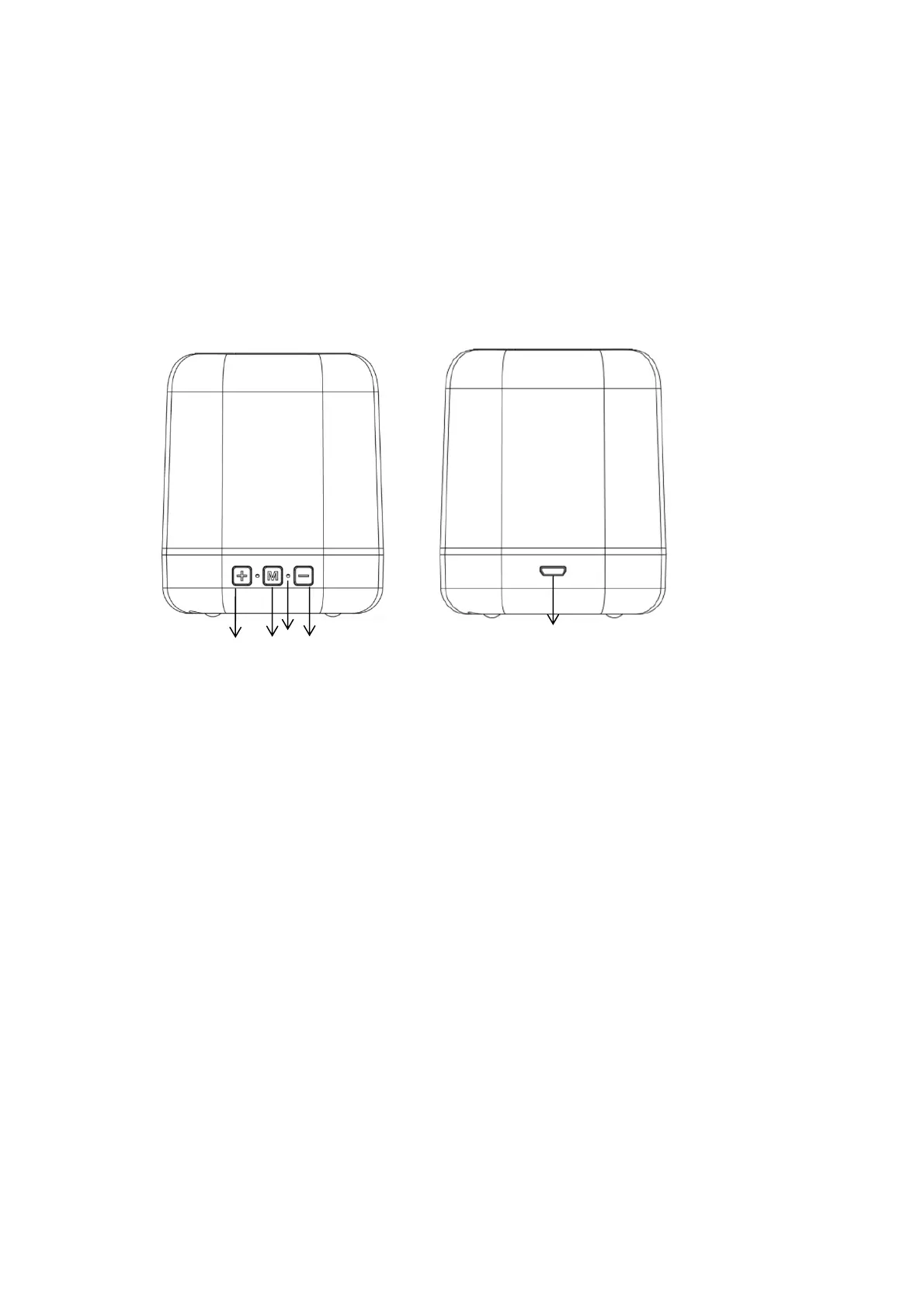
Description of parts:
1. “+”button:long press to increase the volum
e, short press to be next song under Bluetooth
mode, short press to be next channel under FM mode.
2. “M” button: long press to turn on or off ; double-click to switch Bluetooth/FM mode; click to
play or pause song under Bluetooth mode; click to search FM channels automatically under FM
mode; three-click to turn on or off TWS function.
3. “
-”button:long press to decrease the volume, short press to be previous song under Bluetooth
mode, short press to be previous channel under FM mode.
4. Charging LED
5. Mirco USB Charging port (DC 5V)
Caution:
This is not a toy. Please keep away from children.
Please keep away from water / heat.
Low power may cause poor connection even no working of Bluetooth.
Do not overcharge the battery.
Battery pack shall not be exposed to excessive heat such as sunshine, fire or the like.
1
2
3
5
4


 To Next Page
 Loading...