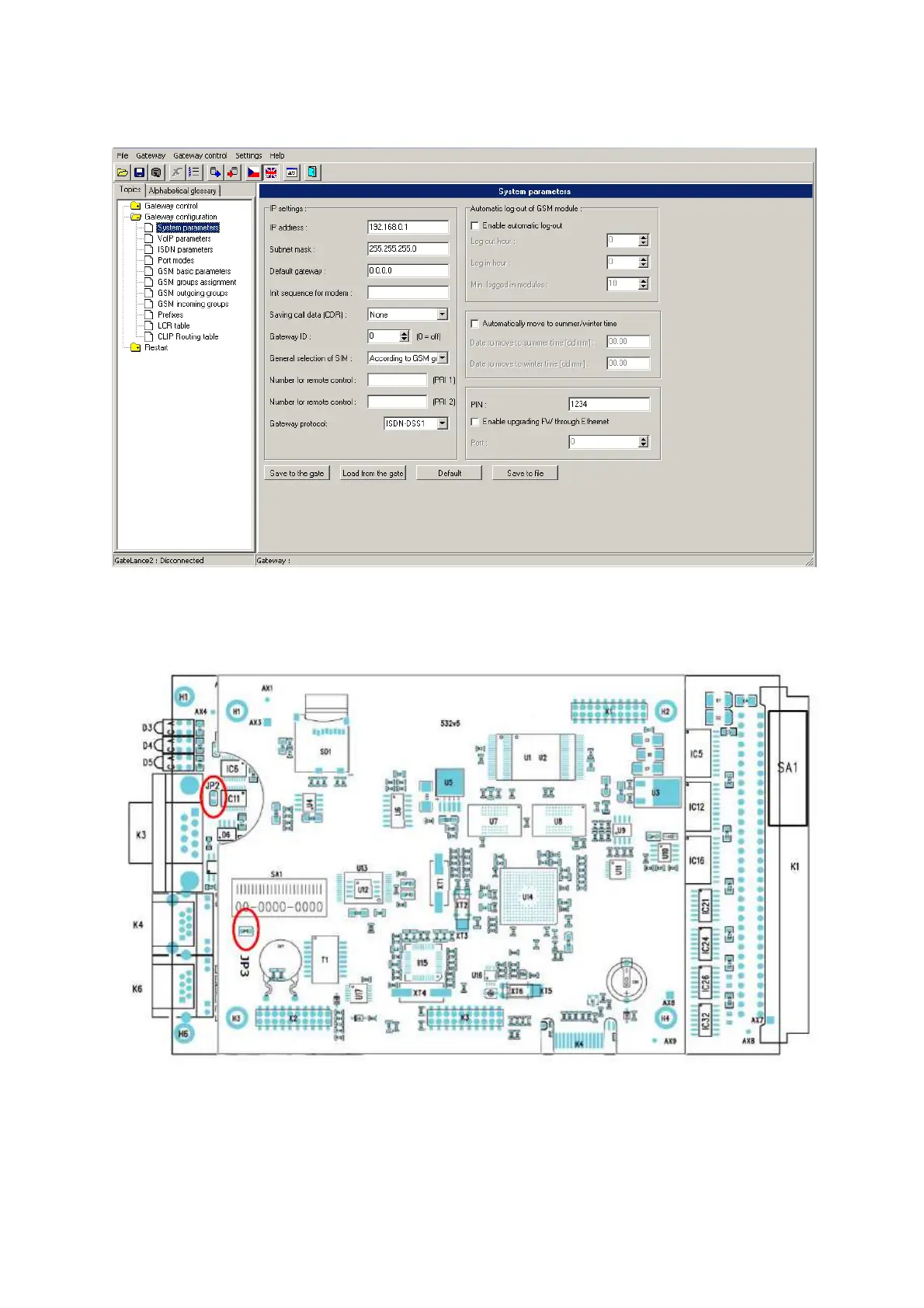
default gateway. Then go to the”VoIP parameters” where you can set IP address of VoIP
card, it’s called “VoIP card/MGCP gateway“.
The last step now is to set IP address on eCPU. To do that you have to switch off your
gateway and plug out CPU board from the case (unscrew both screws). Disconnect
jumper number 2 (check following picture) and plug back the CPU board to case.
Switch on the gateway and connect back serial cable. Run whatever software which is
providing telnet connection (hyperterminal, PuTTy etc.). Again choose right COM port
number and for serial communication speed set 115200 bit/s. Start your connection and
press “ENTER” to see main menu. Go to the menu Configuration -> Network -> and set
IP address, Subnet mask and IP of default network gateway. Then switch off your
gateway again, plug out CPU board and connect back jumper number JP2. When you are



 To Next Page