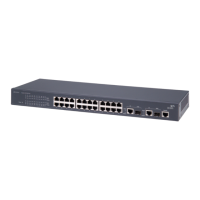
Switch 4400 — Front View Detail
15
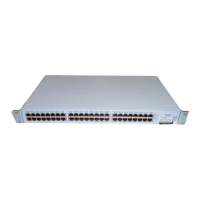
Figure 3 Switch 4400 (48-port) — front view
WARNING: RJ-45 Ports. These are shielded RJ-45 data sockets. They cannot
be used as standard traditional telephone sockets, or to connect the unit to a
traditional PBX or public telephone network. Only connect RJ-45 data
connectors, network telephony systems, or network telephones to these
sockets.
Either shielded or unshielded data cables with shielded or unshielded
jacks can be connected to these data sockets.
10BASE-T/
100BASE-TX Ports
The Switch has 24 or 48 auto-negotiating 10BASE-T/100BASE-TX ports
configured as Auto MDIX (cross-over). These ports automatically provide
the appropriate connection. Alternatively, you can manually set these
ports to 10BASE-T half duplex, 10BASE-T full duplex, 100BASE-TX half
duplex or 100BASE-TX full duplex. The maximum segment length is
100 m (328 ft) over Category 5 twisted pair cable.
LEDs Ta b le 5
lists LEDs visible on the front of the Switch, and how to read their
status according to color. For information on using the LEDs for problem
solving, see “
Solving Problems Indicated by LEDs” on page 48.
DUA1720-3AAA03_online.book Page 15 Monday, March 25, 2002 10:48 AM


 To Next Page