44 CHAPTER 5: CONFIGURING THE ROUTER
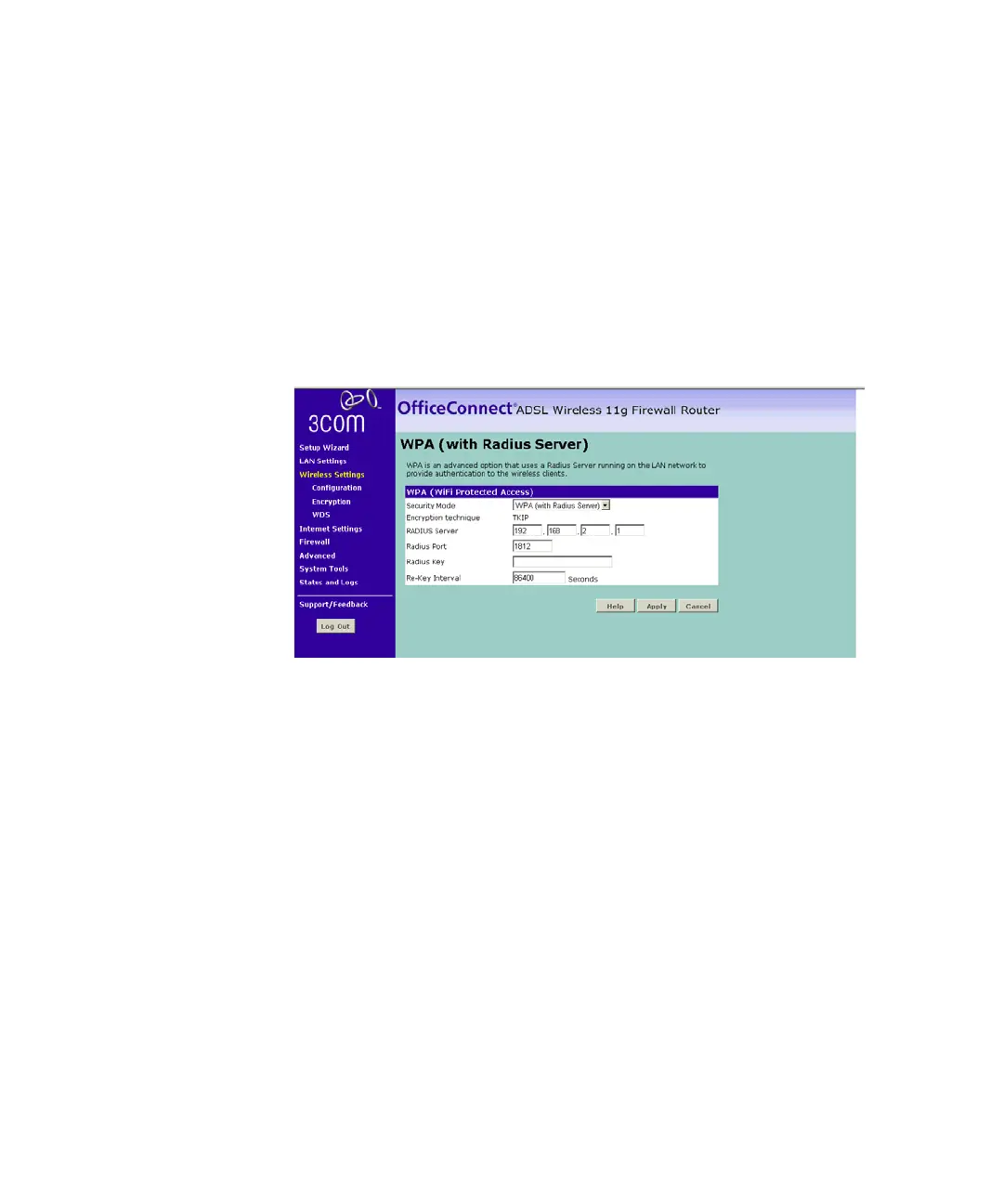
WPA (with RADIUS Server)
WPA (WiFi Protected Access) provides dynamic key changes and
constitutes the best security solution. On a wireless network where not all
devices support WPA, WEP (Wired Equivalent Privacy) should be used.
Wireless Protected Access using a server to distribute keys to the clients,
and this function requires that a Radius server is running on the network.
Figure 35 WPA (with RADIUS Server) Screen
To enable WPA with Radius server:
1 Enter the IP address of the RADIUS server on your network into the
RADIUS Server field.
2 Enter the port that the RADIUS server is operating on in the RADIUS Port
field.
3 Enter the key for the RADIUS server in the RADIUS Key field.
4 By default, the WPA keys are changed every hour, but if you want to
change this you can do so by specifying the required time in the Re-key
Interval field, in minutes.
5 Click Apply.






 To Next Page