Setting Up A RADIUS Server 393
i Open up a command prompt (Start > Run, enter cmd ). Enter secedit
/refreshpolicy machine_policy
. The command may take a few minutes to
take effect.
6 Setup the Internet Authentication Service (IAS) RADIUS Server
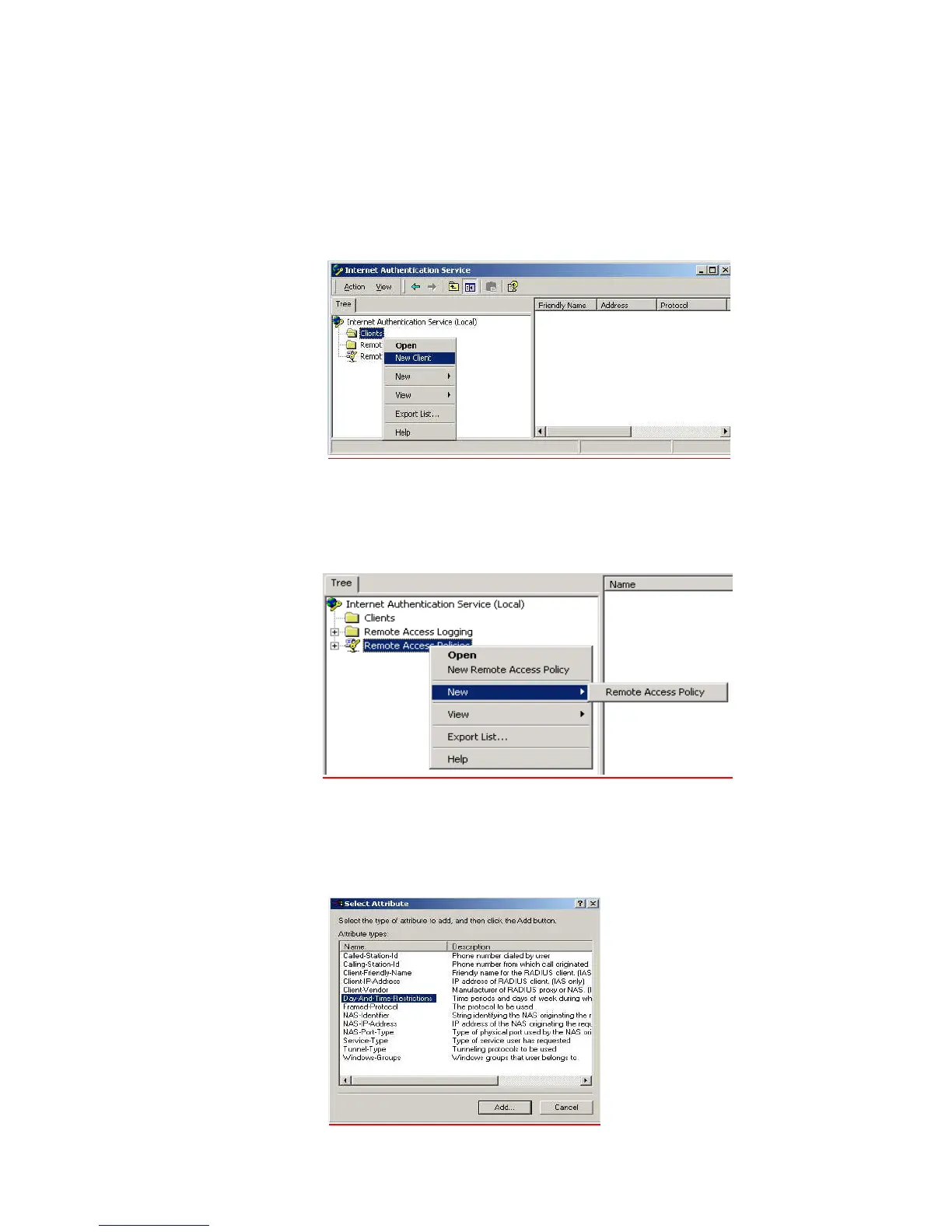
a Go to Programs > Administrative Tools > Internet Authentication Service,
right-click Clients, and Select New Client.
b Enter a name for your device that supports IEEE 802.1x. Click Next.
c Enter the IP address of your device that supports IEEE 802.1x, and set a shared
secret. Select Finish. Leave all the other settings as default.
d Right-click Remote Access Policies, and select New Remote Access Policy.
e Give the policy a name, for example EAP-TLS, and select Next.
f Click Add...
g Set the conditions for using the policy to access the network.
Select Day-And-Time-Restrictions, and click Add...
Click Permitted, then OK. Select Next.













 To Next Page