Need help?
Do you have a question about the 3DConnexion SpacePilot PRO and is the answer not in the manual?
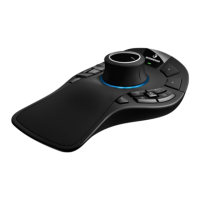
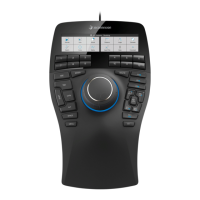
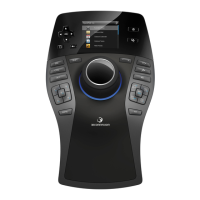
The SpacePilot™ PRO is a professional 3D mouse designed to enhance navigation and interaction with 3D models and environments. It offers an intuitive and precise control experience through its advanced sensor technology and customizable features.
The core function of the SpacePilot™ PRO is to provide six-degrees-of-freedom (6DoF) navigation. This means users can simultaneously pan, zoom, and rotate 3D models or environments by gently pushing, pulling, twisting, or tilting the controller cap. This capability allows for fluid and natural manipulation of digital content, significantly improving workflow efficiency in 3D design and engineering applications.
Beyond its primary navigation function, the SpacePilot™ PRO integrates a range of intelligent features to streamline user interaction. It includes five intelligent function keys that provide fingertip access to 10 frequently used application commands. The device intelligently recognizes the active application and work environment, automatically assigning relevant commands to these dual-function keys. Users can personalize these assignments through the 3DxWare™ control panel, and the LCD Function Key Applet provides visual feedback on the currently assigned commands. A short press activates the key's primary function, while a long press (press and hold) activates its secondary function.
The device also features conveniently positioned keyboard modifiers (Ctrl, Shift, Alt, and Esc keys) directly on the mouse. These allow users to access special functionality or editing features in their software applications without needing to move their hand to the keyboard, further enhancing productivity.
A full-color LCD Workflow Assistant is integrated into the SpacePilot™ PRO, offering visual feedback on the function keys, navigation setting status, and access to productivity applets. When the device is connected or the computer starts up, the LCD home screen displays all available applets. These 3Dconnexion Applets are mini-applications specific to the SpacePilot™ PRO that run on the host computer and are displayed on the LCD panel. They range in functionality from office productivity tools, such as a Mail Applet that retrieves information from Microsoft Outlook, to feedback on function key assignments.
The LCD also includes dedicated control keys for navigation within its interface. Arrow keys facilitate primary LCD navigation, allowing users to select items and move through lists. An "OK" key, situated in the middle of the arrow keys, is used for selecting items. A "Home Screen Toggle Key" switches between the active applet and the LCD home screen, while a "Back Key" allows users to navigate up hierarchical user interface structures. An "LCD Key" toggles LCD illumination on or off, and an "LCD Menu Key" provides access to information specific to the current LCD state.
QuickView Navigation Keys offer fingertip access to 32 views. Each button is dual-function, with a short press activating the primary view command (white icon) and a long press activating its secondary view command (blue icon). This includes standard views (top, bottom, front, back, right, left), two isometric views (ISO1 and ISO2), and a 90-degree rotation key for clockwise and counter-clockwise rotations.
The SpacePilot™ PRO is designed for optimal desktop setup and hand position. It is intended to be placed on the opposite side of the keyboard from the standard mouse. One hand engages the 3D mouse for positioning models (rotating, panning, zooming), while the other hand uses the standard mouse for selecting, creating, and editing. The contoured controller cap guides the fingers into a perfect position for precise and effortless control.
Navigation setting keys allow users to personalize how the controller cap works by restricting navigation to certain axes. The status of these settings is displayed in the LCD Function Key Applet. The "Dominant Key" (top button) toggles dominant mode on or off, filtering out all motion except for data coming from the most actuated axis. The "Pan and Zoom Key" (middle button) toggles pan and zoom motion on or off, allowing translation motion along the three primary axes when on. The "Rotation Key" (bottom button) toggles rotation motion on or off, allowing rotation motion around the three primary axes when on. Turning rotation off enables focus on smooth, simultaneous pan and zoom navigation, which is ideal for sketching or quickly inspecting standard views.
A "Speed Key" allows adjustment of the navigation speed, changing the amount of force or torque needed to move a model or environment. This feature is useful for detailed, close-up work (lower speed) and for design reviews and presentations (increased speed).
The "Fit key" instantly restores the model to the center of the screen, while the "Menu key" opens the 3DxWare™ or application-specific control panel for accessing essential SpacePilot™ PRO settings.
While the manual does not explicitly detail maintenance features, it emphasizes the importance of software updates and support. Users are encouraged to register their SpacePilot™ PRO to receive notifications of software updates and important 3Dconnexion news.
The 3Dconnexion LCD Workflow Assistant is based on an open software architecture, enabling the development of customized applets. After installation, the Software Development Kit (SDK) and supporting documentation are available for developers to create tailored functionalities.
For general 3D mouse settings, users can access documentation through the Windows "Start" menu. Further assistance, including a knowledge base, forum, product documentation, and contact information for technical support, is available through the 3Dconnexion website. This comprehensive support system ensures that users can maintain optimal device performance and address any issues that may arise.
 General
| Device Type | 3D Mouse |
|---|---|
| Model | SpacePilot PRO |
| Connectivity | USB |
| Compatibility | Windows, macOS |
| Weight | 1.3 kg |
| Dimensions | 200 x 200 x 120 mm |
| LCD Display | Yes |