3M Food Services Trade Department
3M Center
St. Paul, MN 55144-1000 © 3M 2005 20050915
Intercom Systems
Accessories
Technical Bulletin 9/15/2005
A125 Noise Reduction Module, Internal, 78-9236-6453-2
***Important installation notice***
Starting with serial number 125002477, the A125 Noise Reduction Module, Internal has a wider ribbon
cable plug. A limited number of these Noise Reduction Modules have two individual ribbon cable plugs.
The wider ribbon cable plug(s) are too wide to fit into the blue 20-pin base station receptacle. The
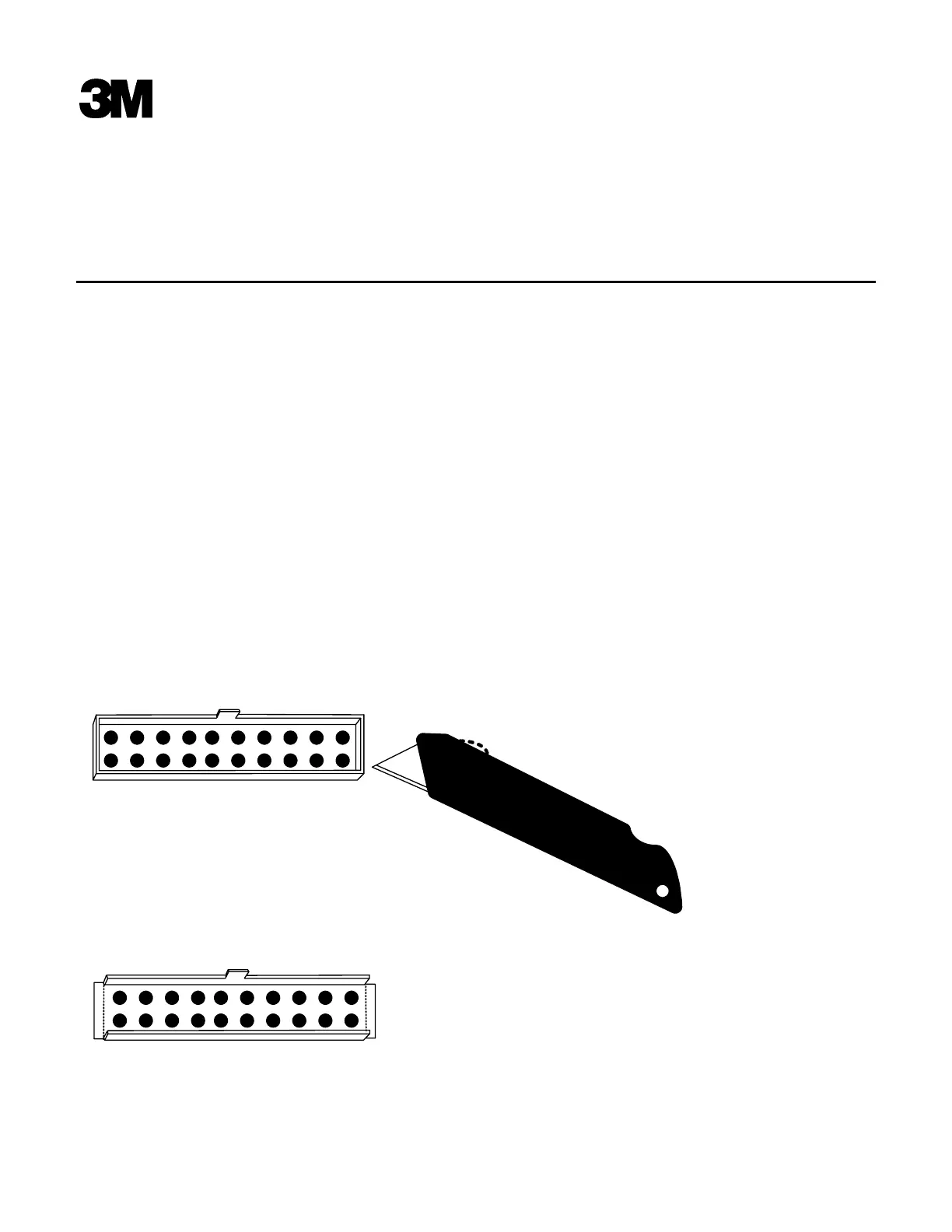
receptacle on the wireless base station board must be trimmed and and the ends opened. Use a sharp razor
knife and make four vertical cuts. Fold the ends of the blue recepticle down as shown below.
Caution - Be careful to not cut any components or circuit traces on the base station circuit board.
Caution - Be careful to pull only on the ribbon connector plug. Pulling on the ribbon cable itself may
cause it to separate from the plug.
Instructions for trimming and opening the base station receptacle:
1. Make a vertical cut at each corner of the blue 20 pin receptacle on the base station circuit board.
2. Fold the short end sides down as shown
3. Carefully insert the ribbon cable plug(s) into the blue receptacle. The locking tab will not engage
and should not be a problem.


 To Next Page