EasyManua.ls Logo

3M Performance Series - User Manual

3M Performance Series
15 pages
Print Icon
To Next Page IconTo Next Page
Loading...
Wired Intercom System
Performance Series
Models 2470 and 2475
Operating Instructions
Question and Answer IconNeed help?

Do you have a question about the 3M Performance Series and is the answer not in the manual?

Summary

FCC Compliance Information

System Description

Introduction to Intercom System

Provides a general overview of the Performance Series Intercom System and its intended applications.

Modes of Operation

Details the five operational states: Standby, Listen, Talk, All Call, and Off Line modes.

Hold Feature Functionality

Explains how to momentarily disconnect from a call, greet a new caller, and return to the previous call.

Paging Feature Functionality

Describes how to communicate between different Station Selectors.

Operating Keypad Functions

Details the purpose and function of each key on the operating keypad.

Multiple Station Selectors Operation

Explains how multiple Station Selectors interact and lock out each other when connected.

Setting Volume Levels

Instructions on adjusting the Station Selector volume through 15 levels using arrow keys.

Using the Performance Series Intercom

One Call Station Calling

Step-by-step guide for attendant to answer a single call from a Call Station.

Multiple Call Station Calling

How to handle and answer multiple calls waiting in the queue.

Advanced Hold Feature Usage

Detailed steps for placing multiple calls on hold and switching between them.

Calling From Station Selector to Call Station

Methods to initiate calls from a Station Selector to a Call Station.

All Call Mode Operation

How to broadcast a message to all Call Stations simultaneously.

Paging Between Station Selectors

Instructions for paging another attendant at a different Station Selector.

Responding to Pages

How to accept or ignore an incoming page request from another Station Selector.

Off Line Mode

Details how to put the Station Selector in an inactive state and how to exit it.

Error Messages and Troubleshooting

Explains the 'NO COMMUNICATION' error message and contact information for support.

Summary

FCC Compliance Information

System Description

Introduction to Intercom System

Provides a general overview of the Performance Series Intercom System and its intended applications.

Modes of Operation

Details the five operational states: Standby, Listen, Talk, All Call, and Off Line modes.

Hold Feature Functionality

Explains how to momentarily disconnect from a call, greet a new caller, and return to the previous call.

Paging Feature Functionality

Describes how to communicate between different Station Selectors.

Operating Keypad Functions

Details the purpose and function of each key on the operating keypad.

Multiple Station Selectors Operation

Explains how multiple Station Selectors interact and lock out each other when connected.

Setting Volume Levels

Instructions on adjusting the Station Selector volume through 15 levels using arrow keys.

Using the Performance Series Intercom

One Call Station Calling

Step-by-step guide for attendant to answer a single call from a Call Station.

Multiple Call Station Calling

How to handle and answer multiple calls waiting in the queue.

Advanced Hold Feature Usage

Detailed steps for placing multiple calls on hold and switching between them.

Calling From Station Selector to Call Station

Methods to initiate calls from a Station Selector to a Call Station.

All Call Mode Operation

How to broadcast a message to all Call Stations simultaneously.

Paging Between Station Selectors

Instructions for paging another attendant at a different Station Selector.

Responding to Pages

How to accept or ignore an incoming page request from another Station Selector.

Off Line Mode

Details how to put the Station Selector in an inactive state and how to exit it.

Error Messages and Troubleshooting

Explains the 'NO COMMUNICATION' error message and contact information for support.

Overview

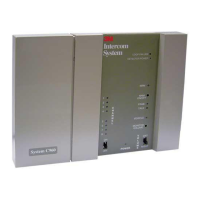
The 3M Wired Intercom System, Performance Series Models 2470 and 2475, is a two-way audio communication system designed for environments such as service stations, convenience stores, and other similar applications. The system facilitates communication between a keypad interface, referred to as a Model 2475 Station Selector, and several remote Call Stations. Additionally, it supports paging communication between different Station Selectors.

System Components and Functionality:

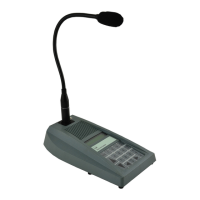
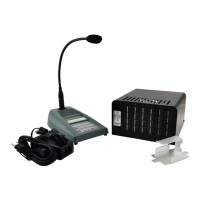
The core of the system is the Model 2470 Communications Controller, which manages the audio communication. The Model 2475 Station Selector serves as the user interface, featuring a keypad for operation and a microphone for transmitting audio.

Modes of Operation:

The system operates in five distinct modes:

  • Standby Mode: Indicated by "SBY" on the display, this is the default mode when no station is connected, no key is pressed, and the Station Selector is not in Off Line mode.
  • Listen Mode: Displayed as "LIS," this mode is active when a station is connected, and the Talk key is not pressed. Inbound audio from the connected station is emitted from the Station Selector.
  • Talk Mode: Shown as "TLK," this mode is active when a station is connected, and the Talk key is pressed. Audio received at the Station Selector microphone is transmitted to the connected station.
  • All Call Mode: Indicated by "ALL CALL," this mode allows the Station Selector to simultaneously connect and transmit audio to all Call Stations. This mode is activated by pressing the ALL CALL key.
  • Off Line Mode: Displayed as "OFF LINE," in this mode, the Station Selector is powered on but remains silent and does not respond to call requests. It is essentially an "off" state for communication purposes.

Keypad and Controls:

The Station Selector features a keypad with several dedicated keys:

  • TALK Key: Controls talk/listen communications. Pressing it cancels the alert tone and enables outbound audio transmission.
  • STD BY (Standby) Key: Used to cancel a Call Station or Station Selector connection, returning the system to Standby mode.
  • ALL CALL Key: Enables simultaneous outbound audio connection to all Call Stations.
  • HOLD Key: Allows an attendant to temporarily disconnect from a current call while retaining the ability to return to it later. This is useful for greeting newer calls without losing the initial connection.
  • MENU/0 Key: Used for Call Station selection, often in conjunction with the Left/Right arrow keys.
  • Up/Down Arrows: Adjust the Station Selector's volume across 15 levels. Each press momentarily displays the new volume level.
  • Left/Right Arrows: Control Call Station selection, allowing the user to scroll through available Call Stations by name.

Usage Features:

Calling a Single Call Station:

When a customer presses the "Push for Service" button at a Call Station, the Station Selector beeps and displays "Q=01" (indicating one call in the queue) along with the Call Station's number and name. To answer, the attendant holds down the TALK key and speaks into the microphone. The display clears "Q=01" and shows "TLK." Releasing the TALK key switches to Listen mode ("LIS"). To end the call, the attendant presses the STD BY key, returning the display to "SBY."

Handling Multiple Call Stations:

The system can manage up to 24 Call Stations, queuing calls in the order received. "Q" on the display indicates the number of calls in the queue. In Standby mode, the Station Selector beeps to alert of incoming calls. To answer, the attendant presses the TALK key, which reduces "Q" by one and displays the first Call Station in the queue. Subsequent calls are answered by repeating this process.

Using the Hold Feature:

The Hold feature allows an attendant to place a current call on hold to answer a newer call, then return to the original call. If a call is in progress (e.g., with Call Station 12) and another station calls in, the display shows "Q=01, LIS," and the current Call Station. To use Hold, the attendant presses the HOLD key. The display shows "HOLD = 01" and "SBY," and the Station Selector beeps. The current call is on hold. The attendant then presses the TALK key to answer the new call (e.g., Call Station 8), which clears "Q=01" and displays the new station with "TLK." To place this second call on hold, the attendant presses HOLD again, showing "HOLD = 02" and "SBY." To return to the first call, the attendant presses HOLD, which displays "HOLD = 01" and "LIS," connecting to the first caller. After conversing, pressing STD BY returns to "HOLD = 01" and "SBY." Pressing HOLD again connects to the second caller.

Calling from Station Selector to Call Station:

There are three methods to initiate a call from a Station Selector to a Call Station:

  1. Select a Specific Call Station: In Standby mode, the attendant presses the key(s) corresponding to the desired Call Station number (1-9 for single-digit stations). The display shows the Call Station number and name. Communication then proceeds as described for answering an incoming call.
  2. Use Directory Assistance: In Standby mode, the attendant presses the MENU/0 key. The display shows "S = 01" and the name of station 1. The attendant can then use the Left/Right Arrow keys to scroll through available Call Stations by name or press a key to select a starting number. Once the desired station is found, communication proceeds as usual.
  3. Use All Call Mode: The attendant holds down the ALL CALL key. The display shows "ALL CALL" and "TLK." The attendant can then speak into the microphone to broadcast to all Call Stations simultaneously. Releasing the ALL CALL key returns the system to Standby mode or the previous call connection.

Paging to Another Station Selector:

Paging allows communication between two Station Selectors.

  1. By Entering a Station Selector Number: The attendant presses the keys corresponding to the target Station Selector (designated 71-85). Then, they press TALK. The display shows the target Station Selector number being paged. If there's no response within 30 seconds, the system returns to Standby.
  2. By Using Directory Assistance: In Standby mode, the attendant presses the MENU/0 key. The display shows "S = 01" and station 1's name. The attendant uses the Left arrow key to scroll to the desired Station Selector number (71-85). Then, they press TALK. The display shows the target Station Selector number being paged. If no response within 30 seconds, the system returns to Standby.

Responding to a Page:

When a page request is received, the display shows "PAGE:REQUEST:SBY" and the paging Station Selector's number. The speaker emits a distinctive alert tone. To respond, the attendant presses TALK, which displays the paging Station Selector number. To ignore the page, the attendant presses STD BY. After talking, pressing STD BY ends the conversation.

Off Line Mode:

The Off Line mode is equivalent to turning off the Station Selector. In this mode, the Station Selector does not respond to call requests and does not beep. To enter Off Line mode from Standby, the attendant repeatedly presses the down arrow key until the minimum volume level is reached, and "OFF LINE" is displayed. To exit Off Line mode and return to Standby, the attendant presses the up arrow key once. The audio level is automatically set to the mid-level of 8.

Maintenance and Error Messages:

The system displays one error message: "ERROR! NO COMMUNICATION." If this message appears, users are advised to contact their 3M authorized dealer or 3M Technical Support at 800-328-0033.

The manual also includes FCC Information, stating that the device complies with part 15 of the FCC rules, must not cause harmful interference, and must accept any interference received. It also warns that changes or modifications not expressly approved by the responsible party could void the user's authority to operate the equipment.

3M Performance Series Specifications

General IconGeneral
Brand3M
ModelPerformance Series
CategoryIntercom System
LanguageEnglish

Related product manuals