34
USER MANUAL
AWT09MLEDSD
Copyright 2018, 3rd Eye
Printed in U.S.A.
Issued October 2018
Menu Descriptions
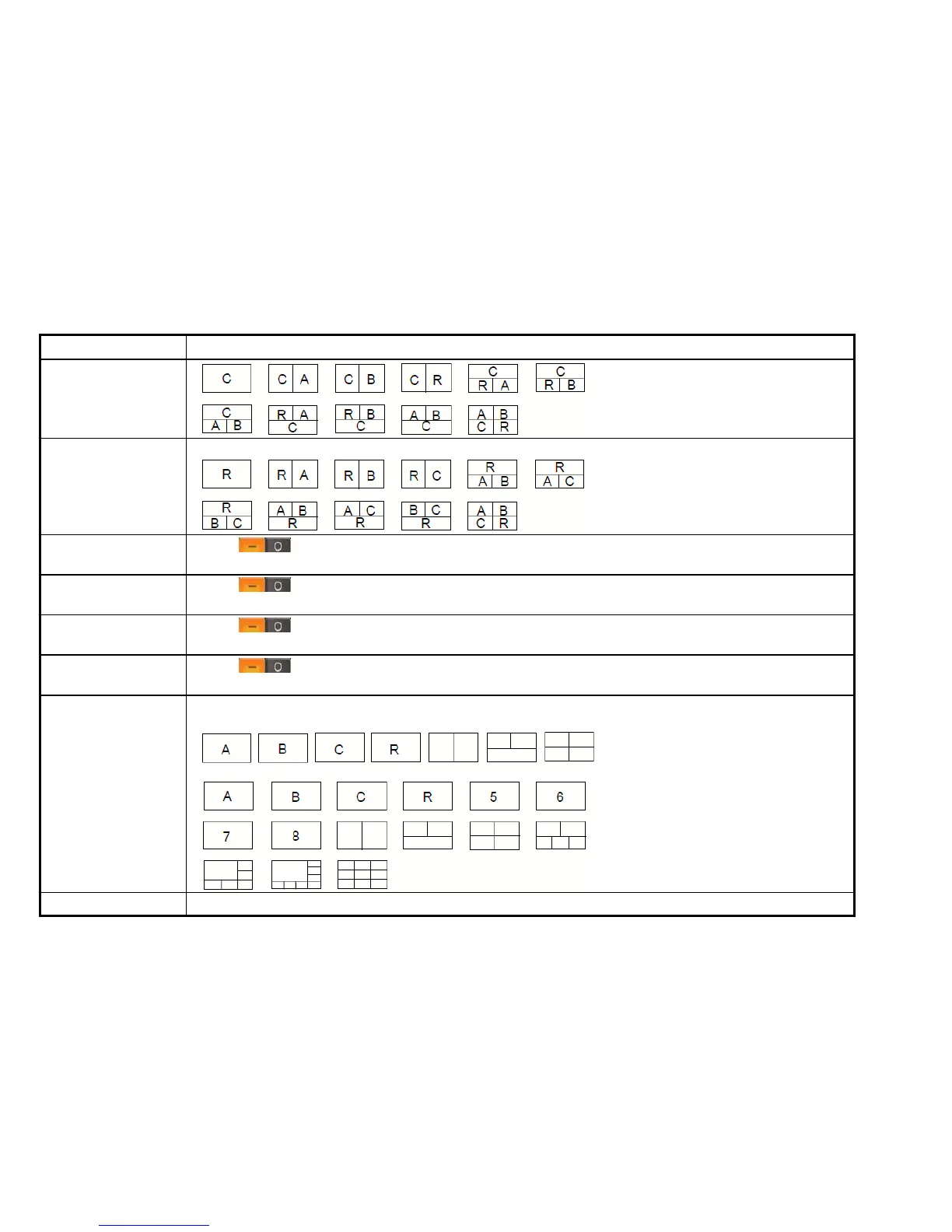
Assign the combination of the triggered pictures on the screen. as shown below:
Click to enable trigger 5 (When selecting 8 channels as max channels, you can turn on
this trigger.)
Click to enable trigger 6 (When selecting 8 channels as max channels, you can turn on
this trigger.)
Click to enable trigger 7 (When selecting 8 channels as max channels, you can turn on
this trigger.)
Click to enable trigger 8 (When selecting 8 channels as max channels, you can turn on
this trigger.)
The driver will be able to obtain the image selected under this setting.
1. When selecting 4 channels as max channels, you can select below settings.
2. When selecting 8 channels as max channels, you can select below settings.
Select "ON" : it shows warning icon when car is over speeding.


 To Next Page