54
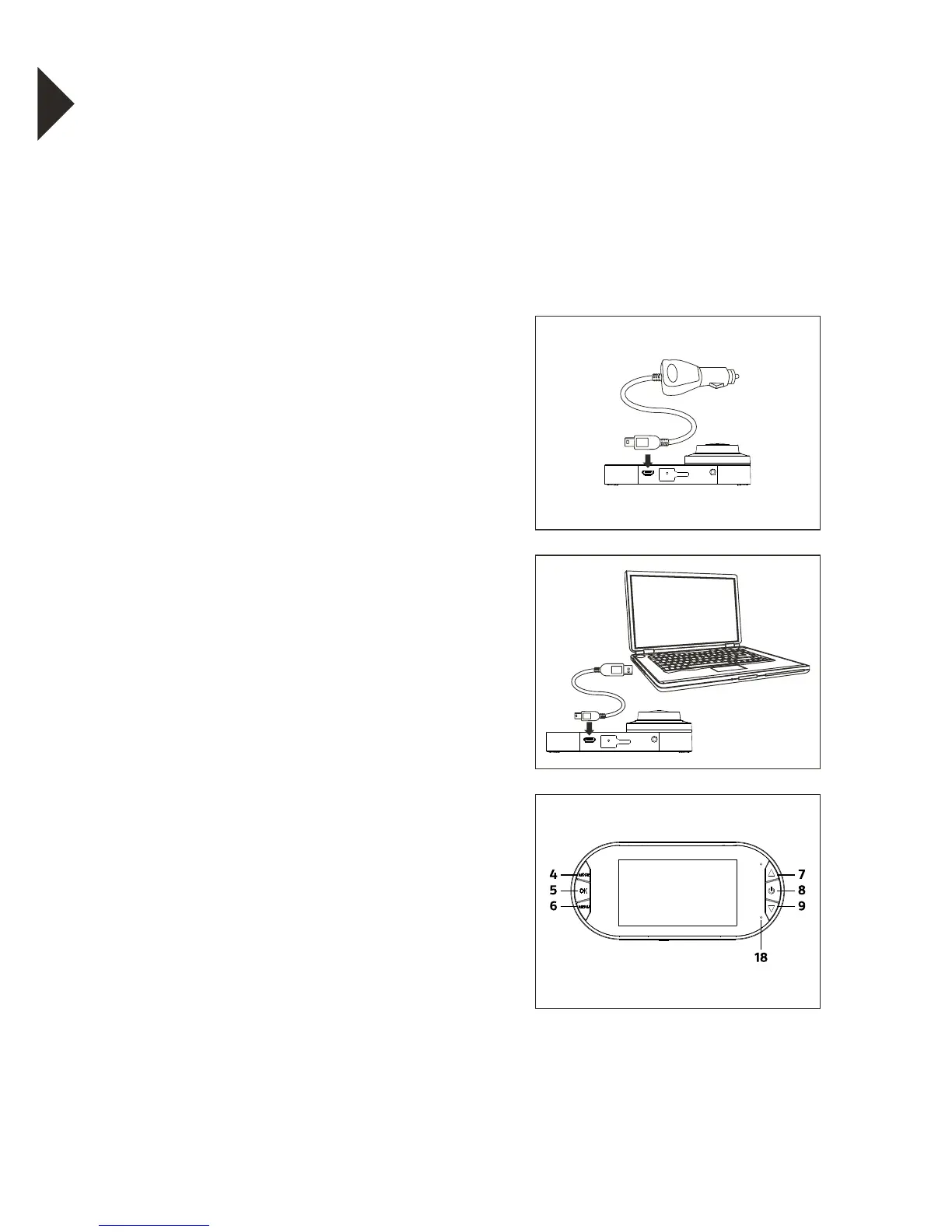
1. First, make sure that the camera is
OFF before inserting or removing
the miniUSB charging connector
2. Check the miniUSB port (10) for any
obstructions or foreign matter
3. Insert the miniUSB connector from
your connected car charger or
charge cable into the miniUSB port
(10) on the camera.
4. The charging indicator light (18) will
illuminate red whilst charging and
turn off when the battery capacity
is at 100%
5. The MiniUSB connector can only
be inserted into the port one way.
Please do not force the connector
into the port.
6. Keep the miniUSB port clear of any
obstructions
AVRESETUSB
AVRESETUSB
CHARGING THE BATTERY
The camera is designed to be used with a car charger
(included). The internal battery is an emergency back
up and is not designed to power the camera for the
intended usage.
WARNING: Using a car charger other than a 5V 1A Charger
can damage the camera battery and could result in fire or
leakage. Only use chargers marked: Output 5V 1A.


 To Next Page