EasyManua.ls Logo

4DRC 4D-F8 - Remote Control Battery Installation

4DRC 4D-F8
16 pages
Print Icon
To Next Page IconTo Next Page
To Previous Page IconTo Previous Page
Loading...
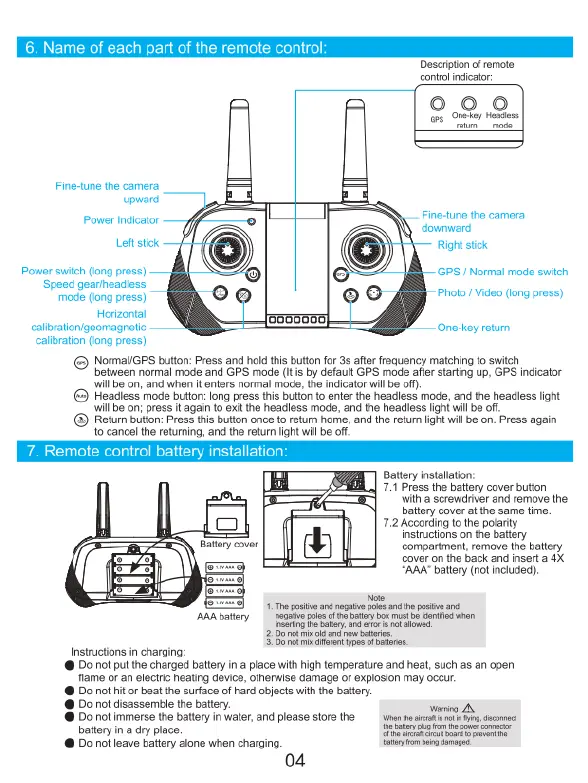
6.
Name
of
each
part
of
the
remote
cor
7.
Remote
control
battery
installation:
Description
o
remote
contro
ndicator:
2.2.9.
P—
Q Q
vara
Power
ndator
[
Finecune
the
came
Lotk
Rt
sk
Powersich
orgpross)
S
Norma
moce
s
Speed
garhendess
°
oo
idoo
ong
ros)
gt
EorenED)
Oneey
reum
caiibraton
(long
press)
©
NomaliGS
button:
Press
and
hold
this
buton
for
35
aflr
requency
maiching
fo
swich
between
normal
mode
and
GPS
mode
(s
by
dfault
GPS
mode
afer
staring
up,
GPS
indicator
wil
bo
on
and
when
i
enirs
niormal
mode,
the
ndicator
wil bo of.
Fieadless
moce
bufon:long
pross
tis
ufton
o
enter
the
headiess
mode,
and
the
headless
ight
wil
bo
o
pross
again
1
et
ihe
neadiess
mod,
and
ihe
headiess
lght
wil
bo
of
®
Retum
butlon
Press
s
buton
once
1
retrn
hore.
and
the
retum
ight
wil
s
on.
Press
again
o
cance
the returming,
and
the
reton
ightwil
bo
Battery
instalaton:
7.1
Press
the
battery
cover
button
aPa
With
a
screwdriver
and
remove
the
battery
cover
at
the
same
fime.
=]
7.2
According
to
the
polarity
instructions
on
the
battery
Batery
cover
compartment,
remove
the
batery
WD
Cover
on
the
back
and
insert
a
4X.
O
o=
“AAA”
battery
(not
included).
T8
1
g
s
e
s
s
e
psite
-
ARAbatery
e
e
bt
e v
i
Sty
a1
lows
2
B0
ok
il
3w
i
5153
7k
i
alfren
s
f
brrs.
Instructions
in
charging:
@
Do
not put
the
charged
battery
in
a
place
with
high
temperature
and
heat,
such
as
an
open
flame
or
an
electric
heating
device,
otherwise
damage
or
explosion
may
occur.
@
Do
not
it
or
beat
the
surface
of
hard
objects
with
the
battery.
o
not
disassemble
the
balter
g
A
@
Do
not
immerse
the
battery
in
water,
and
please
store the
wnnescrt
s s
ot
battery
in
a
dry
place.
il
ety
@
Do
not
leave
battery
alone
when
charging.
e
b
g
04

Related product manuals