EasyManua.ls Logo

4DRC 4D-F8 - App Store

4DRC 4D-F8
16 pages
Print Icon
To Next Page IconTo Next Page
To Previous Page IconTo Previous Page
Loading...
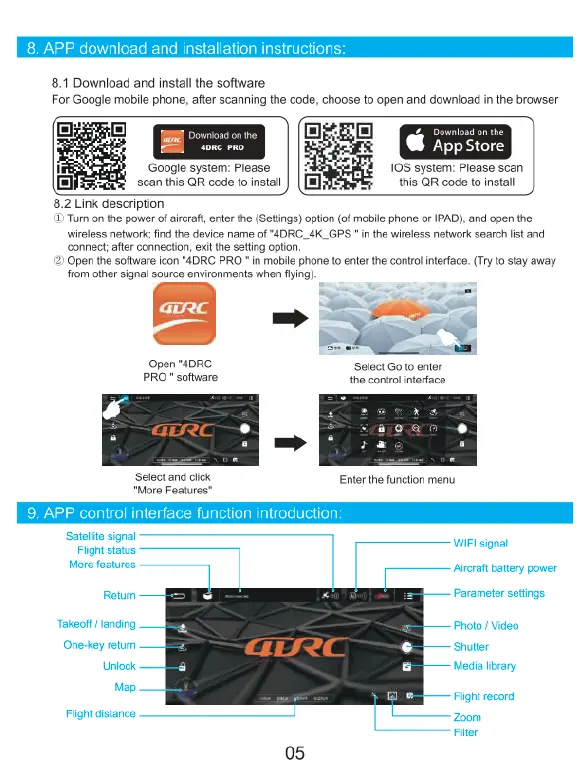
8.1
Download
and
install
the
software
For
Google
mobile
phone,
after
scanning
the
code,
choose
to
open
and
download
in
the
browser
@&
App
Store
10S system:
Please
scan
this
QR
code
to
install
Google
system:
Please
scan
this
QR
code
to
install
8.2
Link
description
i
Turn
on
the
power
of
arcraf,
enter
the
(Setings)
option
(of
mobile
phone
or
IPAD),
and
open
the.
wireless
network;find
the
device
name
of
*4DRC_4K_GPS
"
n
the
wirsless
network
search
list
and
connect;
after
connection,
exit
the
setting
opton,
Open
the
software
icon
"4DRC
PRO
*
in
mobile
phone
to
enter
the
control
interface.
(Try
o stay
away
from
other
signal
source
environments
when
flying)
aorC
’
nd
)
=
2
Open
"4DRC
Select
Go
o
enter
PRO"
software
the
control
interface
»m
‘Select
and
click
Enter
the
function
menu
Satelte
signal
3
Fight
staus
WiFt
signal
Hore
eatures
Aircraft
battery
power
Retumn
Parameter
setiings.
Takeoff
/
landing
Photo
/
Video
Shutter
Media
ibrary
One-key
retumn
Unlock.
My
"
Flightrecord
Fiight
distance
Zoom
Filter

Related product manuals