5, APPLE FIND MY
Serial number lookup
5.2
With your hand, firmly double tap the left crank on the side opposite the device to trigger
the serial number lookup for the device. In order for this double tap to work, the device
must be paired to an iPhone over Bluetooth. This can be done in one of two ways, first by
selecting the device in the Find My app with the iPhone to which the device was paired
with; or second, with the 'Identified Found Item' button in the Find My app. When double
tapped under these conditions, the device will perform a triple green blink, indicating it is
in serial number lookup mode.
Disabling Apple Find My
5.3
Disabling Apple Find My requires removing the battery by rotating the battery cap
counter clockwise 30 degrees. The battery and cap can then be litted off of the main
power meter body disabling the product.
Apple Find My factory reset
12
1.
2.
3.
4.
6.
Wake up the PRECISION 3+ Powermeter by rotating the crank 3-4 times.
Choose the device you want to reset and select "Connect"
Tip: If you are uncertain about which device to connect to, the ANT+ ID is etched on
the side of the power meter for easy viewing.
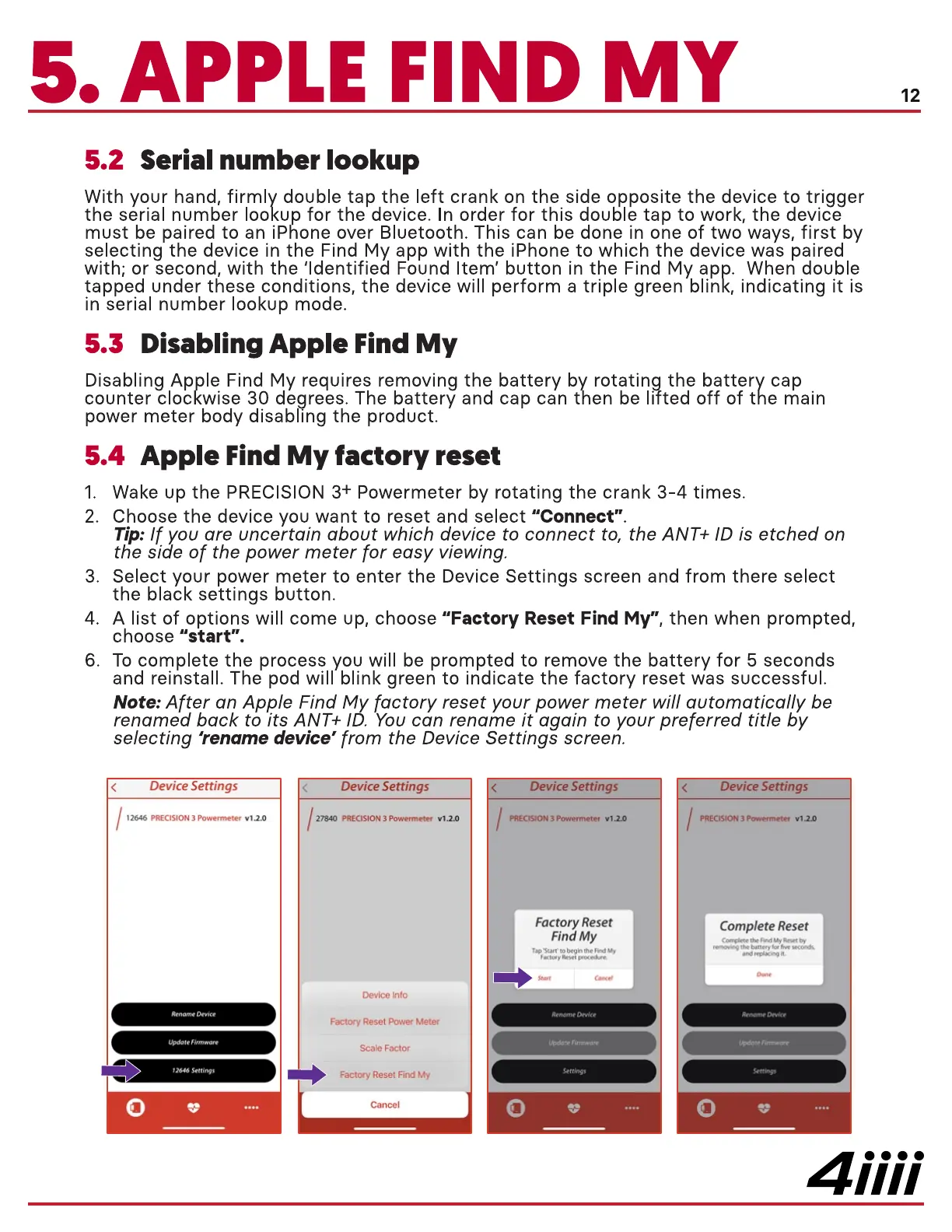
Select your power meter to enter the Device Settings screen and from there select
the black settings button.
A list of options will come up, choose "Factory Reset Find My", then when prompted,
choose "start".
To complete the process you will be prompted to remove the battery for 5 seconds
and reinstall. The pod will blink green to indicate the factory reset was successful.
Note: After an Apple Find M actory reset your power meter will automatically be
renamed back to its ANT+ I
ou can rename it again to your preferred title by
selecting 'rename device' from the Device Settings screen.
< Device Settings
12646 PRECISION 3 Powermeter
2646 Settings
Device Settings
27840 PRECISION 3 Powermeter Vl.20
Device Into
Factory Reset Power Meter
Scale Factor
Factory Reset Find My
ewce ettlngs
PRECISION 3 Po•wermeter VI xo
Factory Reset
Find My
Update Firmware
Vice ettlngs
PRECISION 3 Powermeter Vl.2.o
Complete Reset
e My
the battery 'ot fwe secords
update Firmware
4iiii


 To Next Page
 Loading...
